An NFS export that accepts only numeric client user IDs cannot tell whether a client is honestly representing the user behind each request. Kerberos-backed NFS moves that trust decision to RPCSEC_GSS, so the server accepts file operations only after Kerberos credentials have negotiated a security flavor such as krb5p.
The server side of the setup needs an nfs/<server-fqdn> service principal, a root-owned keytab entry, and an export rule whose sec= option excludes sys. The client still needs matching realm configuration and Kerberos-capable NFS tools, but the export is not protected until the active server table shows the Kerberos flavor.
Use one fully qualified server name for the service principal, export rule, and mount source. In the sample environment, files.example.net is the NFS server, EXAMPLE.NET is the Kerberos realm, and sec=krb5p requires authentication, integrity protection, and encrypted file data for the export.
Related: How to create an NFS export
Related: How to configure NFS over TLS
Steps to secure an NFS export with Kerberos:
- Confirm the canonical server name that clients use for the mount source.
$ hostname --fqdn
files.example.net
The NFS service principal must match this fully qualified name. Avoid Kerberized mounts by raw IP address or by a short alias that resolves differently on clients.
- Install the Kerberos and NFS server tools on the NFS server.
$ sudo apt install --assume-yes krb5-user nfs-kernel-server
Ubuntu and Debian use krb5-user for Kerberos client utilities and nfs-kernel-server for server exports. Use the equivalent package names on another distribution.
- Create the NFS service principal in the Kerberos database.
$ kadmin -p admin/admin -q "addprinc -randkey nfs/files.example.net@EXAMPLE.NET"
Authenticating as principal admin/admin with password.
Principal "nfs/files.example.net@EXAMPLE.NET" created.
Run the equivalent realm-management command when the KDC is FreeIPA, Active Directory, or another identity system.
- Add the server principal to the server keytab.
$ sudo kadmin -p admin/admin -q "ktadd -k /etc/krb5.keytab nfs/files.example.net@EXAMPLE.NET"
Authenticating as principal admin/admin with password.
Entry for principal nfs/files.example.net@EXAMPLE.NET with kvno 2, encryption type aes256-cts-hmac-sha1-96 added to keytab FILE:/etc/krb5.keytab.
Entry for principal nfs/files.example.net@EXAMPLE.NET with kvno 2, encryption type aes128-cts-hmac-sha1-96 added to keytab FILE:/etc/krb5.keytab.
/etc/krb5.keytab is a persistent server secret. Keep it readable only by root and rotate the principal key if the file is copied outside the server's credential-control process.
- Restrict the keytab permissions.
$ sudo chmod 600 /etc/krb5.keytab
- Confirm that the keytab contains the NFS service principal.
$ sudo klist -k /etc/krb5.keytab
Keytab name: FILE:/etc/krb5.keytab
KVNO Principal
---- --------------------------------------------------------------------------
   2 nfs/files.example.net@EXAMPLE.NET
   2 nfs/files.example.net@EXAMPLE.NET
- Confirm that the export path is on a filesystem the NFS server can export.
$ findmnt -T /srv/nfs/projects
TARGET            SOURCE                   FSTYPE OPTIONS
/srv/nfs/projects /dev/mapper/vg0-projects xfs    rw,relatime
Some test, overlay, and container filesystems cannot be exported by the kernel NFS server even when the export syntax is valid.
- Create the export drop-in directory if it does not already exist.
$ sudo install -d -o root -g root -m 0755 /etc/exports.d
- Open the export drop-in file.
$ sudoedit /etc/exports.d/projects.exports
exportfs reads files in /etc/exports.d only when their names end in .exports.
- Add an export rule that requires the Kerberos privacy flavor.
/srv/nfs/projects 192.0.2.0/24(rw,sync,no_subtree_check,sec=krb5p,root_squash)
sec=krb5p requires authentication, integrity protection, and payload privacy. Use sec=krb5i only when integrity without encryption is acceptable, and keep sec=sys out of this selector when clients must authenticate with Kerberos.
- Restart the NFS server after adding the first Kerberos keytab.
$ sudo systemctl restart nfs-server
Ubuntu packages install rpc-svcgssd.service for server-side GSS handling and start it through nfs-server.service when /etc/krb5.keytab exists.
- Reload the saved export definitions.
$ sudo exportfs -ra
No output means exportfs accepted the saved export definitions. Fix any syntax, missing-path, or unsupported-filesystem error before testing from a client.
Related: How to reload NFS exports
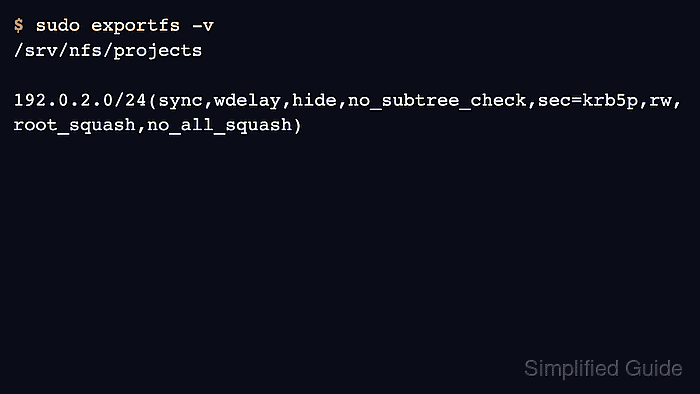
- Verify that the active export table requires Kerberos.
$ sudo exportfs -v
/srv/nfs/projects
		192.0.2.0/24(sync,wdelay,hide,no_subtree_check,sec=krb5p,rw,root_squash,no_all_squash)
The active table should show sec=krb5p, sec=krb5i, or sec=krb5 for the protected selector, not only sec=sys.
Related: How to list NFS exports on a server
- Confirm the client-side GSS helper is active on an allowed Linux client.
$ sudo systemctl is-active rpc-gssd
active
rpc.gssd uses machine credentials from /etc/krb5.keytab for root-initiated mounts and user credential caches for per-user file access.
Related: How to mount a Kerberos-secured NFS export - Obtain a Kerberos ticket for the user who will access files through the mount.
$ kinit alice
Password for alice@EXAMPLE.NET:
- Create the client mount point.
$ sudo mkdir --parents /mnt/projects
Files already inside /mnt/projects become hidden while the NFS filesystem is mounted there.
- Mount the export with the same security flavor required by the server.
$ sudo mount -t nfs -o vers=4.2,sec=krb5p files.example.net:/srv/nfs/projects /mnt/projects
Use sec=krb5i or sec=krb5 here only when the server export allows the same flavor.
Related: How to mount an NFS export on Linux
- Confirm that the mounted filesystem uses the Kerberos security option.
$ findmnt -o TARGET,SOURCE,FSTYPE,OPTIONS /mnt/projects
TARGET        SOURCE                              FSTYPE OPTIONS
/mnt/projects files.example.net:/srv/nfs/projects nfs4   rw,relatime,vers=4.2,sec=krb5p,proto=tcp
##### snipped #####
- Write a temporary file through the Kerberized mount as the authenticated user.
$ touch /mnt/projects/kerberos-check.txt
- Confirm that the client obtained an NFS service ticket for the server.
$ klist
Ticket cache: FILE:/tmp/krb5cc_1000
Default principal: alice@EXAMPLE.NET

Valid starting       Expires              Service principal
07/05/2026 10:15:01  07/05/2026 20:15:01  krbtgt/EXAMPLE.NET@EXAMPLE.NET
07/05/2026 10:16:12  07/05/2026 20:15:01  nfs/files.example.net@EXAMPLE.NET
- Remove the temporary validation file.
$ rm /mnt/projects/kerberos-check.txt
- Unmount the temporary client test mount.
$ sudo umount /mnt/projects

Mohd Shakir Zakaria is a cloud architect with deep roots in software development and open-source advocacy. Certified in AWS, Red Hat, VMware, ITIL, and Linux, he specializes in designing and managing robust cloud and on-premises infrastructures.


