An NFS export with no_root_squash lets the root user on an allowed client act as root against files on the server. That can be convenient for tightly controlled diskless clients, but it expands risk on shared project exports because one compromised or misused client can create or modify server-side root-owned files.
The root_squash export option maps requests from client UID and GID 0 to the anonymous UID and GID on the server, commonly 65534 unless anonuid or anongid is set. It does not rewrite every client user, and it does not replace normal Unix ownership and mode checks for non-root users.
Enable the option in the saved export line, reload the active export table with exportfs, and verify the running options before relying on the change. Linux NFS exports normally use root_squash by default, but writing it explicitly makes the intended security setting visible when removing an old no_root_squash exception or documenting a security-sensitive export.
Related: How to create an NFS export
Related: How to reload NFS exports
Related: How to list NFS exports on a server
Steps to enable root_squash for an NFS export:
- Open a shell on the NFS server with an account that can use sudo.
- Check the active export options before editing.
$ sudo exportfs -v
/srv/nfs/projects
		192.0.2.0/24(sync,wdelay,hide,no_subtree_check,sec=sys,rw,no_root_squash,no_all_squash)
The active table can show defaults that are not written in the file, and it can also reveal an old no_root_squash exception that still needs to be removed.
- Open the saved export definition that owns the path.
$ sudoedit /etc/exports.d/projects.exports
Use /etc/exports instead when the export is defined there. Drop-in files under /etc/exports.d must end with .exports to be read by exportfs.
- Replace no_root_squash with root_squash in the option list.
/srv/nfs/projects 192.0.2.0/24(rw,sync,no_subtree_check,root_squash)
Do not leave both root_squash and no_root_squash in the same client option list. Keep the option list attached directly to the client selector, such as 192.0.2.0/24(rw,root_squash), with no space before the opening parenthesis.
- Reload the export table from the saved files.
$ sudo exportfs -rv
exporting 192.0.2.0/24:/srv/nfs/projects
Use exportfs -rv for this change so removed options and changed client selectors are reconciled with the active table.
Related: How to reload NFS exports
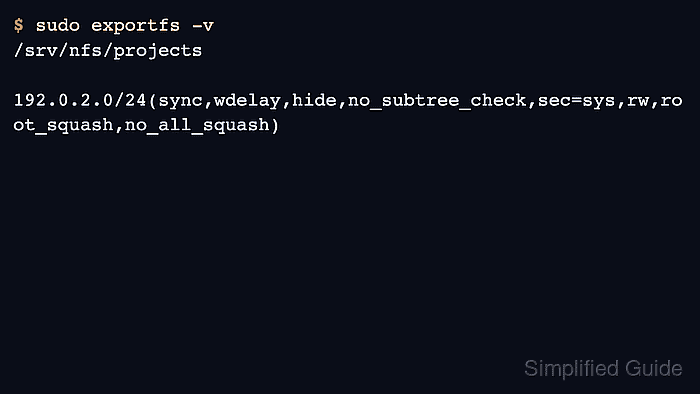
- Verify that the active export now includes root_squash.
$ sudo exportfs -v
/srv/nfs/projects
		192.0.2.0/24(sync,wdelay,hide,no_subtree_check,sec=sys,rw,root_squash,no_all_squash)
The output should show root_squash in the client option set for the intended path and host or network selector.
- If the export is mounted from a Linux client, test client-root behavior from the mounted path.
$ sudo touch /mnt/projects/root-squash-test
touch: cannot touch '/mnt/projects/root-squash-test': Permission denied
This denial is expected when the server-side directory permissions do not allow the anonymous UID or GID to write. If the command succeeds, check whether the export uses anonuid or anongid and whether the directory is writable by that mapped identity.
Related: How to configure anonymous user mapping for an NFS export - Create a normal-user write probe from the mounted path.
$ touch /mnt/projects/user-write-test
- Verify that the normal-user probe was created with the expected owner and group.
$ ls -l /mnt/projects/user-write-test
-rw-r--r-- 1 projectuser projectusers 0 Jul  5 07:33 /mnt/projects/user-write-test
root_squash protects the server from client-root identity. It does not grant or repair ordinary user access; shared write access still depends on matching UID, GID, ownership, modes, ACLs, or the chosen anonymous mapping.
- Remove the normal-user write probe.
$ rm /mnt/projects/user-write-test

Mohd Shakir Zakaria is a cloud architect with deep roots in software development and open-source advocacy. Certified in AWS, Red Hat, VMware, ITIL, and Linux, he specializes in designing and managing robust cloud and on-premises infrastructures.


