Source-built Nagios Core servers need a different upgrade path from package-managed installs. The upstream build installs the new daemon, CGI programs, documentation, and web files into the existing /usr/local/nagios tree while leaving the active monitoring objects and main configuration in place.
The upgrade is still a cutover, not a routine compile. Back up the current configuration and runtime state, prove that the old configuration is already valid, build the target release with the same local configure options, and validate the upgraded binary before restarting the monitoring daemon.
Package installations should normally use apt, dnf, or the platform package manager instead of the source procedure, because package layouts, service names, and web paths differ from the upstream defaults. This source-upgrade path assumes an existing install under /usr/local/nagios and an Apache web front end that already worked before the upgrade.
Steps to upgrade Nagios Core from source:
- Open a terminal on the monitoring server with an account that can use sudo.
- Check the currently installed Nagios Core version.
$ /usr/local/nagios/bin/nagios --version
Nagios Core 4.5.12
Copyright (c) 2009-present Nagios Core Development Team and Community Contributors
Copyright (c) 1999-2009 Ethan Galstad
Last Modified: 2026-03-25
License: GPL
##### snipped #####
- Create a private backup directory for the upgrade window.
$ sudo install -d -m 700 /root/nagios-upgrade-backups
- Create a backup of the current source-install configuration, runtime state, and web files.
$ sudo tar --create --gzip \
  --file /root/nagios-upgrade-backups/nagios-before-4.5.13.tar.gz \
  /usr/local/nagios/etc \
  /usr/local/nagios/var \
  /usr/local/nagios/share
tar: Removing leading `/' from member names
tar: Removing leading `/' from hard link targets
Keep this archive outside /usr/local/nagios before the cutover. It is the rollback source for configuration files, retention data, logs, and web assets if the upgrade fails.
Related: How to back up and restore Nagios Core configuration - Confirm that the backup archive exists.
$ sudo ls -lh /root/nagios-upgrade-backups/nagios-before-4.5.13.tar.gz
-rw-r--r-- 1 root root 908K Jun 25 09:10 /root/nagios-upgrade-backups/nagios-before-4.5.13.tar.gz
- Validate the current configuration before replacing binaries.
$ sudo /usr/local/nagios/bin/nagios -v /usr/local/nagios/etc/nagios.cfg
Nagios Core 4.5.12
Reading configuration data...
   Read main config file okay...
   Read object config files okay...
Total Warnings: 0
Total Errors:   0
Things look okay - No serious problems were detected during the pre-flight check
Fix pre-existing warnings and errors before upgrading so a post-upgrade failure is not mixed with an old configuration problem.
Related: How to validate the Nagios Core configuration - Download the target Nagios Core release tarball.
$ wget --output-document=/tmp/nagios-4.5.13.tar.gz https://assets.nagios.com/downloads/nagioscore/releases/nagios-4.5.13.tar.gz
Replace 4.5.13 with the release selected from the official Nagios Core download or release page.
- Extract the release tarball.
$ tar --extract --gzip --file /tmp/nagios-4.5.13.tar.gz --directory /tmp
- Enter the extracted source directory.
$ cd /tmp/nagios-4.5.13
- Remove obsolete static web entry files from older source installs.
$ sudo rm -f /usr/local/nagios/share/main.html /usr/local/nagios/share/side.html /usr/local/nagios/share/index.html
Current Nagios Core releases use PHP equivalents for these web entry points.
- Configure the new source tree with the same install options used by the current server.
$ ./configure --with-httpd-conf=/etc/apache2/sites-enabled
Keep local options such as --with-command-group or a custom web configuration directory if the existing source install uses them.
- Compile the new Nagios Core release.
$ make all
- Install the upgraded binaries, documentation, and web interface files.
$ sudo make install
Do not run make install-config during a normal in-place upgrade unless restoring sample configuration is intentional. The upgrade should preserve the active objects and main configuration that passed the pre-flight check.
- Rebuild any Nagios Event Broker modules when crossing into the 4.5.x release line.
Nagios Core 4.5.0 updated header files for NEB modules. Custom brokers compiled against older headers should be rebuilt before the daemon is restarted.
- Check that the upgraded binary reports the target version.
$ /usr/local/nagios/bin/nagios --version
Nagios Core 4.5.13
Copyright (c) 2009-present Nagios Core Development Team and Community Contributors
Copyright (c) 1999-2009 Ethan Galstad
Last Modified: 2026-05-28
License: GPL
##### snipped #####
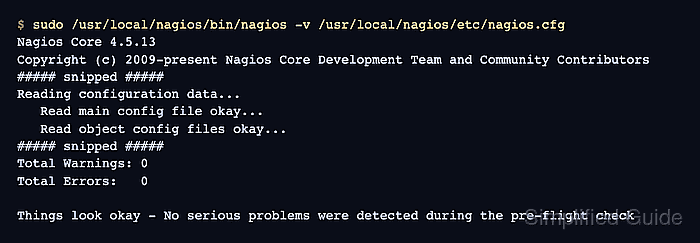
- Validate the configuration with the upgraded binary.
$ sudo /usr/local/nagios/bin/nagios -v /usr/local/nagios/etc/nagios.cfg
Nagios Core 4.5.13
Reading configuration data...
   Read main config file okay...
   Read object config files okay...
Total Warnings: 0
Total Errors:   0
Things look okay - No serious problems were detected during the pre-flight check
Do not restart Nagios Core until Total Errors is 0.
Related: How to validate the Nagios Core configuration - Restart Nagios Core to run the upgraded daemon.
$ sudo systemctl restart nagios.service
Use the service name installed on the server. Some source installs use /etc/init.d/nagios restart instead of a systemd unit.
Related: How to manage the Nagios Core system service - Confirm that Nagios Core is active after the restart.
$ systemctl is-active nagios.service
active
- Open the web interface and confirm that the existing hosts and services are still visible.
http://monitor.example.net/nagios/
Log in with the existing web account. If the page loads but the old objects are missing, restore from the backup archive before accepting the cutover.
- Keep the backup archive until the next successful monitoring cycle has completed.
Remove the old source tree under /tmp after the maintenance window if no rollback is needed. Leave /usr/local/nagios/etc in place unless restoring from the backup archive is intentional.

Mohd Shakir Zakaria is a cloud architect with deep roots in software development and open-source advocacy. Certified in AWS, Red Hat, VMware, ITIL, and Linux, he specializes in designing and managing robust cloud and on-premises infrastructures.


