Rapid state changes can turn one unstable Nagios Core service into repeated problem and recovery alerts. Flap detection watches recent check results, marks the object as flapping when the state-change percentage crosses the high threshold, and suppresses normal notifications until the percentage falls below the low threshold.
The main /etc/nagios4/nagios.cfg file controls whether flap detection runs at all on Debian and Ubuntu package installs. Host and service objects can then enable flap detection, override the global thresholds, and choose which states count toward the calculation.
Use object-specific thresholds when one noisy service needs different flap behavior from the rest of the monitoring server. Keep the high threshold greater than the low threshold, include the f notification option when contacts should receive flapping start and stop notifications, and avoid thresholds that hide a real fault behind long notification suppression.
Steps to configure Nagios Core flap detection:
- Confirm that global flap detection is enabled in the active Nagios Core configuration.
$ sudo grep '^enable_flap_detection=' /etc/nagios4/nagios.cfg
enable_flap_detection=1
Set enable_flap_detection=1 before relying on object-level flap settings. Source installs commonly use /usr/local/nagios/etc/nagios.cfg instead.
- Open the object file that defines the noisy service.
$ sudoedit /etc/nagios4/conf.d/web01-flap.cfg
Edit the existing service definition when one already exists. Creating a second service with the same host_name and service_description causes a duplicate-object error during validation.
- Add or adjust the flap detection directives on the service object.
- /etc/nagios4/conf.d/web01-flap.cfg
define service {
    use                     generic-service
    host_name               web01.example.net
    service_description     HTTP
    check_command           check_http
    max_check_attempts      4
    check_interval          5
    retry_interval          1
    flap_detection_enabled  1
    low_flap_threshold      5.0
    high_flap_threshold     15.0
    flap_detection_options  o,w,c,u
    notification_options    w,c,r,f
    contact_groups          admins
}
low_flap_threshold and high_flap_threshold override the program-wide service thresholds for this service. flap_detection_options controls which service states count toward flapping, where o is OK, w is WARNING, c is CRITICAL, and u is UNKNOWN.
- Validate the Nagios Core configuration before applying the change.
$ sudo nagios4 -v /etc/nagios4/nagios.cfg
Nagios Core 4.4.6
##### snipped #####
Reading configuration data...
   Read main config file okay...
   Read object config files okay...

Running pre-flight check on configuration data...
##### snipped #####
Total Warnings: 0
Total Errors:   0

Things look okay - No serious problems were detected during the pre-flight check
Do not reload Nagios Core while Total Errors is greater than 0. Fix the first reported object, command, or path error before applying the change.
Related: How to validate the Nagios Core configuration - Reload Nagios Core after the pre-flight check reports zero errors.
$ sudo systemctl reload nagios4
Ubuntu and Debian package installs use the nagios4 service name. Use the local service name, init script, or direct SIGHUP method when Nagios Core was installed from source or runs without systemd.
Related: How to manage the Nagios Core system service - Confirm that Nagios Core loaded the service-specific flap settings.
$ sudo cat /var/lib/nagios4/objects.cache
##### snipped #####
define service {
	host_name	web01.example.net
	service_description	HTTP
	check_command	check_http
	check_interval	5.000000
	retry_interval	1.000000
	low_flap_threshold	5.000000
	high_flap_threshold	15.000000
	flap_detection_enabled	1
	flap_detection_options	o,w,u,c
	notification_options	r,w,c,f
}
##### snipped #####
The object cache path comes from object_cache_file in /etc/nagios4/nagios.cfg.
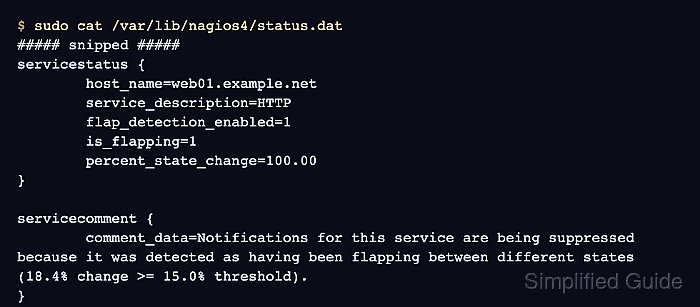
- Check the runtime service status after the service changes states enough for flap detection to evaluate it.
$ sudo cat /var/lib/nagios4/status.dat
##### snipped #####
servicestatus {
	host_name=web01.example.net
	service_description=HTTP
	current_state=2
	flap_detection_enabled=1
	is_flapping=1
	percent_state_change=100.00
}

servicecomment {
	host_name=web01.example.net
	service_description=HTTP
	author=(Nagios Process)
	comment_data=Notifications for this service are being suppressed because it was detected as having been flapping between different states (18.4% change >= 15.0% threshold).  When the service state stabilizes and the flapping stops, notifications will be re-enabled.
}
##### snipped #####
A service that has not crossed the high threshold shows is_flapping=0. The Nagios Process comment appears only after enough included state changes trigger notification suppression.

Mohd Shakir Zakaria is a cloud architect with deep roots in software development and open-source advocacy. Certified in AWS, Red Hat, VMware, ITIL, and Linux, he specializes in designing and managing robust cloud and on-premises infrastructures.


