Nagios Core schedules active host and service checks from interval values stored on the loaded objects, so one short interval can increase plugin runs, retry checks, and notification decisions. Tuning those values is useful when a critical service needs faster failure confirmation or a low-priority check should run less often than the inherited template.
Host and service objects use check_interval for the regular active-check cadence and retry_interval while a host is non-UP or a service is non-OK before max_check_attempts is exhausted. Both interval values are counted in Nagios Core time units, which come from interval_length in the main configuration.
On Debian and Ubuntu package installs, /etc/nagios4/nagios.cfg normally includes /etc/nagios4/conf.d for custom objects and stores the regenerated object cache under /var/lib/nagios4/objects.cache. Change object-level intervals only where the added check load or slower detection window is intentional; editing a shared template can change many hosts and services at once.
Steps to configure Nagios Core check intervals:
- Confirm that the custom object directory is loaded by the main configuration.
$ sudo grep '^cfg_dir=' \
  /etc/nagios4/nagios.cfg
cfg_dir=/etc/nagios-plugins/config
cfg_dir=/etc/nagios4/conf.d
Use the active main configuration file for the local installation. Source installs commonly use /usr/local/nagios/etc/nagios.cfg and custom object paths below /usr/local/nagios/etc.
Related: How to add a Nagios Core object configuration directory - Confirm the active Nagios Core interval unit.
$ sudo grep '^interval_length=' \
  /etc/nagios4/nagios.cfg
interval_length=60
With interval_length=60, check_interval 5 means five minutes and retry_interval 1 means one minute. Changing interval_length affects every interval-style directive, so tune host, service, or template values first unless the whole installation needs a different unit.
- Open the object file that owns the host or service schedule.
$ sudoedit /etc/nagios4/conf.d/\
web01-intervals.cfg
Edit the existing object file when the host or service already exists. A separate file under /etc/nagios4/conf.d is easier to review when adding an isolated example or a new object pair.
- Set the normal interval, retry interval, and retry count on the target object.
define host {
    use linux-server
    host_name web01.example.net
    alias Web 01
    address 192.0.2.10
    max_check_attempts 3
    check_interval 5
    retry_interval 1
}

define service {
    use generic-service
    host_name web01.example.net
    service_description HTTP
    check_command check_http
    max_check_attempts 3
    check_interval 5
    retry_interval 1
}
check_interval controls the regular active-check cadence. retry_interval controls soft-state retries until max_check_attempts is reached, after which Nagios Core returns to the normal check_interval schedule for that object.
Keep host_name and service_description unique for the loaded object set. Duplicate hosts or duplicate service descriptions on the same host block the configuration from loading.
- Validate the Nagios Core configuration before reloading.
$ sudo nagios4 -v \
  /etc/nagios4/nagios.cfg
Nagios Core 4.4.6
##### snipped #####
Reading configuration data...
   Read main config file okay...
   Read object config files okay...
##### snipped #####

Total Warnings: 0
Total Errors:   0
Do not reload Nagios Core while Total Errors is greater than 0. Fix the first reported file and line, then run the verifier again.
Related: How to validate the Nagios Core configuration - Reload Nagios Core after validation reports zero errors.
$ sudo systemctl reload \
  nagios4
Ubuntu and Debian package installs use the nagios4 service name on normal systemd hosts. Use sudo service nagios4 reload on hosts that are not managed by systemd, and use the local service name for source installs.
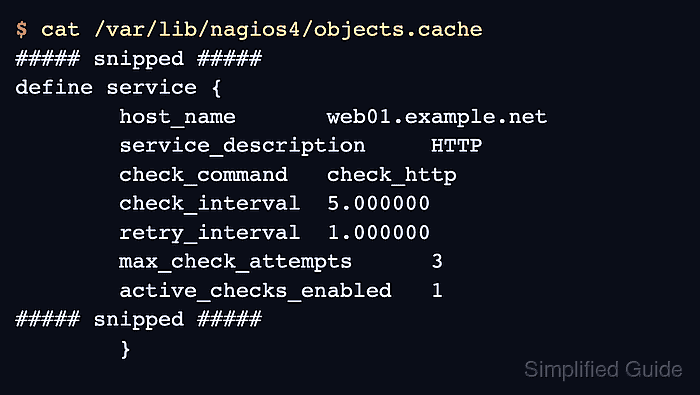
Related: How to manage the Nagios Core system service - Confirm that Nagios Core loaded the interval values.
$ sudo cat /var/lib/nagios4/\
objects.cache
##### snipped #####
define host {
	host_name web01.example.net
	alias Web 01
	address 192.0.2.10
	check_command check-host-alive
	check_interval 5.000000
	retry_interval 1.000000
	max_check_attempts 3
	active_checks_enabled 1
##### snipped #####
}
##### snipped #####
define service {
	host_name web01.example.net
	service_description HTTP
	check_command check_http
	check_interval 5.000000
	retry_interval 1.000000
	max_check_attempts 3
	active_checks_enabled 1
##### snipped #####
}
##### snipped #####
The cache proves the daemon accepted the object values after validation and reload. If the next scheduled check is too far away, force one active check from the web interface instead of shortening intervals only for immediate proof.
Related: How to reschedule an active check in Nagios Core

Mohd Shakir Zakaria is a cloud architect with deep roots in software development and open-source advocacy. Certified in AWS, Red Hat, VMware, ITIL, and Linux, he specializes in designing and managing robust cloud and on-premises infrastructures.


