Alert history in Nagios Core shows the recorded state changes for hosts and services. It helps an operator reconstruct when a problem became critical, when it recovered, and whether the visible timeline matches the incident report.
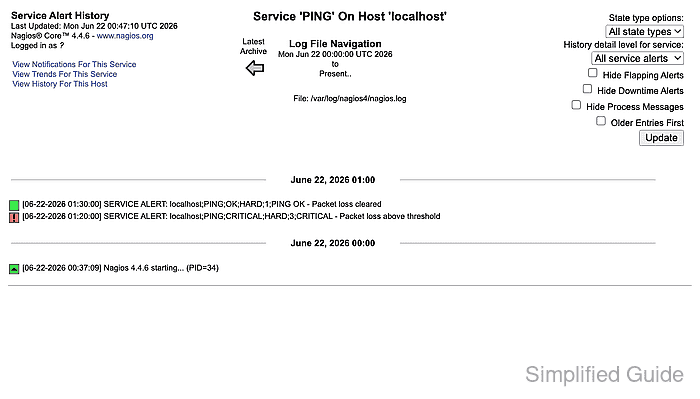
The Alert History page is served by history.cgi and can show all objects, one host, or one service. Starting from the affected object keeps unrelated alerts out of the review and makes the state type, alert type, and recovery rows easier to compare.
Use the event log and notifications pages when the alert row alone is not enough. showlog.cgi includes alert, notification, process, and command records from the selected log file, while notifications.cgi shows which contacts were notified for the same host or service.
Steps to view Nagios Core alert history:
- Open the Nagios Core web interface as a user allowed to view the affected host or service.
http://monitor.example.net/nagios4/
- Open Alert History from the Reports navigation.
- Open the affected service history directly when the host and service names are known.
http://monitor.example.net/nagios4/cgi-bin/history.cgi?host=localhost&service=PING
Replace localhost and PING with the host and service from the status page. Use host=all only when the affected object is not known yet.
- Review the alert rows for time, host, service, state, state type, attempt, and plugin output.
The CRITICAL row shows when the service entered the problem state. The later OK row shows the recovery time for the same service.
- Use State type options when the timeline needs only Hard states or Soft states.
- Use History detail level to narrow the view to service alerts, service critical alerts, service recovery rows, host down alerts, or host recovery rows.
- Open Event Log when the incident review needs surrounding records from the same log file.
http://monitor.example.net/nagios4/cgi-bin/showlog.cgi?oldestfirst=on
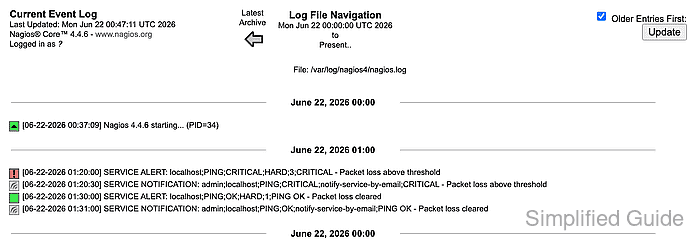
The event log can include alert, recovery, notification, acknowledgement, downtime, reload, and process messages depending on the selected time range and logging settings.
- Open Notifications for the same host or service when the question is whether contacts were notified.
http://monitor.example.net/nagios4/cgi-bin/notifications.cgi?host=localhost&service=PING
- Review the contact, host, service, notification type, command, time, and information columns.
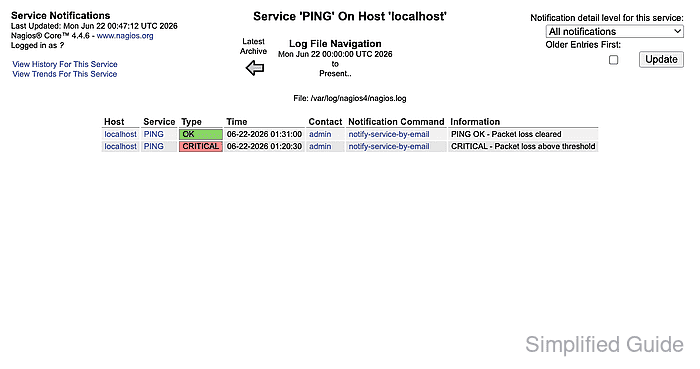
- Compare the alert history rows with the notification rows for the same object.
A service can change state without sending a notification when the service is in downtime, notifications are disabled, the state is still soft, the notification period excludes the time, or escalation rules suppress the contact.
- Confirm the review is complete when the problem row, recovery row, event-log entry, or notification record explains the incident timeline being investigated.

Mohd Shakir Zakaria is a cloud architect with deep roots in software development and open-source advocacy. Certified in AWS, Red Hat, VMware, ITIL, and Linux, he specializes in designing and managing robust cloud and on-premises infrastructures.


