Style sheets in Matplotlib collect visual defaults such as grid behavior, line widths, marker sizes, legend frames, and background colors. A theme keeps charts from the same report or project visually consistent without repeating the same styling arguments on every plot call.
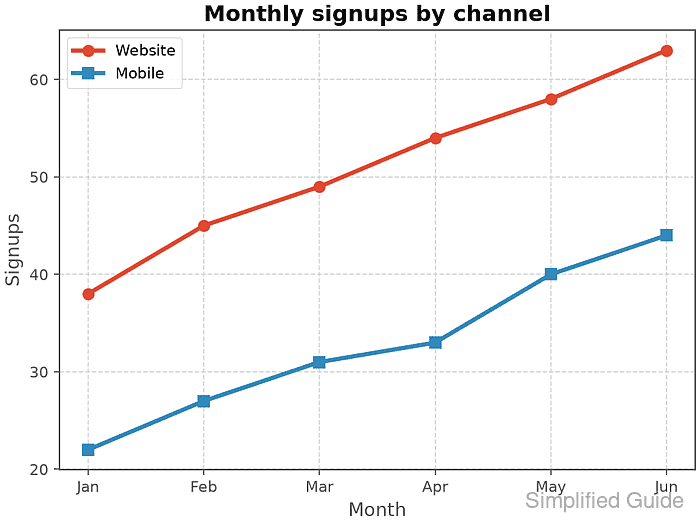
plt.style.use() applies a built-in style name, a path to a .mplstyle file, or a list of styles. When a list is used, Matplotlib applies entries from left to right, so a project style file can refine a built-in theme such as ggplot.
Style sheets are best for appearance defaults that should apply across a figure or script. Direct plot arguments still belong on individual series when one line, marker, or bar needs a fixed color or label, and non-style runtime settings such as the backend should stay outside .mplstyle files.
Steps to set a Matplotlib style theme:
- Confirm the built-in style names available in the active Python environment.
$ python - <<'PY'
import matplotlib.pyplot as plt
print("ggplot available:", "ggplot" in plt.style.available)
print("seaborn-v0_8 available:", "seaborn-v0_8" in plt.style.available)
PY
ggplot available: True
seaborn-v0_8 available: True
plt.style.available lists built-in styles and styles installed in the user style library. Current Matplotlib uses versioned Seaborn style names such as seaborn-v0_8.
- Save a project style sheet as report-theme.mplstyle.
axes.facecolor: white
axes.edgecolor: 0.35
axes.grid: True
axes.titleweight: bold
grid.color: 0.85
grid.linestyle: --
lines.linewidth: 2.8
lines.markersize: 7
legend.frameon: True
legend.facecolor: white
figure.facecolor: white
Use a .mplstyle file for visual defaults that should travel with a project. Settings such as backend are ignored in style sheets because they are runtime configuration, not plot appearance.
- Save the themed plot script as style_theme_set.py.
- style_theme_set.py
from pathlib import Path

import matplotlib
import matplotlib.pyplot as plt

plt.style.use(["ggplot", "report-theme.mplstyle"])

months = ["Jan", "Feb", "Mar", "Apr", "May", "Jun"]
website = [38, 45, 49, 54, 58, 63]
mobile = [22, 27, 31, 33, 40, 44]

fig, ax = plt.subplots(layout="constrained")
ax.plot(months, website, marker="o", label="Website")
ax.plot(months, mobile, marker="s", label="Mobile")
ax.set_title("Monthly signups by channel")
ax.set_xlabel("Month")
ax.set_ylabel("Signups")
ax.legend()

output = Path("style-theme-set.png")
fig.savefig(output, dpi=160)
plt.close(fig)

print(f"matplotlib {matplotlib.__version__} ({matplotlib.get_backend()} backend)")
print("styles applied: ggplot + report-theme.mplstyle")
print(f"axes facecolor: {plt.rcParams['axes.facecolor']}")
print(f"grid enabled: {plt.rcParams['axes.grid']}")
print(f"line width: {plt.rcParams['lines.linewidth']}")
print(f"saved: {output}")
print(f"bytes: {output.stat().st_size}")
The built-in ggplot style sets the base look, and report-theme.mplstyle overrides selected defaults for the project. Use plt.style.use(“ggplot”) when no local style file is needed.
- Run the script and confirm the active style settings.
$ python style_theme_set.py
matplotlib 3.11.0 (Agg backend)
styles applied: ggplot + report-theme.mplstyle
axes facecolor: white
grid enabled: True
line width: 2.8
saved: style-theme-set.png
bytes: 64409
The byte count can change with Matplotlib, fonts, backend, or DPI differences. The style settings and saved filename confirm that the theme loaded and the figure was written.
- Inspect the saved PNG dimensions when the script runs without an interactive display.
$ python - <<'PY'
from PIL import Image
image = Image.open("style-theme-set.png")
print(image.size)
PY
(1024, 768)
The dimensions come from the default figure size and the 160 DPI value passed to fig.savefig().
- Remove the temporary files when they were created only for testing.
$ rm report-theme.mplstyle style_theme_set.py style-theme-set.png
Keep report-theme.mplstyle in the project when the theme should be reused by other plotting scripts.

Mohd Shakir Zakaria is a cloud architect with deep roots in software development and open-source advocacy. Certified in AWS, Red Hat, VMware, ITIL, and Linux, he specializes in designing and managing robust cloud and on-premises infrastructures.


