Mastodon can queue a post through the same statuses API endpoint that publishes immediately. Scheduling is useful for maintenance announcements, release notices, or automation where the publication time matters more than when the script runs.
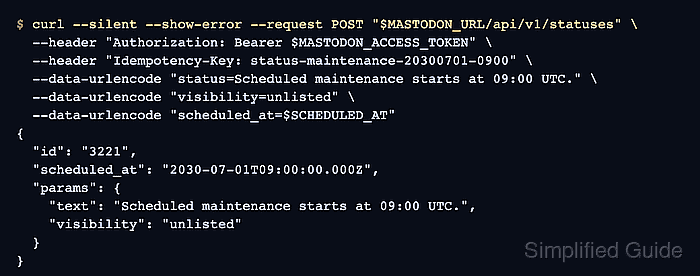
The scheduling field is scheduled_at on POST /api/v1/statuses. When that field is present, Mastodon returns a ScheduledStatus object instead of a published status, so automation should keep the returned scheduled-status ID until the post is published or cancelled.
A scheduled timestamp must be an RFC3339 datetime at least five minutes in the future. Use a token with write:statuses for the creation request and read:statuses for the verification request, and keep bearer tokens out of saved transcripts, screenshots, and shared ticket text.
Steps to schedule a Mastodon status with the API:
- Confirm that the token has the scopes needed to create and inspect the scheduled status.
Required scopes:
write:statuses
read:statuses
A token with only write:statuses can create the scheduled post, but it cannot list or read scheduled statuses through GET /api/v1/scheduled_statuses.
- Set the Mastodon server URL for the API request.
$ export MASTODON_URL="https://social.example.com"
- Read the bearer token into a shell variable without echoing it. Paste the token and press Enter when the command waits for input.
$ read -r -s MASTODON_ACCESS_TOKEN
The token can post as the account that granted it. Do not paste a real token into scripts, screenshots, logs, or support tickets.
- Set the publication time in RFC3339 format.
$ export SCHEDULED_AT="2030-07-01T09:00:00.000Z"
Replace the sample time with the real target time. A value less than five minutes ahead of the server clock is rejected as a validation error.
- Submit the scheduled status.
$ curl --silent --show-error --request POST "$MASTODON_URL/api/v1/statuses" \
  --header "Authorization: Bearer $MASTODON_ACCESS_TOKEN" \
  --header "Idempotency-Key: status-maintenance-20300701-0900" \
  --data-urlencode "status=Scheduled maintenance starts at 09:00 UTC." \
  --data-urlencode "visibility=unlisted" \
  --data-urlencode "scheduled_at=$SCHEDULED_AT"
{
  "id": "3221",
  "scheduled_at": "2030-07-01T09:00:00.000Z",
  "params": {
    "text": "Scheduled maintenance starts at 09:00 UTC.",
    "visibility": "unlisted",
    "scheduled_at": null
  },
  "media_attachments": []
}
Use a unique Idempotency-Key for each intended scheduled post. Reusing one within the one-hour retry window can return the earlier submission instead of creating a separate scheduled post.
- Store the scheduled status ID from the response.
$ export SCHEDULED_STATUS_ID="3221"
- List scheduled statuses to confirm the post is queued.
$ curl --silent --show-error --request GET "$MASTODON_URL/api/v1/scheduled_statuses" \
  --header "Authorization: Bearer $MASTODON_ACCESS_TOKEN"
[
  {
    "id": "3221",
    "scheduled_at": "2030-07-01T09:00:00.000Z",
    "params": {
      "text": "Scheduled maintenance starts at 09:00 UTC.",
      "visibility": "unlisted"
    },
    "media_attachments": []
  }
]
- Cancel the scheduled status only if it was a disposable test.
$ curl --silent --show-error --request DELETE "$MASTODON_URL/api/v1/scheduled_statuses/$SCHEDULED_STATUS_ID" \
  --header "Authorization: Bearer $MASTODON_ACCESS_TOKEN"
{}
Do not run this against a real announcement that should remain queued for publication.

Mohd Shakir Zakaria is a cloud architect with deep roots in software development and open-source advocacy. Certified in AWS, Red Hat, VMware, ITIL, and Linux, he specializes in designing and managing robust cloud and on-premises infrastructures.


