Automation that publishes to Mastodon needs the same guardrails as a human post. The text should land on the intended account, carry the intended visibility, and return an identifier that later jobs can log or reference. The Mastodon REST API exposes that handoff through the status creation endpoint, so a release script, moderation tool, or announcement job can publish without opening the web composer.
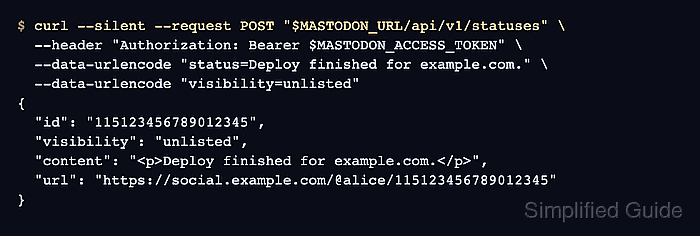
The status creation endpoint is POST /api/v1/statuses. It accepts form data such as status and visibility, and it requires a user access token with write:statuses. The request uses curl with shell variables so the instance URL and token can be reused without placing a live secret in shared command samples.
Use an unlisted status while testing because it avoids public timeline distribution while still producing a normal status URL and API record. Store the returned id with the job log, and verify the same status through GET /api/v1/statuses/:id before treating automation as ready. Avoid logging bearer tokens; a Mastodon access token should be handled like a password.
Steps to post a Mastodon status through the API:
- Set the Mastodon instance URL for the current shell.
$ MASTODON_URL="https://social.example.com"
- Read the posting token into a silent shell variable.
$ read -s MASTODON_ACCESS_TOKEN
The token must belong to the account that should publish the status and include write:statuses. It does not need admin scopes.
- Post an unlisted status.
$ curl --silent --request POST "$MASTODON_URL/api/v1/statuses" \
  --header "Authorization: Bearer $MASTODON_ACCESS_TOKEN" \
  --data-urlencode "status=Deploy finished for example.com." \
  --data-urlencode "visibility=unlisted"
{
  "id": "115123456789012345",
  "created_at": "2026-06-27T08:40:13.492Z",
  "visibility": "unlisted",
  "content": "<p>Deploy finished for example.com.</p>",
  "url": "https://social.example.com/@alice/115123456789012345"
}
visibility can be public, unlisted, private, or direct. Use unlisted for smoke tests that should not enter public timelines.
- Save the returned status ID for follow-up checks or automation logs.
$ STATUS_ID="115123456789012345"
- Fetch the status by ID.
$ curl --silent "$MASTODON_URL/api/v1/statuses/$STATUS_ID"
{
  "id": "115123456789012345",
  "visibility": "unlisted",
  "content": "<p>Deploy finished for example.com.</p>",
  "url": "https://social.example.com/@alice/115123456789012345"
}
For private statuses or authorized-fetch instances, add the same Authorization header and include read:statuses in the token used for the lookup.
- Open the returned URL while signed in to the posting account.
https://social.example.com/@alice/115123456789012345

Mohd Shakir Zakaria is a cloud architect with deep roots in software development and open-source advocacy. Certified in AWS, Red Hat, VMware, ITIL, and Linux, he specializes in designing and managing robust cloud and on-premises infrastructures.


