TensorFlow runtimes consume SavedModel directories as callable inference artifacts rather than editable Keras projects. Exporting a trained model after the architecture and weights are ready lets TensorFlow Serving, tf.saved_model.load(), and other TensorFlow consumers run the model without rebuilding the training code.
In Keras 3, model.export() is the supported path for SavedModel export. model.save() belongs to native .keras or legacy .h5 model files, while format="tf_saved_model" writes a SavedModel directory with callable endpoints.
Use the native .keras format when the artifact needs to keep Keras training configuration for continued editing or fine-tuning. Use SavedModel export when the serving input shape and dtype are ready to hand off, then reload the artifact and call serve before moving it into a serving runtime.
Steps to export a Keras model as a SavedModel:
- Install Keras and TensorFlow in the active Python environment.
$ python -m pip install --upgrade keras tensorflow
- Select the TensorFlow backend before importing Keras.
$ export KERAS_BACKEND=tensorflow
Keras reads KERAS_BACKEND during import. Set it in the shell, notebook kernel, or process environment before any import keras statement.
Related: How to set the Keras backend - Create the export script.
- export_savedmodel.py
import os
import shutil
from pathlib import Path

os.environ.setdefault("KERAS_BACKEND", "tensorflow")
os.environ.setdefault("TF_CPP_MIN_LOG_LEVEL", "2")

import keras
import numpy as np
import tensorflow as tf


export_dir = Path("credit-risk-score-savedmodel")
if export_dir.exists():
    shutil.rmtree(export_dir)

keras.utils.set_random_seed(42)

model = keras.Sequential(
    [
        keras.Input(shape=(4,), name="features"),
        keras.layers.Dense(3, activation="relu", name="hidden"),
        keras.layers.Dense(2, activation="softmax", name="risk_score"),
    ]
)

sample = np.array([[0.2, 0.4, 0.1, 0.8]], dtype="float32")
keras_output = model(sample, training=False).numpy()

model.export(export_dir, format="tf_saved_model", verbose=False)

reloaded = tf.saved_model.load(export_dir)
served_output = reloaded.serve(tf.constant(sample)).numpy()
prediction = [round(float(value), 4) for value in served_output[0]]
artifact_files = sorted(path.name for path in export_dir.iterdir())
signature_names = sorted(reloaded.signatures.keys())

print(f"Exported SavedModel directory: {export_dir}")
print(f"SavedModel files: {artifact_files}")
print(f"Available signatures: {signature_names}")
print("Serve endpoint: serve")
print(f"Serve output shape: {served_output.shape}")
print(f"Prediction row: {prediction}")
print(f"Matches Keras output: {np.allclose(keras_output, served_output, atol=1e-6)}")
Replace the demo model and sample tensor with the trained model and input shape used by the TensorFlow runtime that will load the SavedModel.
- Run the export script.
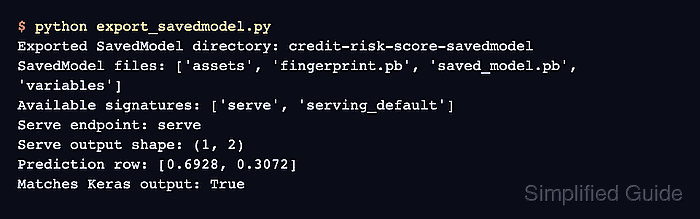
$ python export_savedmodel.py
Exported SavedModel directory: credit-risk-score-savedmodel
SavedModel files: ['assets', 'fingerprint.pb', 'saved_model.pb', 'variables']
Available signatures: ['serve', 'serving_default']
Serve endpoint: serve
Serve output shape: (1, 2)
Prediction row: [0.6928, 0.3072]
Matches Keras output: True
A True value means the SavedModel reloaded through tf.saved_model.load() and the exported serve endpoint returned the same prediction as the original Keras model for the sample tensor.
- Verify the exported artifact from the script output.
The directory should contain saved_model.pb and variables, the signatures should include serve, and the final line should read Matches Keras output: True.

Mohd Shakir Zakaria is a cloud architect with deep roots in software development and open-source advocacy. Certified in AWS, Red Hat, VMware, ITIL, and Linux, he specializes in designing and managing robust cloud and on-premises infrastructures.


