A trained Keras model often needs to move from a notebook or training script into another Python process before it can be scored, evaluated, or shared with a teammate. Saving the complete model to the native .keras format keeps the architecture and learned weights together instead of relying on a separate model-building script.
The native Keras file is the standard whole-model artifact for Keras 3. It can store the model configuration, layer weights, and compile information, including optimizer state when the optimizer has been built during training.
Use native .keras saving when the next consumer is another Keras process that should reload the same model for prediction, evaluation, or fine-tuning. Use a SavedModel export when the target is TensorFlow serving tooling, and handle custom-layer registration separately when the model contains custom Python objects.
Steps to save and load a Keras model:
- Install Keras and the backend package used by the model.
$ python -m pip install --upgrade keras jax
The sample script uses JAX. Use the same backend package and runtime that the saved model will run with.
- Select the backend before importing Keras.
$ export KERAS_BACKEND=jax
Keras reads KERAS_BACKEND during import, so set it before opening a Python shell, notebook kernel, or script process.
Related: How to set the Keras backend - Create the save and load test script.
- save_load_model.py
import os
from pathlib import Path

os.environ.setdefault("KERAS_BACKEND", "jax")

import keras
import numpy as np


keras.utils.set_random_seed(42)

model_path = Path("credit-risk-score.keras")
if model_path.exists():
    model_path.unlink()

x_train = np.linspace(0.05, 0.95, 32, dtype="float32").reshape(8, 4)
y_train = ((x_train[:, 0] + x_train[:, 1]) > 0.9).astype("float32").reshape(-1, 1)

model = keras.Sequential(
    [
        keras.Input(shape=(4,), name="features"),
        keras.layers.Dense(6, activation="relu", name="hidden"),
        keras.layers.Dense(1, activation="sigmoid", name="risk_score"),
    ]
)
model.compile(
    optimizer=keras.optimizers.Adam(learning_rate=0.05),
    loss=keras.losses.BinaryCrossentropy(),
    metrics=[keras.metrics.BinaryAccuracy(name="accuracy")],
)
model.fit(x_train, y_train, epochs=8, batch_size=4, verbose=0)

sample = np.array([[0.25, 0.60, 0.35, 0.45]], dtype="float32")
before_save = model.predict(sample, verbose=0)

model.save(model_path)
loaded_model = keras.models.load_model(model_path)
after_load = loaded_model.predict(sample, verbose=0)
loaded_loss, loaded_accuracy = loaded_model.evaluate(x_train, y_train, verbose=0)

print(f"Backend: {keras.backend.backend()}")
print(f"Saved model: {model_path}")
print(f"Saved file exists: {model_path.exists()}")
print(f"Loaded model type: {loaded_model.__class__.__name__}")
print(f"Loaded optimizer: {loaded_model.optimizer.__class__.__name__}")
print(f"Reloaded accuracy: {loaded_accuracy:.4f}")
print(f"Prediction before save: {before_save[0, 0]:.6f}")
print(f"Prediction after load: {after_load[0, 0]:.6f}")
print(f"Predictions match: {np.allclose(before_save, after_load, atol=1e-6)}")
Replace the demo training data and model definition with the trained model that should become the portable .keras artifact.
- Run the script.
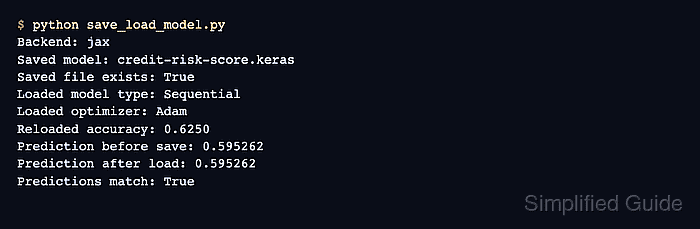
$ python save_load_model.py
Backend: jax
Saved model: credit-risk-score.keras
Saved file exists: True
Loaded model type: Sequential
Loaded optimizer: Adam
Reloaded accuracy: 0.6250
Prediction before save: 0.595262
Prediction after load: 0.595262
Predictions match: True
Predictions match: True confirms that keras.models.load_model() restored a model that returns the same prediction for the sample input.
- Remove the demo script and saved model if the run was only a save/load test.
$ rm -f save_load_model.py credit-risk-score.keras
Do not delete a production .keras artifact until it has been copied to the intended model registry, release directory, or deployment handoff location.

Mohd Shakir Zakaria is a cloud architect with deep roots in software development and open-source advocacy. Certified in AWS, Red Hat, VMware, ITIL, and Linux, he specializes in designing and managing robust cloud and on-premises infrastructures.


