ONNX gives a trained Keras model a handoff format for runtimes that do not run the Keras training stack. Exporting the model after the architecture and weights are ready lets a deployment team load the graph with ONNX Runtime and test the tensor shape the application will send.
Keras 3 exposes ONNX export through model.export() with format="onnx". The TensorFlow backend path installs tf2onnx for conversion and verifies the exported .onnx file with onnxruntime.InferenceSession on the CPU execution provider.
The exported file is an inference artifact, not a native .keras training checkpoint. Keep native Keras save/load for continued training or model editing, and export to ONNX after the serving input shape and dtype are settled enough for the receiving runtime to test.
Steps to export a Keras model to ONNX:
- Install Keras, the TensorFlow backend, the TensorFlow-to-ONNX converter, and ONNX Runtime in the active Python environment.
$ python -m pip install --upgrade keras tensorflow tf2onnx onnxruntime
Use onnxruntime-gpu instead of onnxruntime only in environments prepared for the matching GPU execution provider. Keep only one ONNX Runtime package installed in the same environment.
- Select the TensorFlow backend before importing Keras.
$ export KERAS_BACKEND=tensorflow
Keras reads KERAS_BACKEND during import. Set it in the shell, notebook kernel, or process environment before any import keras statement.
Related: How to set the Keras backend - Create the export script.
- export_onnx.py
import os
from pathlib import Path

os.environ.setdefault("KERAS_BACKEND", "tensorflow")

import keras
import numpy as np
import onnxruntime as ort


export_path = Path("credit-risk-score.onnx")
if export_path.exists():
    export_path.unlink()

keras.utils.set_random_seed(42)

model = keras.Sequential(
    [
        keras.Input(shape=(4,), name="features"),
        keras.layers.Dense(3, activation="relu", name="hidden"),
        keras.layers.Dense(2, activation="softmax", name="risk_score"),
    ]
)

sample = np.array([[0.2, 0.4, 0.1, 0.8]], dtype="float32")
keras_output = model(sample, training=False).numpy()

model.export(export_path, format="onnx", verbose=False)

session = ort.InferenceSession(
    str(export_path),
    providers=["CPUExecutionProvider"],
)
input_meta = session.get_inputs()[0]
output_meta = session.get_outputs()[0]
onnx_output = session.run(None, {input_meta.name: sample})[0]
prediction = [round(float(value), 4) for value in onnx_output[0]]

print(f"Exported ONNX file: {export_path}")
print(f"ONNX file size: {export_path.stat().st_size} bytes")
print(f"ONNX input: {input_meta.name} {input_meta.shape} {input_meta.type}")
print(f"ONNX output: {output_meta.name} {output_meta.shape} {output_meta.type}")
print(f"ONNX output shape: {onnx_output.shape}")
print(f"Prediction row: {prediction}")
print(f"Matches Keras output: {np.allclose(keras_output, onnx_output, atol=1e-5)}")
Replace the demo model and sample tensor with the trained model and input shape used by the ONNX consumer. Keep verbose=False when sharing Torch-backend ONNX exports, because verbose export can include local filesystem details.
- Run the export script.
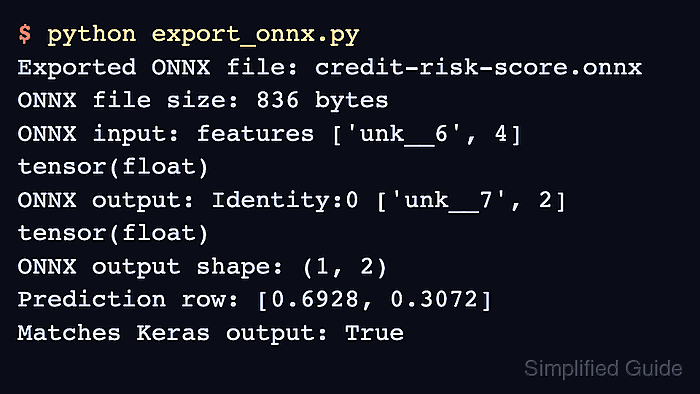
$ python export_onnx.py
Exported ONNX file: credit-risk-score.onnx
ONNX file size: 836 bytes
ONNX input: features ['unk__6', 4] tensor(float)
ONNX output: Identity:0 ['unk__7', 2] tensor(float)
ONNX output shape: (1, 2)
Prediction row: [0.6928, 0.3072]
Matches Keras output: True
A True value means ONNX Runtime loaded the exported file and returned the same prediction as the Keras model for the sample tensor.

Mohd Shakir Zakaria is a cloud architect with deep roots in software development and open-source advocacy. Certified in AWS, Red Hat, VMware, ITIL, and Linux, he specializes in designing and managing robust cloud and on-premises infrastructures.


