Support FAQ search can route a short customer question to a curated answer before a generator or chat interface is added. A keyword pipeline in Haystack keeps that first retrieval layer inspectable because the selected FAQ record, category, answer, and score remain visible to the application.
Haystack's InMemoryDocumentStore holds the example records inside the Python process, while InMemoryBM25Retriever ranks them by word overlap. The in-memory store suits a prototype or small test dataset; a persistent document store is required when FAQ content must survive process restarts or serve production traffic.
Each record uses a stable ID and keeps its short support answer in metadata beside the searchable content. The completed script accepts another question as a command-line argument, which makes it possible to prove that the same pipeline selects different FAQ records instead of returning one fixed response.
Steps to build Haystack support FAQ search:
- Create support_faq_search.py with the imports and command-line question fallback.
- support_faq_search.py
import sys

from haystack import Document, Pipeline
from haystack.components.retrievers.in_memory import InMemoryBM25Retriever
from haystack.document_stores.in_memory import InMemoryDocumentStore


question = (
    sys.argv[1]
    if len(sys.argv) > 1
    else "How can a customer reset a forgotten password?"
)
The haystack-ai package must already be installed in the same Python environment.
Related: How to install Haystack with pip - Add the three searchable FAQ records below the question assignment.
documents = [
    Document(
        id="faq-password-reset",
        content=(
            "Customers reset forgotten passwords from the account login page. "
            "Send the password reset email and keep the reset link valid for 30 minutes."
        ),
        meta={
            "title": "Reset a forgotten password",
            "category": "account",
            "answer": "Send the password reset email from the account login page.",
        },
    ),
    Document(
        id="faq-invoice-copy",
        content=(
            "Customers download invoice copies from the billing portal after payment "
            "has been posted."
        ),
        meta={
            "title": "Download invoice copy",
            "category": "billing",
            "answer": "Open the billing portal and download the paid invoice.",
        },
    ),
    Document(
        id="faq-shipping-address",
        content=(
            "Customers can change a shipping address only before the order is dispatched."
        ),
        meta={
            "title": "Change shipping address",
            "category": "shipping",
            "answer": "Edit the shipping address before dispatch.",
        },
    ),
]
The metadata answer lets the support interface display concise text while the longer content remains searchable.
- Add the in-memory store and BM25 retrieval pipeline below the document list.
document_store = InMemoryDocumentStore()
written = document_store.write_documents(documents)

pipeline = Pipeline()
pipeline.add_component(
    "faq_retriever",
    InMemoryBM25Retriever(document_store=document_store, top_k=1, scale_score=True),
)
top_k=1 returns only the highest-ranked FAQ, while scale_score=True keeps its BM25 score between 0 and 1 for display.
- Add the search execution and result output below the pipeline definition.
result = pipeline.run({"faq_retriever": {"query": question}})
match = result["faq_retriever"]["documents"][0]

print(f"documents indexed: {written}")
print(f"question: {question}")
print(f"top faq id: {match.id}")
print(f"title: {match.meta['title']}")
print(f"category: {match.meta['category']}")
print(f"answer: {match.meta['answer']}")
print(f"score: {match.score:.4f}")
- Review the completed support_faq_search.py file for the assembled sections.
- support_faq_search.py
import sys

from haystack import Document, Pipeline
from haystack.components.retrievers.in_memory import InMemoryBM25Retriever
from haystack.document_stores.in_memory import InMemoryDocumentStore


question = (
    sys.argv[1]
    if len(sys.argv) > 1
    else "How can a customer reset a forgotten password?"
)

documents = [
    Document(
        id="faq-password-reset",
        content=(
            "Customers reset forgotten passwords from the account login page. "
            "Send the password reset email and keep the reset link valid for 30 minutes."
        ),
        meta={
            "title": "Reset a forgotten password",
            "category": "account",
            "answer": "Send the password reset email from the account login page.",
        },
    ),
    Document(
        id="faq-invoice-copy",
        content=(
            "Customers download invoice copies from the billing portal after payment "
            "has been posted."
        ),
        meta={
            "title": "Download invoice copy",
            "category": "billing",
            "answer": "Open the billing portal and download the paid invoice.",
        },
    ),
    Document(
        id="faq-shipping-address",
        content=(
            "Customers can change a shipping address only before the order is dispatched."
        ),
        meta={
            "title": "Change shipping address",
            "category": "shipping",
            "answer": "Edit the shipping address before dispatch.",
        },
    ),
]

document_store = InMemoryDocumentStore()
written = document_store.write_documents(documents)

pipeline = Pipeline()
pipeline.add_component(
    "faq_retriever",
    InMemoryBM25Retriever(document_store=document_store, top_k=1, scale_score=True),
)

result = pipeline.run({"faq_retriever": {"query": question}})
match = result["faq_retriever"]["documents"][0]

print(f"documents indexed: {written}")
print(f"question: {question}")
print(f"top faq id: {match.id}")
print(f"title: {match.meta['title']}")
print(f"category: {match.meta['category']}")
print(f"answer: {match.meta['answer']}")
print(f"score: {match.score:.4f}")
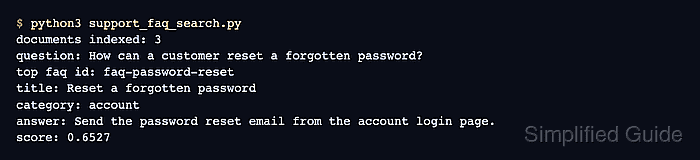
- Run the FAQ search with the default password-reset question.
$ python3 support_faq_search.py
documents indexed: 3
question: How can a customer reset a forgotten password?
top faq id: faq-password-reset
title: Reset a forgotten password
category: account
answer: Send the password reset email from the account login page.
score: 0.6527
- Run an invoice-copy query through the same FAQ search pipeline.
$ python3 support_faq_search.py "How do I get an invoice copy after payment?"
documents indexed: 3
question: How do I get an invoice copy after payment?
top faq id: faq-invoice-copy
title: Download invoice copy
category: billing
answer: Open the billing portal and download the paid invoice.
score: 0.6186
The changed top faq id and answer show that the retriever selected the billing record for the second question rather than replaying the password-reset result.

Mohd Shakir Zakaria is a cloud architect with deep roots in software development and open-source advocacy. Certified in AWS, Red Hat, VMware, ITIL, and Linux, he specializes in designing and managing robust cloud and on-premises infrastructures.


