BM25 retrieval gives Haystack a lexical search path for exact terms, product names, identifiers, and error messages. The retriever ranks documents by weighted keyword overlap before a pipeline adds reranking, generation, or another retrieval method.
The in-memory setup has two active configuration layers. InMemoryDocumentStore owns the BM25 algorithm and scoring parameters, while InMemoryBM25Retriever owns query-time defaults such as top_k, score scaling, and metadata filters.
A three-document fixture makes the merged filter scope and top-ranked content visible in one run. The store keeps its index inside the Python process, so choose a persistent document store when the index must survive restarts or serve multiple workers.
Steps to configure a Haystack BM25 retriever:
- Create bm25_retriever_demo.py with the imports and BM25Plus document store configuration.
- bm25_retriever_demo.py
from haystack import Document
from haystack.components.retrievers.in_memory import InMemoryBM25Retriever
from haystack.document_stores.in_memory import InMemoryDocumentStore
from haystack.document_stores.types import FilterPolicy


document_store = InMemoryDocumentStore(
    bm25_algorithm="BM25Plus",
    bm25_parameters={"k1": 1.2, "b": 0.75, "delta": 0.5},
)
BM25Plus adds delta to reduce the penalty applied to long documents that contain the query terms. Score comparisons remain attributable when each run changes only one scoring parameter.
- Add the fixture documents below the document_store definition.
documents = [
    Document(
        content="Restart the payment API after changing retry settings.",
        meta={"domain": "operations", "section": "api"},
    ),
    Document(
        content="BM25 retrievers match exact error codes and product names.",
        meta={"domain": "operations", "section": "search"},
    ),
    Document(
        content="Embedding retrievers find semantic matches with vector similarity.",
        meta={"domain": "ml", "section": "search"},
    ),
]
- Write the fixture documents into the configured store.
document_store.write_documents(documents)
- Add the retriever below write_documents() with component-level filtering and query-time overrides enabled.
retriever = InMemoryBM25Retriever(
    document_store=document_store,
    filters={"field": "meta.domain", "operator": "==", "value": "operations"},
    filter_policy=FilterPolicy.MERGE,
    top_k=2,
    scale_score=True,
)
FilterPolicy.MERGE combines the component-level domain filter with the runtime section filter. Without this policy, runtime filters replace the component filters.
- Add the lexical query below the retriever definition.
result = retriever.run(
    query="exact error codes product names",
    filters={"field": "meta.section", "operator": "==", "value": "search"},
    top_k=1,
)
- Add the result inspection below the run() call.
documents = result["documents"]

print(f"indexed_documents: {document_store.count_documents()}")
print(f"retrieved_documents: {len(documents)}")
for document in documents:
    print(f"content: {document.content}")
    print(f"section: {document.meta['section']}")
    print(f"score: {document.score:.4f}")
- Compare the completed bm25_retriever_demo.py file with the assembled program.
- bm25_retriever_demo.py
from haystack import Document
from haystack.components.retrievers.in_memory import InMemoryBM25Retriever
from haystack.document_stores.in_memory import InMemoryDocumentStore
from haystack.document_stores.types import FilterPolicy


document_store = InMemoryDocumentStore(
    bm25_algorithm="BM25Plus",
    bm25_parameters={"k1": 1.2, "b": 0.75, "delta": 0.5},
)

documents = [
    Document(
        content="Restart the payment API after changing retry settings.",
        meta={"domain": "operations", "section": "api"},
    ),
    Document(
        content="BM25 retrievers match exact error codes and product names.",
        meta={"domain": "operations", "section": "search"},
    ),
    Document(
        content="Embedding retrievers find semantic matches with vector similarity.",
        meta={"domain": "ml", "section": "search"},
    ),
]

document_store.write_documents(documents)

retriever = InMemoryBM25Retriever(
    document_store=document_store,
    filters={"field": "meta.domain", "operator": "==", "value": "operations"},
    filter_policy=FilterPolicy.MERGE,
    top_k=2,
    scale_score=True,
)

result = retriever.run(
    query="exact error codes product names",
    filters={"field": "meta.section", "operator": "==", "value": "search"},
    top_k=1,
)

documents = result["documents"]

print(f"indexed_documents: {document_store.count_documents()}")
print(f"retrieved_documents: {len(documents)}")
for document in documents:
    print(f"content: {document.content}")
    print(f"section: {document.meta['section']}")
    print(f"score: {document.score:.4f}")
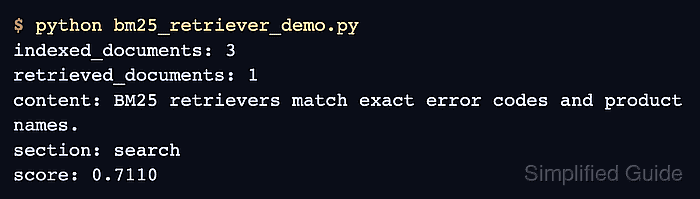
- Run the completed BM25 retriever program.
$ python bm25_retriever_demo.py
indexed_documents: 3
retrieved_documents: 1
content: BM25 retrievers match exact error codes and product names.
section: search
score: 0.7110
- Confirm that the returned content satisfies the lexical query and both metadata filters.
indexed_documents: 3 confirms that the corpus was loaded, retrieved_documents: 1 confirms the runtime top_k=1 override, and section: search shows that the merged filters excluded the api and ml documents. The scaled score is meaningful only within the same corpus and configuration.

Mohd Shakir Zakaria is a cloud architect with deep roots in software development and open-source advocacy. Certified in AWS, Red Hat, VMware, ITIL, and Linux, he specializes in designing and managing robust cloud and on-premises infrastructures.


