A Haystack pipeline moves from wiring to execution when application data enters the component graph. Pipeline.run() accepts runtime values for named input sockets and returns the component outputs that remain available after the graph finishes.
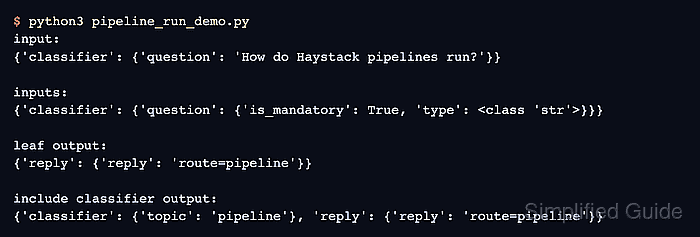
The input dictionary uses component names at the first level and input socket names at the second level. Connected downstream inputs receive values through Pipeline.connect(), so only unconnected sockets need runtime values.
This local smoke test avoids models, API keys, and external services. Its first result proves that the question reached the leaf component, while include_outputs_from exposes the classifier's intermediate output without changing the graph.
Related: How to create a pipeline in Haystack
Related: How to create a custom component in Haystack
Related: How to install Haystack with pip
Steps to run a Haystack pipeline:
- Create pipeline_run_demo.py with the imports and question-classifying component.
- pipeline_run_demo.py
import sys
from pprint import pprint

from haystack import Pipeline, component


@component
class QuestionClassifier:
    @component.output_types(topic=str)
    def run(self, question: str):
        normalized = " ".join(question.strip().split()).lower()
        if "pipeline" in normalized:
            return {"topic": "pipeline"}
        return {"topic": "general"}
The question parameter becomes an input socket, and the returned topic key matches the output declared by @component.output_types.
Related: How to create a custom component in Haystack - Add the reply-building component below QuestionClassifier.
@component
class ReplyBuilder:
    @component.output_types(reply=str)
    def run(self, topic: str):
        return {"reply": f"route={topic}"}
The topic input accepts the classifier's string output, and reply becomes the leaf output returned by default.
- Append the named pipeline graph below both component classes.
pipeline = Pipeline()
pipeline.add_component("classifier", QuestionClassifier())
pipeline.add_component("reply", ReplyBuilder())
pipeline.connect("classifier.topic", "reply.topic")
The connection supplies reply.topic from classifier.topic, leaving classifier.question as the only runtime input.
- Append the runtime input and output inspection below the connection.
question = " ".join(sys.argv[1:]) or "How do Haystack pipelines run?"
data = {"classifier": {"question": question}}

print("input:")
pprint(data)

print("\ninputs:")
pprint(pipeline.inputs())

print("\nleaf output:")
pprint(pipeline.run(data))

print("\ninclude classifier output:")
pprint(pipeline.run(data, include_outputs_from={"classifier"}))
pipeline.inputs() lists unconnected input sockets, while include_outputs_from={“classifier”} retains the intermediate topic value in the result.
- Review the completed pipeline_run_demo.py file before execution.
- pipeline_run_demo.py
import sys
from pprint import pprint

from haystack import Pipeline, component


@component
class QuestionClassifier:
    @component.output_types(topic=str)
    def run(self, question: str):
        normalized = " ".join(question.strip().split()).lower()
        if "pipeline" in normalized:
            return {"topic": "pipeline"}
        return {"topic": "general"}


@component
class ReplyBuilder:
    @component.output_types(reply=str)
    def run(self, topic: str):
        return {"reply": f"route={topic}"}


pipeline = Pipeline()
pipeline.add_component("classifier", QuestionClassifier())
pipeline.add_component("reply", ReplyBuilder())
pipeline.connect("classifier.topic", "reply.topic")

question = " ".join(sys.argv[1:]) or "How do Haystack pipelines run?"
data = {"classifier": {"question": question}}

print("input:")
pprint(data)

print("\ninputs:")
pprint(pipeline.inputs())

print("\nleaf output:")
pprint(pipeline.run(data))

print("\ninclude classifier output:")
pprint(pipeline.run(data, include_outputs_from={"classifier"}))
- Run the pipeline with its default question.
$ python3 pipeline_run_demo.py
input:
{'classifier': {'question': 'How do Haystack pipelines run?'}}

inputs:
{'classifier': {'question': {'is_mandatory': True, 'type': <class 'str'>}}}

leaf output:
{'reply': {'reply': 'route=pipeline'}}

include classifier output:
{'classifier': {'topic': 'pipeline'}, 'reply': {'reply': 'route=pipeline'}}
The inputs section exposes classifier.question, the leaf result contains only reply, and the second run includes both component outputs.
Related: How to install Haystack with pip - Rerun the pipeline with a question that omits the word pipeline.
$ python3 pipeline_run_demo.py 'Where should I install dependencies?'
input:
{'classifier': {'question': 'Where should I install dependencies?'}}

inputs:
{'classifier': {'question': {'is_mandatory': True, 'type': <class 'str'>}}}

leaf output:
{'reply': {'reply': 'route=general'}}

include classifier output:
{'classifier': {'topic': 'general'}, 'reply': {'reply': 'route=general'}}
The unchanged component and socket keys with route=general prove that the runtime question, rather than a fixed result, determines the pipeline output.

Mohd Shakir Zakaria is a cloud architect with deep roots in software development and open-source advocacy. Certified in AWS, Red Hat, VMware, ITIL, and Linux, he specializes in designing and managing robust cloud and on-premises infrastructures.


