Incident summaries often need a count by error code or service before raw log lines are useful to another operator. Counting against the full log can overstate noise when informational and warning entries are mixed with failures, while counting only one field can hide which service produced the repeated error.
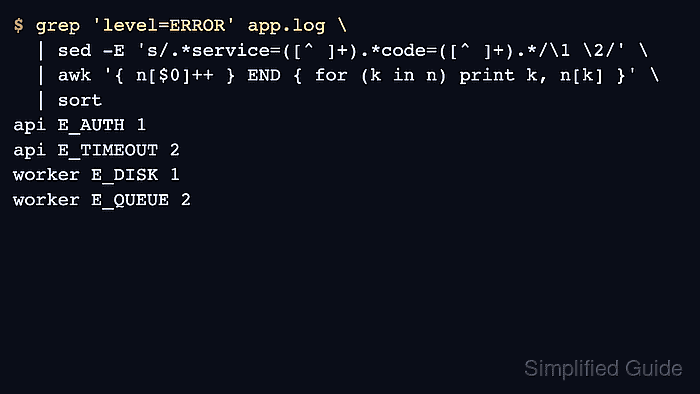
Plain key-value log lines can be narrowed and reshaped in stages. grep selects entries with level=ERROR, sed extracts the fields that form the grouping key, and awk increments a count for each repeated key before sort makes the output stable.
Use this pattern for whitespace-separated fields such as service=api and code=E_TIMEOUT. Logs with JSON, quoted spaces, or multiline messages need a format-aware parser first; the sample log has known counts, so the final table should show two api E_TIMEOUT errors and two worker E_QUEUE errors.
Related: How to count matches with grep
Related: How to count rows by field with awk
Related: How to redact sensitive fields from logs with sed
Steps to extract error counts from logs with grep, awk, and sed:
- Create a small sample log with informational, warning, and error entries.
- app.log
2026-06-08T09:00:04Z level=INFO service=api code=OK message="ready"
2026-06-08T09:01:12Z level=ERROR service=api code=E_TIMEOUT message="upstream timeout"
2026-06-08T09:02:03Z level=ERROR service=worker code=E_QUEUE message="job stalled"
2026-06-08T09:02:44Z level=WARN service=api code=W_RETRY message="retry queued"
2026-06-08T09:03:08Z level=ERROR service=api code=E_TIMEOUT message="upstream timeout"
2026-06-08T09:04:20Z level=ERROR service=worker code=E_DISK message="disk full"
2026-06-08T09:05:00Z level=ERROR service=api code=E_AUTH message="token rejected"
2026-06-08T09:05:44Z level=ERROR service=worker code=E_QUEUE message="job stalled"
- Print only the error lines.
$ grep 'level=ERROR' app.log
2026-06-08T09:01:12Z level=ERROR service=api code=E_TIMEOUT message="upstream timeout"
2026-06-08T09:02:03Z level=ERROR service=worker code=E_QUEUE message="job stalled"
2026-06-08T09:03:08Z level=ERROR service=api code=E_TIMEOUT message="upstream timeout"
2026-06-08T09:04:20Z level=ERROR service=worker code=E_DISK message="disk full"
2026-06-08T09:05:00Z level=ERROR service=api code=E_AUTH message="token rejected"
2026-06-08T09:05:44Z level=ERROR service=worker code=E_QUEUE message="job stalled"
grep leaves matching lines unchanged, so the next stage still has the full log entry available for field extraction.
- Extract the service and error code from each error line.
$ grep 'level=ERROR' app.log | sed -E 's/.*service=([^ ]+).*code=([^ ]+).*/\1 \2/'
api E_TIMEOUT
worker E_QUEUE
api E_TIMEOUT
worker E_DISK
api E_AUTH
worker E_QUEUE
sed -E captures the value after service= and the value after code=, then prints one grouping key per line.
- Count each service and code pair.
$ grep 'level=ERROR' app.log \
  | sed -E 's/.*service=([^ ]+).*code=([^ ]+).*/\1 \2/' \
  | awk '{ n[$0]++ } END { for (k in n) print k, n[k] }' \
  | sort
api E_AUTH 1
api E_TIMEOUT 2
worker E_DISK 1
worker E_QUEUE 2
awk increments n[$0] for each extracted key line. sort keeps the final table in a stable order for comparison or handoff.
- Count by error code only when the service name does not matter.
$ grep 'level=ERROR' app.log \
  | sed -E 's/.*code=([^ ]+).*/\1/' \
  | awk '{ n[$0]++ } END { for (k in n) print k, n[k] }' \
  | sort
E_AUTH 1
E_DISK 1
E_QUEUE 2
E_TIMEOUT 2
Changing the sed replacement changes the grouping key while keeping the same error filter and awk count step.
- Remove the sample log after testing.
$ rm app.log

Mohd Shakir Zakaria is a cloud architect with deep roots in software development and open-source advocacy. Certified in AWS, Red Hat, VMware, ITIL, and Linux, he specializes in designing and managing robust cloud and on-premises infrastructures.


