Copied log snippets often need to keep timestamps, severity levels, user names, and request paths while removing passwords, tokens, and API keys before the text goes into a ticket, report, or article. Replacing only the value keeps the evidence readable without exposing the secret.
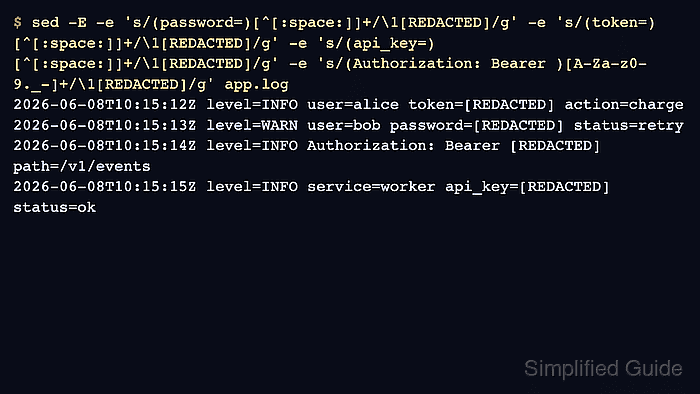
sed can match the label part of each sensitive field and replace the value that follows it. The command pattern handles unquoted password=, token=, and api_key= values that end at whitespace, plus Authorization: Bearer ... values copied from log lines.
Run redaction on a copied log file and review the output before sharing it. Confirm both sides of the change before handoff: redaction markers should appear where sensitive values were, and the known raw values should no longer appear in the redacted copy.
Steps to redact sensitive fields from logs with sed:
- Create a sample log with key-value fields and a bearer token header value.
$ cat > app.log <<'EOF'
2026-06-08T10:15:12Z level=INFO user=alice token=pay_7f4b3c2a action=charge
2026-06-08T10:15:13Z level=WARN user=bob password=plainTextSecret status=retry
2026-06-08T10:15:14Z level=INFO Authorization: Bearer sk_live_4f2a9c path=/v1/events
2026-06-08T10:15:15Z level=INFO service=worker api_key=svc_8a2dd10f status=ok
EOF
The values in this sample are synthetic. Use the same structure with copied log text when real logs contain secrets.
- Redact the sensitive values and write the result to a separate file.
$ sed -E \
  -e 's/(password=)[^[:space:]]+/\1[REDACTED]/g' \
  -e 's/(token=)[^[:space:]]+/\1[REDACTED]/g' \
  -e 's/(api_key=)[^[:space:]]+/\1[REDACTED]/g' \
  -e 's/(Authorization: Bearer )[A-Za-z0-9._-]+/\1[REDACTED]/g' \
  app.log > app.redacted.log
Each substitution keeps the field label in the first capture group and replaces only the following value with [REDACTED]. The [^[:space:]]+ class stops at the next whitespace character, which fits simple unquoted log fields.
Do not overwrite the original log while testing a redaction pattern. Write to a new file, inspect it, and only share the reviewed redacted copy.
- Review the redacted output.
$ cat app.redacted.log
2026-06-08T10:15:12Z level=INFO user=alice token=[REDACTED] action=charge
2026-06-08T10:15:13Z level=WARN user=bob password=[REDACTED] status=retry
2026-06-08T10:15:14Z level=INFO Authorization: Bearer [REDACTED] path=/v1/events
2026-06-08T10:15:15Z level=INFO service=worker api_key=[REDACTED] status=ok
- Confirm that every expected field received a redaction marker.
$ grep '\[REDACTED\]' app.redacted.log
2026-06-08T10:15:12Z level=INFO user=alice token=[REDACTED] action=charge
2026-06-08T10:15:13Z level=WARN user=bob password=[REDACTED] status=retry
2026-06-08T10:15:14Z level=INFO Authorization: Bearer [REDACTED] path=/v1/events
2026-06-08T10:15:15Z level=INFO service=worker api_key=[REDACTED] status=ok
- Confirm that the raw sample values are absent from the redacted copy.
$ grep -E 'plainTextSecret|pay_7f4b3c2a|sk_live_4f2a9c|svc_8a2dd10f' app.redacted.log
No output means none of those raw values remain. If grep prints a line, update the matching expression before sharing the file.
- Adjust the field labels for the real log format, then rerun the same redaction and verification checks against the copied file.
Use a parser instead of sed when the log is JSON, YAML, CSV with quoting, or another structured format where values can contain spaces, escapes, nested data, or quoted separators.
- Remove the sample files after testing.
$ rm app.log app.redacted.log

Mohd Shakir Zakaria is a cloud architect with deep roots in software development and open-source advocacy. Certified in AWS, Red Hat, VMware, ITIL, and Linux, he specializes in designing and managing robust cloud and on-premises infrastructures.


