Scaling the LGTM stack for high availability means giving Grafana, Loki, Tempo, and Mimir enough replicas and placement rules to survive routine pod or node loss. A production stack should keep ingesting and querying telemetry while one pod is restarted or one node is drained.
Backend availability depends on more than replica counts. Loki, Tempo, and Mimir need object storage, member or hash rings, anti-affinity, and resource requests that match the deployment mode selected in their Helm charts.
Validate scaling changes in staging before applying them to production. A useful HA check compares readiness and smoke queries before and after restarting one non-critical pod, then confirms the component returns to the expected replica count.
Steps to scale the LGTM stack for high availability:
- Check current pod placement.
$ kubectl get pods --namespace monitoring -o wide
NAME                                  READY   STATUS    NODE
grafana-7f9df8f8c7-n2c6x             1/1     Running   worker-a
loki-write-0                         2/2     Running   worker-a
loki-write-1                         2/2     Running   worker-b
mimir-ingester-zone-a-0              1/1     Running   worker-a
mimir-ingester-zone-b-0              1/1     Running   worker-b
##### snipped #####
- Set production replica counts in the stack values.
- values-ha.yaml
grafana:
  replicas: 2

loki:
  deploymentMode: SimpleScalable
  read:
    replicas: 3
  write:
    replicas: 3
  backend:
    replicas: 3

tempo:
  distributor:
    replicas: 2
  ingester:
    replicas: 3
  querier:
    replicas: 2
  queryFrontend:
    replicas: 2

mimir:
  distributor:
    replicas: 2
  ingester:
    replicas: 3
  querier:
    replicas: 2
  query_frontend:
    replicas: 2
  store_gateway:
    replicas: 3
Use the keys supported by the chart versions installed in the cluster. Render the chart before applying the values.
- Add pod anti-affinity or topology spread settings.
- values-spread.yaml
global:
  podAntiAffinity:
    enabled: true
  topologySpreadConstraints:
    - maxSkew: 1
      topologyKey: kubernetes.io/hostname
      whenUnsatisfiable: ScheduleAnyway
- Render the chart values before changing the cluster.
$ helm template loki grafana/loki \
  --namespace monitoring \
  --values values/loki.yaml \
  --values values-ha.yaml
##### snipped #####
kind: StatefulSet
metadata:
  name: loki-write
- Apply the HA values to each release.
$ helm upgrade --install loki grafana/loki \
  --namespace monitoring \
  --values values/loki.yaml \
  --values values-ha.yaml \
  --wait --timeout 15m
Release "loki" has been upgraded. Happy Helming!
- Wait for the namespace to return to ready state.
$ kubectl wait --namespace monitoring \
  --for=condition=Ready pod \
  --all --timeout=10m
pod/grafana-7f9df8f8c7-n2c6x condition met
pod/loki-write-0 condition met
##### snipped #####
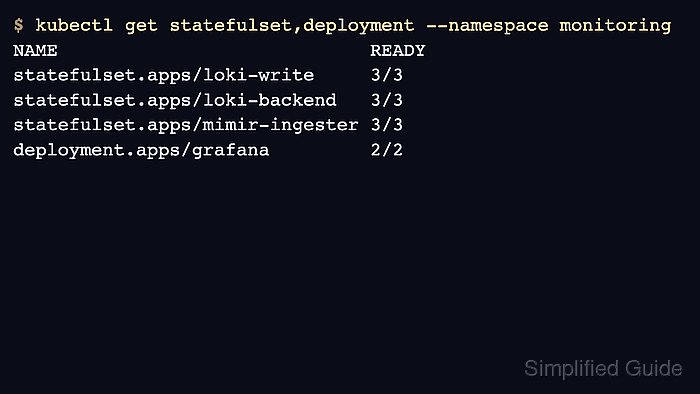
- Check that scaled components have the expected replica counts.
$ kubectl get statefulset,deployment --namespace monitoring
NAME                            READY
statefulset.apps/loki-write     3/3
statefulset.apps/loki-backend   3/3
statefulset.apps/mimir-ingester 3/3
deployment.apps/grafana         2/2
- Run a smoke query before restarting a pod.
$ curl --silent https://grafana.example.com/api/health {"database":"ok","version":"13.0.1"} - Restart one backend pod through the owning controller.
$ kubectl rollout restart statefulset/loki-write \
  --namespace monitoring
statefulset.apps/loki-write restarted
Run disruption tests in staging first. Do not delete multiple ring members at once unless the component documentation and current ring state support it.
- Confirm readiness returns after the restart.
$ kubectl rollout status statefulset/loki-write \
  --namespace monitoring --timeout=10m
statefulset rolling update complete 3 pods at revision loki-write-7c7d9d
- Run the same smoke query after the restart.
$ curl --silent --get https://logs.example.com/loki/api/v1/query_range \
  --data-urlencode 'query={service_name="checkout-api"}'
{"status":"success","data":{"resultType":"streams","result":[]}}

Mohd Shakir Zakaria is a cloud architect with deep roots in software development and open-source advocacy. Certified in AWS, Red Hat, VMware, ITIL, and Linux, he specializes in designing and managing robust cloud and on-premises infrastructures.


