Shared app state can make an Espresso suite pass or fail based on test order. Android Test Orchestrator runs each test method in its own Instrumentation invocation, which helps expose dependencies on cached sessions, in-memory objects, or earlier test methods.
Gradle enables Orchestrator from the app module configuration. AndroidJUnitRunner remains the test runner, testOptions.execution switches connected test execution to Orchestrator, and androidTestUtil supplies the Orchestrator APK that Gradle installs for the test run.
Use clearPackageData when each test method must also start without app data on the device. That setting runs a package-data clear between methods and can slow connected tests, so reserve it for suites that need isolation instead of using it to hide missing test setup.
Steps to enable Android Test Orchestrator for Espresso:
- Open the app module Gradle file.
$ $EDITOR app/build.gradle.kts
The examples use Kotlin DSL. Put the same settings in the module that builds the app under test, usually app.
- Set AndroidJUnitRunner and add package-data clearing when the suite must start each method from empty app data.
- build.gradle.kts
android {
    defaultConfig {
        testInstrumentationRunner = "androidx.test.runner.AndroidJUnitRunner"
        testInstrumentationRunnerArguments["clearPackageData"] = "true"
    }
}
Omit clearPackageData when the test itself intentionally verifies data that survives across methods. Orchestrator still starts a separate Instrumentation invocation for each method.
- Enable Orchestrator execution for connected Android tests.
- build.gradle.kts
android {
    testOptions {
        execution = "ANDROIDX_TEST_ORCHESTRATOR"
    }
}
Merge this into the existing android block instead of creating duplicate top-level blocks when the file already has defaultConfig or testOptions.
- Add the runner and Orchestrator dependencies.
- build.gradle.kts
dependencies {
    androidTestImplementation("androidx.test:runner:1.7.0")
    androidTestUtil("androidx.test:orchestrator:1.6.1")
}
Keep only one androidTestImplementation entry for androidx.test:runner if the project already declares it. The androidTestUtil dependency is the Orchestrator artifact Gradle installs for the connected test run.
Related: How to configure an Android project for Espresso - Connect the emulator or device that will run the instrumentation tests.
$ adb devices
List of devices attached
emulator-5554	device
A connected test task needs one usable device unless the project uses a managed-device task instead.
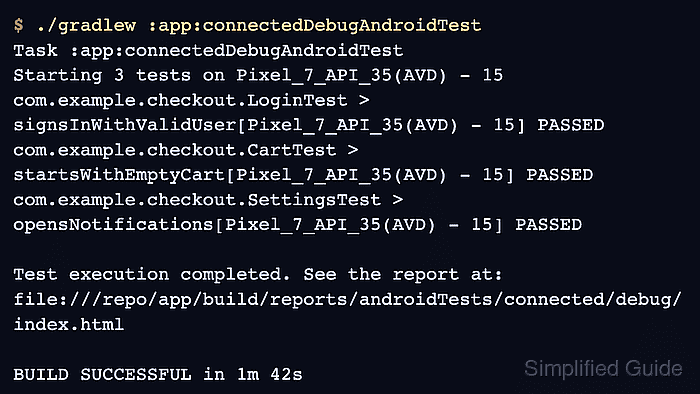
Related: How to run Espresso tests on Gradle managed devices - Run the connected test task for the app module and build variant.
$ ./gradlew :app:connectedDebugAndroidTest
> Task :app:connectedDebugAndroidTest
Starting 3 tests on Pixel_7_API_35(AVD) - 15
com.example.checkout.LoginTest > signsInWithValidUser[Pixel_7_API_35(AVD) - 15] PASSED
com.example.checkout.CartTest > startsWithEmptyCart[Pixel_7_API_35(AVD) - 15] PASSED
com.example.checkout.SettingsTest > opensNotifications[Pixel_7_API_35(AVD) - 15] PASSED

Test execution completed. See the report at:
file:///repo/app/build/reports/androidTests/connected/debug/index.html

BUILD SUCCESSFUL in 1m 42s
Use the connected task that matches the module and variant, such as :mobile:connectedReleaseAndroidTest for a release instrumentation target.
Related: How to run Espresso tests locally - Confirm that the Orchestrator package is present on the test device after the Gradle run.
$ adb shell pm list packages androidx.test.orchestrator
package:androidx.test.orchestrator
Gradle installs the Orchestrator support package from the androidTestUtil dependency when connected tests run with ANDROIDX_TEST_ORCHESTRATOR.
- Retest the previously order-dependent class with the same connected task.
$ ./gradlew :app:connectedDebugAndroidTest \
  -Pandroid.testInstrumentationRunnerArguments.class=com.example.checkout.SessionIsolationTest
> Task :app:connectedDebugAndroidTest
Starting 2 tests on Pixel_7_API_35(AVD) - 15
com.example.checkout.SessionIsolationTest > startsSignedOut[Pixel_7_API_35(AVD) - 15] PASSED
com.example.checkout.SessionIsolationTest > createsFreshCart[Pixel_7_API_35(AVD) - 15] PASSED

BUILD SUCCESSFUL in 48s
A passing focused run after enabling Orchestrator means the class no longer depends on state left by a previous method. Keep the focused class argument only for diagnosis; CI usually runs the full connected task.

Mohd Shakir Zakaria is a cloud architect with deep roots in software development and open-source advocacy. Certified in AWS, Red Hat, VMware, ITIL, and Linux, he specializes in designing and managing robust cloud and on-premises infrastructures.


