Login screens combine text entry, validation, asynchronous authentication, and navigation, so they are often the first Android UI flow that exposes weak test wiring. An Espresso login flow test should drive the visible email and password fields, tap the submit control, and assert the signed-in destination instead of only checking that the login button exists.
ActivityScenarioRule launches the login activity for each test method, while Espresso interacts with views through matchers, actions, and assertions. A controlled auth layer keeps the UI path deterministic because valid test credentials return success immediately, and the test remains focused on view wiring and navigation.
Use resource ID matchers for login fields and post-login state whenever the app exposes them. Text matchers can help when the destination title is stable, but copy-only selectors make a login test brittle when localization or content changes.
Related: How to write a first Espresso test
Related: network-response-mock
Steps to write an Espresso login flow test:
- Add the Espresso runner and test dependencies to the app module.
- build.gradle.kts
android {
    defaultConfig {
        testInstrumentationRunner =
            "androidx.test.runner.AndroidJUnitRunner"
    }
}

val espressoVersion = "3.7.0"
val junitVersion = "1.3.0"
val runnerVersion = "1.7.0"

dependencies {
    androidTestImplementation(
        "androidx.test.espresso:" +
            "espresso-core:$espressoVersion"
    )
    androidTestImplementation(
        "androidx.test.ext:" +
            "junit:$junitVersion"
    )
    androidTestImplementation(
        "androidx.test:" +
            "runner:$runnerVersion"
    )
}
The versions shown match the current AndroidX Test releases in Google Maven. Use the app's existing version catalog or dependency convention when the project already centralizes test libraries.
Related: How to configure an Android project for Espresso - Create a test-only auth fake for one successful credential pair.
- FakeAuthRepository.kt
class FakeAuthRepository : AuthRepository {
    override suspend fun login(
        email: String,
        password: String
    ): LoginResult {
        return if (
            email == "qa-login@example.com" &&
            password == "correct-password"
        ) {
            LoginResult.Success(userId = "user-123")
        } else {
            LoginResult.InvalidCredentials
        }
    }
}
Do not point an instrumented login test at production authentication. Use a fake repository, local test server, debug backend, or seeded test tenant that can be reset safely.
- Create the login flow test under the app module's androidTest source set.
- LoginFlowTest.kt
package com.example.app

import androidx.test.espresso.Espresso.onView
import androidx.test.espresso.action.ViewActions.*
import androidx.test.espresso.assertion.ViewAssertions.*
import androidx.test.espresso.matcher.ViewMatchers.*
import androidx.test.ext.junit.rules.ActivityScenarioRule
import androidx.test.ext.junit.runners.AndroidJUnit4
import androidx.test.filters.LargeTest
import org.junit.After
import org.junit.Before
import org.junit.Rule
import org.junit.Test
import org.junit.runner.RunWith

@RunWith(AndroidJUnit4::class)
@LargeTest
class LoginFlowTest {

    @get:Rule
    val activityRule =
        ActivityScenarioRule(LoginActivity::class.java)

    @Before
    fun setUpAuth() {
        ServiceLocator.authRepository =
            FakeAuthRepository()
    }

    @After
    fun resetAuth() {
        ServiceLocator.resetForTests()
    }

    @Test
    fun validCredentialsOpenAccountScreen() {
        onView(withId(R.id.email_input))
            .perform(
                replaceText("qa-login@example.com"),
                closeSoftKeyboard()
            )

        onView(withId(R.id.password_input))
            .perform(
                replaceText("correct-password"),
                closeSoftKeyboard()
            )

        onView(withId(R.id.login_button))
            .perform(click())

        onView(withId(R.id.account_title))
            .check(matches(withText("Account")))
    }
}
- Replace the sample activity, auth hook, view IDs, credentials, and destination assertion with values from the app under test.
The final assertion should target the signed-in screen, session state, or account-specific content. A login-button click without a post-login assertion can pass even when authentication fails silently.
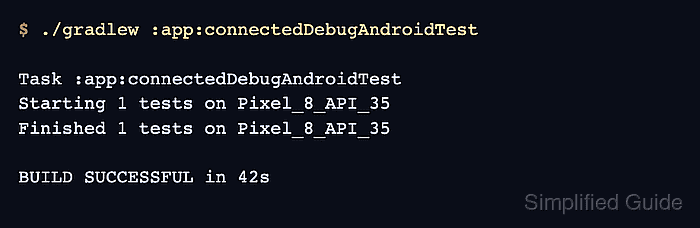
- Run the connected Android test task on an emulator or device.
$ ./gradlew :app:connectedDebugAndroidTest

Task :app:connectedDebugAndroidTest
Starting 1 tests on Pixel_8_API_35
Finished 1 tests on Pixel_8_API_35

BUILD SUCCESSFUL in 42s
The task name changes with the module and variant. Android projects with product flavors may expose a task such as :app:connectedFreeDebugAndroidTest.
Related: How to run Espresso tests locally

Mohd Shakir Zakaria is a cloud architect with deep roots in software development and open-source advocacy. Certified in AWS, Red Hat, VMware, ITIL, and Linux, he specializes in designing and managing robust cloud and on-premises infrastructures.


