External Android intents move a UI flow from the app under test to another Activity, such as a contact picker, camera app, browser, or share target. Stubbing that handoff with Espresso-Intents lets an instrumentation test check the outgoing request and return a controlled Activity result without depending on whichever external app is installed on the device.
Espresso-Intents hooks into the instrumentation process after IntentsRule initializes and records intents launched by the app under test. A matcher passed to intending() supplies a stubbed Instrumentation.ActivityResult, while intended() verifies that the expected outgoing intent was sent.
A contact-pick flow keeps the stub concrete because the app requests an external contact Activity and expects a phone number in the result. Replace package names, IDs, extras, and assertions with the app's own contract so the test proves the handoff behavior rather than only proving that a matcher was registered.
Steps to stub Android intents with Espresso-Intents:
- Add Espresso-Intents to the app module's instrumented test dependencies.
- build.gradle.kts
android {
    defaultConfig {
        testInstrumentationRunner =
            "androidx.test.runner." +
                "AndroidJUnitRunner"
    }
}

val espressoVersion = "3.7.0"
val junitVersion = "1.3.0"
val runnerVersion = "1.7.0"

dependencies {
    androidTestImplementation(
        "androidx.test.espresso:" +
            "espresso-core:$espressoVersion"
    )
    androidTestImplementation(
        "androidx.test.espresso:" +
            "espresso-intents:$espressoVersion"
    )
    androidTestImplementation(
        "androidx.test.ext:" +
            "junit:$junitVersion"
    )
    androidTestImplementation(
        "androidx.test:" +
            "runner:$runnerVersion"
    )
}
The versions shown match the current AndroidX Test releases in Google Maven. Keep espresso-core and espresso-intents on the same Espresso release.
- Create the Espresso-Intents test class under the app module's src/androidTest tree.
- ContactIntentTest.kt
package com.example.app

import android.app.Activity
import android.app.Instrumentation.ActivityResult
import android.content.Intent
import androidx.test.espresso.Espresso.onView
import androidx.test.espresso.action.ViewActions.click
import androidx.test.espresso.assertion.ViewAssertions.matches
import androidx.test.espresso.intent.Intents.intended
import androidx.test.espresso.intent.Intents.intending
import androidx.test.espresso.intent.matcher.IntentMatchers.hasAction
import androidx.test.espresso.intent.matcher.IntentMatchers.toPackage
import androidx.test.espresso.intent.rule.IntentsRule
import androidx.test.espresso.matcher.ViewMatchers.withId
import androidx.test.espresso.matcher.ViewMatchers.withText
import androidx.test.ext.junit.rules.ActivityScenarioRule
import androidx.test.ext.junit.runners.AndroidJUnit4
import androidx.test.filters.LargeTest
import org.hamcrest.Matchers.allOf
import org.junit.Rule
import org.junit.Test
import org.junit.rules.RuleChain
import org.junit.rules.TestRule
import org.junit.runner.RunWith

@RunWith(AndroidJUnit4::class)
@LargeTest
class ContactIntentTest {

    @get:Rule
    val rules: TestRule =
        RuleChain
            .outerRule(IntentsRule())
            .around(
                ActivityScenarioRule(
                    ContactActivity::class.java
                )
            )

    @Test
    fun stubsContactResult() {
        val resultData =
            Intent().putExtra(
                "phone",
                "555-0100"
            )
        val result =
            ActivityResult(
                Activity.RESULT_OK,
                resultData
            )

        intending(
            allOf(
                hasAction(Intent.ACTION_PICK),
                toPackage("com.android.contacts")
            )
        ).respondWith(result)

        onView(withId(R.id.pick_contact))
            .perform(click())

        intended(
            allOf(
                hasAction(Intent.ACTION_PICK),
                toPackage("com.android.contacts")
            )
        )

        onView(withId(R.id.phone_number))
            .check(
                matches(withText("555-0100"))
            )
    }
}
IntentsRule is the current rule for automatic Espresso-Intents setup and cleanup. IntentsTestRule is deprecated in the current API reference.
- Replace the sample matcher with the external intent contract used by the app.
intending(
    allOf(
        hasAction(Intent.ACTION_PICK),
        toPackage("com.android.contacts")
    )
).respondWith(result)

intended(
    allOf(
        hasAction(Intent.ACTION_PICK),
        toPackage("com.android.contacts")
    )
)
Use a package, component, action, data URI, type, or extra matcher that identifies the real outgoing intent. A broad matcher can hide a wrong target app or an unexpected request shape.
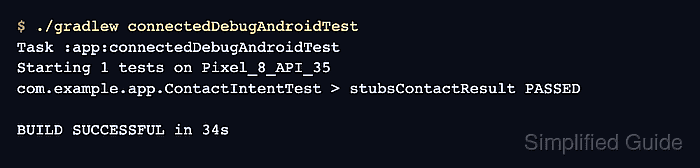
- Run the connected instrumented test task on an emulator or device.
$ ./gradlew connectedDebugAndroidTest
Task :app:connectedDebugAndroidTest
Starting 1 tests on Pixel_8_API_35
com.example.app.ContactIntentTest > stubsContactResult PASSED

BUILD SUCCESSFUL in 34s
If Gradle reports no connected devices, start an emulator or attach a device before rerunning the task.
Related: How to run Espresso tests locally - Open the app module's connected Android test report and confirm ContactIntentTest marks stubsContactResult as passed.

Mohd Shakir Zakaria is a cloud architect with deep roots in software development and open-source advocacy. Certified in AWS, Red Hat, VMware, ITIL, and Linux, he specializes in designing and managing robust cloud and on-premises infrastructures.


