Creating a Detox test configuration gives the CLI one named path from a test command to a mobile app binary and a simulator or emulator. The configuration belongs in a project-local .detoxrc.js file, so each app build, device target, and test runner setting can be reviewed before the first end-to-end run.
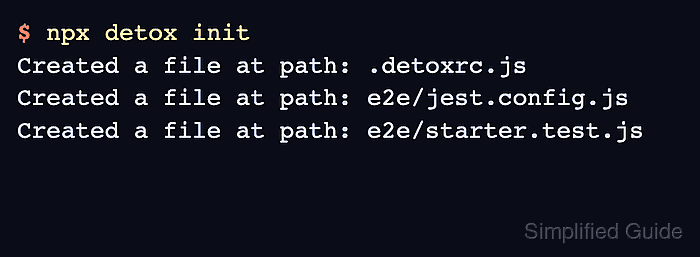
Detox 20.x generates a starter config with npx detox init after Detox and Jest are installed. The generated file uses apps for build commands and binary paths, devices for simulator or emulator targets, and configurations for the named combinations passed to detox build and detox test.
An existing React Native-style project with native build files is the normal starting point for this configuration. Expo projects and unusual native build layouts may need different build commands, but the same app, device, and configuration relationship still applies.
Steps to create a Detox test configuration:
- Install Jest and Detox as development dependencies from the project root.
$ npm install "jest@^29" detox --save-dev
added 586 packages, and audited 587 packages in 18s

##### snipped #####

Run `npm audit` for details.
Jest 29 is the current Detox project setup recommendation for avoiding older lockfile-pinned Jest versions.
- Generate the Detox starter files.
$ npx detox init
Created a file at path: .detoxrc.js
Created a file at path: e2e/jest.config.js
Created a file at path: e2e/starter.test.js
- Confirm that the config and test-runner files exist.
$ ls .detoxrc.js e2e/jest.config.js e2e/starter.test.js
.detoxrc.js
e2e/jest.config.js
e2e/starter.test.js
- Open .detoxrc.js in a text editor.
$ vi .detoxrc.js
- Define the Jest runner config.
- .detoxrc.js
/** @type {Detox.DetoxConfig} */
module.exports = {
  testRunner: {
    args: {
      '$0': 'jest',
      config: 'e2e/jest.config.js',
    },
    jest: {
      setupTimeout: 120000,
    },
  },
  apps: {},
  devices: {},
  configurations: {},
};
The generated file already includes a test-runner section. Keep it pointed at e2e/jest.config.js unless the project uses a different Jest config path.
- Add the app build and binary path entries.
- .detoxrc.js
apps: {
  'ios.debug': {
    type: 'ios.app',
    binaryPath: 'ios/build/Build/Products/Debug-iphonesimulator/Example.app',
    build: 'xcodebuild -workspace ios/Example.xcworkspace -scheme Example -configuration Debug -sdk iphonesimulator -derivedDataPath ios/build',
  },
  'android.debug': {
    type: 'android.apk',
    binaryPath: 'android/app/build/outputs/apk/debug/app-debug.apk',
    build: 'cd android && ./gradlew assembleDebug assembleAndroidTest -DtestBuildType=debug',
  },
},
Replace Example, the Xcode workspace, the scheme, and the Android APK path with the app's actual build outputs. Keep Android assembleAndroidTest in the build command so Detox can install the test APK when needed.
Related: How to configure Detox build settings - Add the simulator and emulator device entries.
- .detoxrc.js
devices: {
  simulator: {
    type: 'ios.simulator',
    device: {
      type: 'iPhone 15',
    },
  },
  emulator: {
    type: 'android.emulator',
    device: {
      avdName: 'Pixel_7_API_36_Detox',
    },
  },
},
Use a simulator type from xcrun simctl list devicetypes or an Android AVD name from emulator -list-avds.
Related: How to set up an Android emulator environment for Detox - Add named Detox configurations that join one app entry to one device entry.
- .detoxrc.js
configurations: {
  'ios.sim.debug': {
    device: 'simulator',
    app: 'ios.debug',
  },
  'android.emu.debug': {
    device: 'emulator',
    app: 'android.debug',
  },
},
The name after --configuration must match one key under configurations, such as ios.sim.debug or android.emu.debug.
- Save the completed .detoxrc.js file.
- .detoxrc.js
/** @type {Detox.DetoxConfig} */
module.exports = {
  testRunner: {
    args: {
      '$0': 'jest',
      config: 'e2e/jest.config.js',
    },
    jest: {
      setupTimeout: 120000,
    },
  },
  apps: {
    'ios.debug': {
      type: 'ios.app',
      binaryPath: 'ios/build/Build/Products/Debug-iphonesimulator/Example.app',
      build: 'xcodebuild -workspace ios/Example.xcworkspace -scheme Example -configuration Debug -sdk iphonesimulator -derivedDataPath ios/build',
    },
    'android.debug': {
      type: 'android.apk',
      binaryPath: 'android/app/build/outputs/apk/debug/app-debug.apk',
      build: 'cd android && ./gradlew assembleDebug assembleAndroidTest -DtestBuildType=debug',
    },
  },
  devices: {
    simulator: {
      type: 'ios.simulator',
      device: {
        type: 'iPhone 15',
      },
    },
    emulator: {
      type: 'android.emulator',
      device: {
        avdName: 'Pixel_7_API_36_Detox',
      },
    },
  },
  configurations: {
    'ios.sim.debug': {
      device: 'simulator',
      app: 'ios.debug',
    },
    'android.emu.debug': {
      device: 'emulator',
      app: 'android.debug',
    },
  },
};
- List the saved Detox configuration names.
$ node -e "const c=require('./.detoxrc.js'); console.log(Object.keys(c.configurations).join('\n'))"
ios.sim.debug
android.emu.debug
This check proves the JavaScript config loads and that Detox has named configurations to select. It does not build the app or boot a device.
- Build one configuration to verify that Detox can resolve the app entry.
$ npx detox build --configuration ios.sim.debug
detox[build] running command: xcodebuild -workspace ios/Example.xcworkspace -scheme Example -configuration Debug -sdk iphonesimulator -derivedDataPath ios/build
##### snipped #####
** BUILD SUCCEEDED **
A successful detox build run means the selected configuration found its app entry and the native build command produced the expected binary path. Replace the configuration name with android.emu.debug when validating the Android path.

Mohd Shakir Zakaria is a cloud architect with deep roots in software development and open-source advocacy. Certified in AWS, Red Hat, VMware, ITIL, and Linux, he specializes in designing and managing robust cloud and on-premises infrastructures.


