A Debian release upgrade replaces the package set behind the installed system, so the risky point is not only the apt full-upgrade command. The upgrade needs a tested backup, recovery access, consistent APT sources, and a post-reboot check that the system is running the target release instead of a half-upgraded mix.
Debian supports release upgrades one stable release at a time. For the current stable path, upgrade Debian 12 bookworm to Debian 13 trixie after bringing Bookworm fully up to date; systems on older releases should first follow the release notes for each intermediate version.
APT should point at codenames such as bookworm and trixie during the change, not moving names such as stable or oldstable. Third-party repositories, sloppy backports, package holds, and APT pinning can pull the resolver away from the target release, so remove or disable them before changing the Debian archive entries.
Steps to upgrade Debian to a newer release:
- Confirm the current Debian release before changing package sources.
$ cat /etc/debian_version
12.14
Debian supports the direct release upgrade from the previous stable release to the new stable release. For example, upgrade bookworm to trixie before planning any later release jump.
- Confirm that the system has a restorable backup and a recovery path outside the upgraded operating system.
A failed reboot can require console, hypervisor, serial, installer rescue, or live-media access. Do not start a remote release upgrade when SSH is the only recovery path.
Related: How to boot Debian rescue mode
- Keep a package selection record with the backup.
$ dpkg --get-selections '*' > ~/debian-package-selections.txt
- Save the current APT configuration before editing release sources.
$ sudo cp -a /etc/apt /root/apt-before-release-upgrade
- Refresh the current release package index.
$ sudo apt update
Hit:1 http://deb.debian.org/debian bookworm InRelease
Hit:2 http://deb.debian.org/debian bookworm-updates InRelease
Hit:3 http://deb.debian.org/debian-security bookworm-security InRelease
Reading package lists... Done
All packages are up to date.
- Bring the current release fully up to date before switching codenames.
$ sudo apt full-upgrade
Reading package lists... Done
Building dependency tree... Done
Calculating upgrade... Done
0 upgraded, 0 newly installed, 0 to remove and 0 not upgraded.
Reboot here if the current-release upgrade installs a new kernel or low-level system package and the system has not already booted into that update.
- Ensure APT has the current Debian archive keyring and certificate store.
$ sudo apt install ca-certificates debian-archive-keyring
Reading package lists... Done
Building dependency tree... Done
Reading state information... Done
debian-archive-keyring is already the newest version.
ca-certificates is already the newest version.
The official Debian release notes use HTTPS archive entries. Minimal systems without ca-certificates can fail certificate verification after switching to the target release sources.
- Check for broken package states before editing sources.
$ dpkg --audit
No output means dpkg found no half-installed or failed-configuration packages.
- Check for held packages and resolve any hold that should not block the release upgrade.
$ apt-mark showhold
No output means no packages are held by apt-mark.
Related: How to hold a Debian package - Replace the Debian archive entries with target-release Deb822 sources.
$ sudoedit /etc/apt/sources.list.d/debian.sources
Types: deb
URIs: https://deb.debian.org/debian
Suites: trixie trixie-updates
Components: main non-free-firmware
Signed-By: /usr/share/keyrings/debian-archive-keyring.gpg

Types: deb
URIs: https://security.debian.org/debian-security
Suites: trixie-security
Components: main non-free-firmware
Signed-By: /usr/share/keyrings/debian-archive-keyring.gpg
Keep contrib or non-free in the Components lines only when the system already uses those components. Disable old bookworm, bookworm-backports, proposed-updates, and unsupported third-party entries instead of mixing releases.
Related: How to remove an APT repository on Debian - Refresh APT metadata from the target release.
$ sudo apt update
Get:1 https://deb.debian.org/debian trixie InRelease [140 kB]
Get:2 https://deb.debian.org/debian trixie-updates InRelease [47.3 kB]
Get:3 https://security.debian.org/debian-security trixie-security InRelease [43.4 kB]
Reading package lists... Done
83 packages can be upgraded. Run 'apt list --upgradable' to see them.
If this step reports certificate, signature, mixed-suite, or missing-release errors, stop and fix the source files before running any upgrade command.
- Run the minimal upgrade phase.
$ sudo apt upgrade --without-new-pkgs
Reading package lists... Done
Building dependency tree... Done
Calculating upgrade... Done
The following packages have been kept back:
  adduser apt coreutils e2fsprogs
##### snipped #####
The following packages will be upgraded:
  base-files base-passwd bash bsdutils
##### snipped #####
67 upgraded, 0 newly installed, 0 to remove and 16 not upgraded.
Do you want to continue? [Y/n]
The minimal phase upgrades packages that do not need new package installs or removals. Held-back packages are expected here and are resolved by the full upgrade phase.
- Run the full release upgrade and review any removals before accepting.
$ sudo apt full-upgrade
Reading package lists... Done
Building dependency tree... Done
Calculating upgrade... Done
The following packages will be REMOVED:
  libdb5.3 libext2fs2 libhogweed6 libnettle8 libssl3
The following NEW packages will be installed:
  libdb5.3t64 libext2fs2t64 libhogweed6t64 libnettle8t64 libssl3t64
The following packages will be upgraded:
  apt base-files bash dpkg libc6
##### snipped #####
83 upgraded, 14 newly installed, 5 to remove and 0 not upgraded.
Do you want to continue? [Y/n]
Do not accept removals that would delete required local services, drivers, kernels, or vendor packages until the release notes or the package owner confirms the replacement path.
- Reboot into the upgraded system.
$ sudo reboot
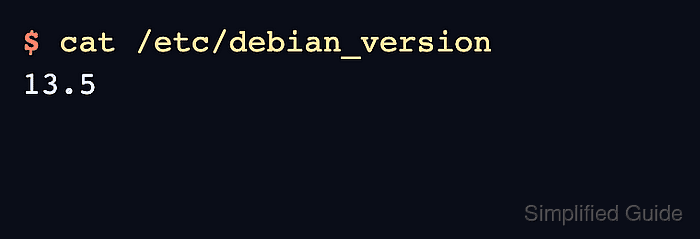
- Confirm the upgraded Debian release after reconnecting.
$ cat /etc/debian_version
13.5
- Refresh APT metadata again to confirm the post-upgrade sources work.
$ sudo apt update
Hit:1 https://deb.debian.org/debian trixie InRelease
Hit:2 https://deb.debian.org/debian trixie-updates InRelease
Hit:3 https://security.debian.org/debian-security trixie-security InRelease
Reading package lists... Done
All packages are up to date.
- Review packages that APT no longer needs before removing them.
$ sudo apt autoremove
Reading package lists... Done
Building dependency tree... Done
Reading state information... Done
The following packages will be REMOVED:
  usr-is-merged
0 upgraded, 0 newly installed, 1 to remove and 0 not upgraded.
Do you want to continue? [Y/n]
Review the package list before confirming.
Related: How to clean up disk space on Debian - Check for obsolete or locally created packages that still need an owner decision.
$ apt list '?obsolete'
Listing... Done
An empty list means APT did not find installed packages outside the enabled repositories. Investigate any listed package before purging it.

Mohd Shakir Zakaria is a cloud architect with deep roots in software development and open-source advocacy. Certified in AWS, Red Hat, VMware, ITIL, and Linux, he specializes in designing and managing robust cloud and on-premises infrastructures.


