Custom HTTP headers in cURL control how APIs and web services interpret requests, carrying identity, feature switches, and routing metadata alongside the URL and body. Precise header control enables realistic test traffic, reproducible automation, and integration with endpoints that depend on more than standard browser-style defaults.
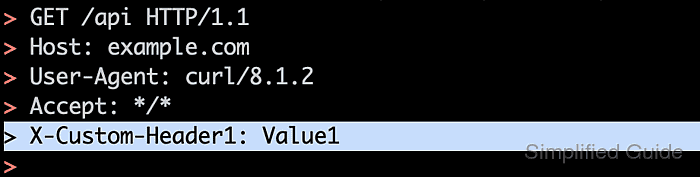
During execution, cURL builds a default header set and applies any --header directives in the order specified on the command line or in configuration files. Each directive injects, overrides, or removes a header line, allowing detailed control over values such as User-Agent, Accept, Authorization, and custom X-* fields used for tracing or multi-tenant routing.
Misapplied headers can break content negotiation, invalidate authentication, or leak sensitive tokens into command history, logs, and monitoring systems. The commands below assume access to a terminal with cURL in the path and focus specifically on header behavior, leaving broader topics such as proxy configuration, TLS tuning, and cookie handling to complementary references.
Steps to set custom headers in cURL requests:
- Check the installed cURL version in a terminal session.
$ curl --version
curl 8.5.0 (aarch64-unknown-linux-gnu) libcurl/8.5.0 OpenSSL/3.0.13 zlib/1.3 brotli/1.1.0 zstd/1.5.5 libidn2/2.3.7 libpsl/0.21.2 (+libidn2/2.3.7) libssh/0.10.6/openssl/zlib nghttp2/1.59.0 librtmp/2.3 OpenLDAP/2.6.7
Release-Date: 2023-12-06, security patched: 8.5.0-2ubuntu10.6
Protocols: dict file ftp ftps gopher gophers http https imap imaps ldap ldaps mqtt pop3 pop3s rtmp rtsp scp sftp smb smbs smtp smtps telnet tftp
Features: alt-svc AsynchDNS brotli GSS-API HSTS HTTP2 HTTPS-proxy IDN IPv6 Kerberos Largefile libz NTLM PSL SPNEGO SSL threadsafe TLS-SRP UnixSockets zstd
##### snipped #####
Version output confirms available protocol support and feature set before relying on specific header-related behavior such as HTTP/2 or advanced authentication.
- Send a verbose request to a test endpoint to observe the default request headers.
$ curl https://api.example.net/headers --verbose --silent
##### snipped #####
> GET /headers HTTP/1.1
> Host: api.example.net
> User-Agent: curl/8.5.0
> Accept: */*
>
##### snipped #####
Lines starting with > show the outbound request line and headers that cURL sends before any customisation.
- Add a single custom header using --header to override a default value.
$ curl https://api.example.net/headers --verbose --silent \
  --header "User-Agent: MyTestApp/1.0"
##### snipped #####
> GET /headers HTTP/1.1
> Host: api.example.net
> Accept: */*
> User-Agent: MyTestApp/1.0
>
##### snipped #####
When a custom header uses the same name as a default header, cURL replaces the built-in value with the one supplied on the command line.
- Attach multiple custom headers by repeating --header for each field.
$ curl https://api.example.net/headers --verbose --silent \
  --header "User-Agent: MyTestApp/1.0" \
  --header "X-Trace-Id: demo-1234" \
  --header "Accept: application/json"
##### snipped #####
> GET /headers HTTP/1.1
> Host: api.example.net
> User-Agent: MyTestApp/1.0
> X-Trace-Id: demo-1234
> Accept: application/json
>
##### snipped #####
Repeating --header composes a full header set so identification, tracing, and content-negotiation settings travel in the same request.
- Send authentication metadata in a header when an API expects tokens or keys.
$ curl https://api.example.net/headers --verbose --silent \
  --header "Authorization: Bearer abc123exampletoken" \
  --header "X-Request-Id: demo-req-001"
##### snipped #####
> GET /headers HTTP/1.1
> Host: api.example.net
> User-Agent: curl/8.5.0
> Accept: */*
> Authorization: Bearer abc123exampletoken
> X-Request-Id: demo-req-001
>
##### snipped #####
Bearer tokens and API keys inside Authorization headers appear in shell history, process lists, and logs, so environment variables, restricted config files, and regular credential rotation reduce exposure risk.
- Remove or blank headers when a scenario requires suppressing defaults.
$ curl https://api.example.net/headers --verbose --silent \
  --header "Accept;" \
  --header "X-Debug: 1"
##### snipped #####
> GET /headers HTTP/1.1
> Host: api.example.net
> User-Agent: curl/8.5.0
> Accept:
> X-Debug: 1
>
##### snipped #####
$ curl https://api.example.net/headers --verbose --silent \
  --header "X-Empty-Header;"
##### snipped #####
> GET /headers HTTP/1.1
> Host: api.example.net
> User-Agent: curl/8.5.0
> Accept: */*
> X-Empty-Header:
>
##### snipped #####
Appending a semicolon ("Header-Name;") clears the default value and leaves an empty header line, while appending a colon with no value ("Header-Name:") attempts to send an empty header value and may be ignored by some endpoints.
- Create a reusable header profile in a configuration file for recurring API calls.
$ printf 'header = "User-Agent: MyTestSuite/2.0"\nheader = "X-Trace-Id: suite-1234"\n' > headers.txt
$ cat headers.txt
header = "User-Agent: MyTestSuite/2.0"
header = "X-Trace-Id: suite-1234"
Files containing header directives behave like compact profiles, enabling consistent header injection from scripts, cron jobs, or CI pipelines.
- Load the header configuration file with --config so the stored headers apply automatically.
$ curl https://api.example.net/headers --verbose --silent --config headers.txt
##### snipped #####
> GET /headers HTTP/1.1
> Host: api.example.net
> Accept: */*
> User-Agent: MyTestSuite/2.0
> X-Trace-Id: suite-1234
>
##### snipped #####
The --config option reads each line in the file as if it were typed on the command line, including multiple header entries and other cURL options.
- Verify that custom headers reach an endpoint by calling a header-echo service.
$ curl https://api.example.net/headers --silent \
  --header "X-Demo: custom-header" \
  --header "User-Agent: DemoClient/1.0"
{
  "headers": {
    "Accept": "*/*",
    "Host": "api.example.net",
    "User-Agent": "DemoClient/1.0",
    "X-Demo": "custom-header"
  }
}
Success signals: every intended header appears under the returned "headers" object, matching the names and values supplied to cURL without unexpected additions or omissions.


Mohd Shakir Zakaria is a cloud architect with deep roots in software development and open-source advocacy. Certified in AWS, Red Hat, VMware, ITIL, and Linux, he specializes in designing and managing robust cloud and on-premises infrastructures.


