Reusable Codex workflows drift when they live only in a prompt or a chat thread. A skill gives Codex a named instruction set that can be checked into a repository or kept in a user skill folder, so repeated work starts from the same task rules.
Codex discovers skills from SKILL.md files. It sees each skill's name, description, and file path first, then reads the full instructions only when the user invokes the skill or the task matches the description.
Use the built-in $skill-creator when the workflow shape is still unclear. A manual SKILL.md is easier to review, commit, and test when the skill belongs to one repository, and the same format can later move into a plugin for team distribution.
Related: How to migrate a Codex custom prompt to a skill
Related: How to build a Codex plugin
Related: How to create an AGENTS.md file for Codex
Steps to create a Codex skill:
- Open a terminal at the Git repository root that should own the repository skill.
Codex scans repository skills under .agents/skills from the current working directory up toward the repository root. Use $HOME/.agents/skills instead when the skill should follow one user across projects.
- Create a directory for the skill.
$ mkdir -p .agents/skills/release-check
Use a lowercase, hyphenated folder name that matches the skill's name so humans can find the file from the skill list.
- Open the skill file in a text editor.
$ vi .agents/skills/release-check/SKILL.md
- Add the required front matter and task instructions.
---
name: release-check
description: Review release notes for missing risk, rollback, and verification details. Use when asked to prepare or review release notes before deployment.
---

1. Read the release notes and deployment plan.
2. Check for a rollback step, verification step, and owner for each risk.
3. Report missing items before suggesting edits.
name is the explicit invocation name, and description is the discovery surface Codex sees before it loads the full file. Keep the description narrow enough that unrelated release or review tasks do not trigger the skill.
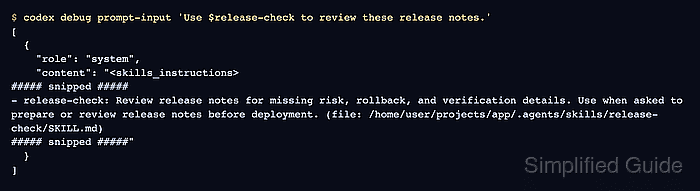
- Check that Codex includes the skill in the model-visible context.
$ codex debug prompt-input 'Use $release-check to review these release notes.'
[
  {
    "role": "system",
    "content": "<skills_instructions>
##### snipped #####
- release-check: Review release notes for missing risk, rollback, and verification details. Use when asked to prepare or review release notes before deployment. (file: /home/user/projects/app/.agents/skills/release-check/SKILL.md)
##### snipped #####"
  }
]
codex debug prompt-input renders the local prompt context without sending a model request. The skill row confirms Codex detected the SKILL.md metadata from the current repository.
- Invoke the skill in a normal Codex task after it appears.
$ codex 'Use $release-check to review release-notes.md before deployment.'
If the skill does not appear, start a new Codex session from the project root or restart Codex so the skill scan runs again.

Mohd Shakir Zakaria is a cloud architect with deep roots in software development and open-source advocacy. Certified in AWS, Red Hat, VMware, ITIL, and Linux, he specializes in designing and managing robust cloud and on-premises infrastructures.


