Switching coding assistants is easier when the new assistant can see why earlier choices were made. The Codex plugin copies the current Claude Code conversation into a saved Codex thread, so you can continue the task with its earlier messages available.
The transfer creates a separate conversation history. It leaves the Claude session available to resume, but later messages in either assistant do not become a shared conversation. Both assistants still use the same project files, so continuing in one does not provide a separate checkout or undo edits made by the other.
The starting point is an ongoing Claude Code conversation with the Codex plugin installed and both CLIs signed in on the same machine. The session must have started or resumed after the plugin was enabled, because its startup hook identifies the transcript. Node.js 18.18 or later and a Codex CLI release with session-import support are required.
Steps to transfer a session to Codex in Claude Code:
The copied history can contain private code, tool output, and decisions. Continuing in Codex can send that context to its configured model provider. Transfer only conversations authorized for that provider, with secrets excluded.
- Enter the transfer command yourself in the active Claude Code conversation.
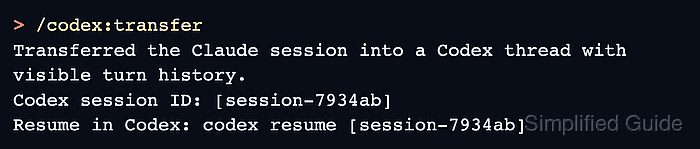
/codex:transfer
The command is user-invoked; asking Claude to transfer the session is not a substitute. This transfer was run with plugin 1.0.6 and Codex CLI 0.166.0. If the plugin cannot identify the transcript, /codex:transfer --source /full/path/to/session.jsonl accepts the conversation's JSONL file under ~/.claude/projects. A transcript elsewhere is rejected.
- Check the transfer result for a Codex session ID and its matching resume command.
Transferred the Claude session into a Codex thread with visible turn history.
Codex session ID: [session-7934ab]
Resume in Codex: codex resume [session-7934ab]
The session ID is redacted here. Your result contains the full ID and a runnable resume command. An error about unsupported session transfer requires a Codex CLI update before retrying.
- Exit the Claude Code conversation with /exit.
/exit
The saved Claude history remains available. Leaving this session avoids having two assistants edit the same project at once.
- Run the printed Codex resume command from the same project directory.
$ codex resume SESSION_ID
SESSION_ID stands for the full ID from the transfer result; the printed resume command already contains it. If Codex asks whether to trust the folder, continue only for a project you trust. A different current directory can trigger a choice between the current folder and the session's saved folder.
- Confirm that Codex displays a recognizable earlier Claude request and reply.
The imported thread shows the earlier turns followed by <EXTERNAL SESSION IMPORTED>. A new empty thread or unfamiliar history means the intended conversation has not been restored.
- Submit a follow-up in Codex that depends on an earlier decision without repeating that decision.
Now save the validation command we agreed on earlier in handoff-command.txt, then report the saved command. Do not run the validation command.
This request fits a conversation that already agreed on a validation command. For your own task, ask about a detail from its history. Codex should recover the earlier decision and complete the requested follow-up; a provider or authentication error does not prove a usable handoff.
- Confirm that Codex's reply contains the command from the Claude conversation.
Saved in handoff-command.txt:

python3 -m unittest tests.test_checkout

The validation command was not run.
This reply came from a conversation that had agreed on that command. The imported user and assistant turns remained visible, and handoff-command.txt contained the same command. Your result should agree with your own earlier decision.
- Quit Codex with /quit.
/quit
The transferred thread remains saved under its Codex session ID.
- Open the original Claude session picker from the project shell.
$ claude --resume
- Highlight the source conversation in the picker.
The conversation title and recent activity distinguish it from other saved sessions. Typing filters the list; the arrow keys move the highlight.
- Press Enter to reopen the highlighted Claude conversation.
- Confirm that the original Claude messages reappear.
The source session should still contain the request and reply copied into Codex. The Codex follow-up belongs to the separate Codex thread, which remains available with the same codex resume SESSION_ID command.