A second model can review code changes while development stays in the same terminal session. OpenAI's Codex plugin brings Codex reviews into Claude Code through the local Codex CLI.
The plugin uses the Codex executable, authentication, and configuration on the same machine. Signing in to Claude Code does not sign in to Codex, and Codex requests use the selected ChatGPT plan's allowance or OpenAI API billing.
Claude Code must already work, and the plugin requires Node.js 18.18 or later. A Git repository with uncommitted changes provides work for the first review. User-scope installation makes the plugin available across your projects on this machine without enabling it for collaborators through shared repository settings.
Steps to install the Codex plugin in Claude Code:
Plugins can run local hooks and tools. The source here is OpenAI's Codex plugin repository; trust its code before installing it.
- Add OpenAI's Codex marketplace from your shell.
$ claude plugin marketplace add openai/codex-plugin-cc
- Install the Codex plugin for your user account.
$ claude plugin install codex@openai-codex --scope user
user scope applies to your projects on this machine. It records the plugin in your user settings rather than a shared project file.
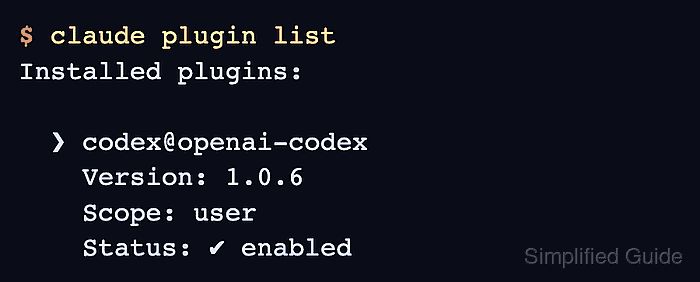
- Confirm that the Codex plugin is enabled at user scope.
$ claude plugin list
Installed plugins:

  ❯ codex@openai-codex
    Version: 1.0.6
    Scope: user
    Status: ✔ enabled
The version may increase as OpenAI releases updates. A missing plugin or a disabled status needs correction before continuing.
- Start a fresh Claude Code session in a trusted Git repository with uncommitted changes.
$ claude
A fresh session loads the installed plugin.
- Check Codex readiness inside the Claude Code session.
/codex:setup
The report should show Codex installed and authenticated. The plugin can offer an npm installation when Codex is missing. If authentication is missing, !codex login starts Codex sign-in; a working Claude login alone is insufficient.
If you run inside a Linux container, Codex's sandbox also needs namespace support; setup readiness does not prove that support. A namespace or sandbox initialization error means the environment must change before a review can succeed. OpenAI's sandbox documentation explains the container restrictions.
- Run a Codex review of the repository's uncommitted changes.
Review can send changed code and nearby repository context to your configured Codex provider. Only review code authorized for that provider, with credentials and private data excluded.
/codex:review --wait
--wait keeps the review in the foreground. A completed response headed Codex Review contains findings or reports that none were found; authentication, runtime, or repository-access errors do not count as a completed review. The review is read-only, so the changes remain available for you to assess and fix.