Checkmk agent connection failures usually appear as a failed connection test, missing Check_MK service data, or a registration error from the Agent Controller. Keep the original failure visible while checking the same host from the Checkmk site and from the monitored system, because each side proves a different part of the path.
In pull mode, the Checkmk site connects to the agent on TCP port 6556. Registration, push-mode transfers, and certificate updates use the Agent Receiver, normally TCP port 8000 for the first site after discovery through the site REST API, so a port 6556 firewall fix does not repair every registration or push-mode failure.
Linux monitored hosts expose direct CLI evidence for the agent socket, trust relationship, and data dump. Windows agents use the same Checkmk site-side tests and cmk-agent-ctl checks from an elevated shell, with service restarts handled through the Windows service control surface.
Steps to troubleshoot a Checkmk agent connection:
- Reproduce the failing query from the Checkmk site user.
OMD[monitoring]:~$ cmk -d web01.example.net
ERROR: [agent] Communication failed: timed out while connecting to 192.0.2.21:6556
Use the same host name that is configured in Setup. A timeout points toward routing, firewall, DNS, or address selection; a TLS or registration message points toward the Agent Controller trust relationship.
- Test the pull-mode TCP path from the Checkmk site to the monitored host.
OMD[monitoring]:~$ echo | nc 192.0.2.21 6556
16
The output 16 means the TCP connection reached a registered Agent Controller and the TLS handshake can start. Legacy or unencrypted agents return full agent text beginning with <<<check_mk>>> instead.
- Check the Agent Controller trust relationship on the monitored host.
$ sudo cmk-agent-ctl status
Connection: monitoring.example.net:8000/monitoring
        UUID: d38e7e53-9f0b-4f11-bbcf-d19617971595
        Local:
                Connection type: pull-agent
                Certificate issuer: Site 'monitoring' local CA
        Remote:
                Connection type: pull-agent
                Host name: web01.example.net
If no connection is listed, register the host again with the exact Checkmk host name from Setup. A host registered under another name can replace the previous trust relationship and leave the original host without agent data.
Related: How to register a Checkmk agent host - Dump the agent data through the Agent Controller.
$ sudo cmk-agent-ctl dump
<<<check_mk>>>
Version: 2.5.0p7
AgentOS: linux
Hostname: web01.example.net
cmk-agent-ctl dump checks the output as the Agent Controller receives it. A direct check_mk_agent run can have a different shell environment and can hide socket or controller problems.
- Restart the local agent socket when the dump reports a refused local connection.
$ sudo systemctl restart check-mk-agent.socket
Use this remediation only when cmk-agent-ctl dump reports Connection refused or the agent socket is missing after an update. Restarting the socket does not repair a wrong Checkmk host name, blocked network path, or failed TLS registration.
- Verify that the Agent Controller is listening on TCP port 6556 for pull-mode hosts.
$ sudo ss -ltnp 'sport = :6556'
State  Recv-Q Send-Q Local Address:Port Peer Address:Port Process
LISTEN 0      1024         0.0.0.0:6556      0.0.0.0:*     users:(("cmk-agent-ctl",pid=1861810,fd=9))
Skip the port 6556 listener check for push-mode hosts after registration. In push mode, the agent sends output to the Checkmk site through the Agent Receiver instead of waiting for the site to pull it.
- Check the Agent Receiver port on the Checkmk site when registration fails before the certificate prompt.
OMD[monitoring]:~$ omd config show
ADMIN_MAIL:
AGENT_RECEIVER: on
AGENT_RECEIVER_PORT: 8000
APACHE_MODE: own
##### snipped #####
The Agent Controller discovers this port through the Checkmk REST API on HTTP or HTTPS first. If discovery fails but port 8000 is reachable, specify the port in --server monitoring.example.net:8000 during registration.
- Rerun registration with verbose output when the receiver discovery or proxy path is still unclear.
$ sudo cmk-agent-ctl -vv register \
    --hostname web01.example.net \
    --server monitoring.example.net:8000 \
    --site monitoring \
    --user agent_registration
INFO [cmk_agent_ctl] starting
Attempting to register at monitoring.example.net:8000/monitoring
Do you want to establish this connection? [Y/n]
Confirm the certificate only when the site identity matches the expected Checkmk server. Use --detect-proxy only when the monitored host must reach the Checkmk server through its system proxy settings.
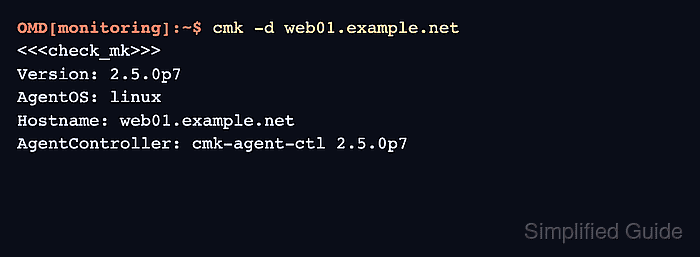
- Retest the original Checkmk query from the site user.
OMD[monitoring]:~$ cmk -d web01.example.net
<<<check_mk>>>
Version: 2.5.0p7
AgentOS: linux
Hostname: web01.example.net
AgentController: cmk-agent-ctl 2.5.0p7
When this output appears, Checkmk is retrieving agent data through the configured host object. If the host was newly registered or services changed, run service discovery and activate the pending changes.
Related: How to run Checkmk service discovery
Related: How to activate Checkmk pending changes

Mohd Shakir Zakaria is a cloud architect with deep roots in software development and open-source advocacy. Certified in AWS, Red Hat, VMware, ITIL, and Linux, he specializes in designing and managing robust cloud and on-premises infrastructures.


