Automatic Checkmk agent updates let a commercial-edition site deliver newly baked agent packages to registered hosts without logging in to each server for every package change. Enabling them is useful when agent rules, plug-ins, or Checkmk releases need a controlled rollout across monitored hosts.
The feature depends on the Agent Bakery and the Agent Updater. The bakery builds and signs host-specific packages, while the updater installed on each host registers with the deployment server and later downloads only the package intended for that host.
Start with a pilot host or folder before enabling distribution broadly. The page uses Linux updater commands for host-side verification, and the same Checkmk rule and status views apply to Windows hosts with the updater command exposed through check_mk_agent.exe updater.
Steps to enable automatic Checkmk agent updates:
- Open Setup → Agents → Windows, Linux, Solaris, AIX → Agents → Automatic updates.
Automatic agent updates require a commercial edition with the Agent Bakery. Checkmk Raw can install agents manually, but it does not provide baked, automatically updated agent packages.
- Create a signature key for the bakery if no usable key exists.
Keep the key passphrase recoverable for future bakes. Hosts accept only packages signed with a key that the updater plug-in knows.
- Create or edit the Agent updater (Linux, Windows, Solaris) rule.
Apply the rule to the pilot folder or host group first so the initial updater rollout does not reach every monitored host at once.
- Enable the updater plug-in in the rule.
Use the activation option that deploys the plug-in which updates the agent automatically.
- Set the deployment server, site, protocol, interval, accepted signature key, and registration mode in the rule.
On first agent controller registration registers the updater together with the first Agent Controller registration. Use Manual only when the updater must be registered separately from the controller, such as in a distributed monitoring handoff.
- Save the updater rule.
- Bake and sign the agent packages.
Open Baked agents from the automatic updates page, choose Bake and sign agents, enter the signature key passphrase, and wait for the bake job to finish.
- Confirm the baked package includes the updater plug-in.
The baked agent package properties should list the setting that deploys the plug-in for automatic agent updates, and the package should show a signature key icon after signing.
- Install the baked package on a pilot host.
The first package still has to be installed manually or by an existing software distribution tool. Later package changes can be delivered by the updater after registration succeeds.
- Register the Agent Controller and Agent Updater from the pilot host.
$ sudo cmk-agent-ctl register \
  --server monitor.example.com \
  --site prod \
  --hostname web-01 \
  --user agent_registration
Attempting to register at monitor.example.com, port 8000. Server certificate details:
##### snipped #####
Do you want to establish this connection? [Y/n]
> Y
Password for Checkmk user 'agent_registration':
>
Registration complete.
Attempting to register Agent Updater...
Agent Updater registration complete.
The --hostname value must match the host name in Checkmk Setup. If the updater rule uses Manual registration, add --automatic-updates to the controller registration command or run cmk-update-agent register separately.
Related: How to register a Checkmk agent host
- Restrict update distribution before using the master switch.
On the automatic updates page, set host selection conditions and use Test hostname before activation to confirm that only the intended pilot host receives updates.
- Enable the automatic updates Master switch.
The master switch allows registered hosts that match the selection conditions to start checking for newer signed packages at their configured interval.
- Activate the pending Checkmk changes.
Rules, global settings, and host selection changes must be activated before the monitoring environment uses them.
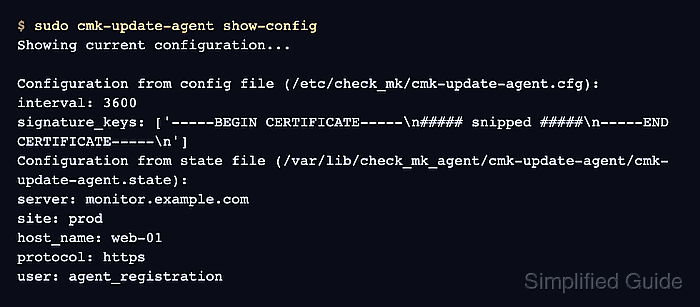
- Show the updater configuration on the pilot host.
$ sudo cmk-update-agent show-config
Showing current configuration...

Configuration from agent info file (/usr/lib/check_mk_agent/agent_info.json):
hash: 37221b87f5cb46a2
platform: linux_deb
agent_controller_user: cmk-agent
Configuration from config file (/etc/check_mk/cmk-update-agent.cfg):
interval: 3600
signature_keys: ['-----BEGIN CERTIFICATE-----\n##### snipped #####\n-----END CERTIFICATE-----\n']
Configuration from state file (/var/lib/check_mk_agent/cmk-update-agent/cmk-update-agent.state):
server: monitor.example.com
site: prod
host_name: web-01
protocol: https
user: agent_registration
Do not edit /etc/check_mk/cmk-update-agent.cfg directly. It is written by agent package installation and later updates.
- Open Monitor → System → Agent update status.
The host row should show the target agent, downloaded agent, installed agent, update check time, and update check output. In Checkmk 2.5.0 and newer, the update check fields are supplied by the updater status plug-in on every agent request.

Mohd Shakir Zakaria is a cloud architect with deep roots in software development and open-source advocacy. Certified in AWS, Red Hat, VMware, ITIL, and Linux, he specializes in designing and managing robust cloud and on-premises infrastructures.


