A Certbot certificate lineage can keep renewing with an old webroot, authenticator, installer, server, or hook after the site changes. Update the saved renewal configuration before the next scheduled run so Certbot tests the new option against staging and keeps future renewals on the intended route.
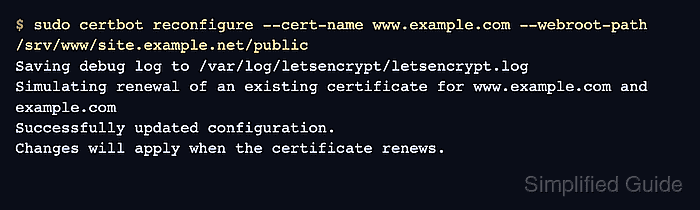
Certbot stores certificate-specific renewal choices in files under /etc/letsencrypt/renewal, but current releases change those choices through certbot reconfigure instead of direct file edits. During reconfiguration, Certbot selects one lineage with --cert-name, performs a staging renewal with the amended option, and saves the option only after that test succeeds.
Run the change on the server that owns the /etc/letsencrypt/ tree for the certificate. Keep the update limited to one lineage, use the exact certificate name from certbot certificates, and avoid repeated production renewals while testing a changed validation path.
Related: List Certbot certificates
Related: Test Certbot certificate renewal
Related: Configure a Certbot renewal hook
Steps to update a Certbot renewal configuration:
- Open a terminal on the server that stores the Certbot certificate lineage.
- List the saved certificate lineages.
$ sudo certbot certificates
Saving debug log to /var/log/letsencrypt/letsencrypt.log

Found the following certs:
  Certificate Name: www.example.com
    Domains: www.example.com example.com
    Expiry Date: 2026-07-25 06:50:00+00:00 (VALID: 42 days)
    Certificate Path: /etc/letsencrypt/live/www.example.com/fullchain.pem
    Private Key Path: /etc/letsencrypt/live/www.example.com/privkey.pem
Use the value after Certificate Name in every later --cert-name option. Do not guess from the first domain because older hosts often have lineages such as example.com-0001.
Related: List Certbot certificates
- Check the renewal options accepted by certbot reconfigure.
$ sudo certbot help reconfigure
usage:
  certbot reconfigure --cert-name CERTNAME [options]

reconfigure:
  Common options that may be updated with the "reconfigure" subcommand:

  --cert-name CERTNAME  Certificate name to apply.
  --run-deploy-hooks    When performing a test run using `--dry-run` or
                        `reconfigure`, run any applicable deploy hooks.
##### snipped #####
  -a, --authenticator AUTHENTICATOR
                        Authenticator plugin name.
  -i, --installer INSTALLER
                        Installer plugin name.
  --webroot             Obtain certificates by placing files in a webroot
                        directory.
If reconfigure is not available, upgrade Certbot before changing saved renewal behavior. Older Certbot releases used a dry-run renewal followed by a forced live renewal to persist some option changes, which can consume production rate limits if repeated.
- Decide the single renewal option to change.
Change Typical option Moved webroot directory --webroot-path Switched to the webroot authenticator --webroot with --webroot-path Changed installer plugin --installer Added or replaced a deploy hook --deploy-hook Changed ACME server for future renewals --server Do not hand-edit /etc/letsencrypt/renewal/www.example.com.conf as the first path. A malformed renewal file can make Certbot skip the lineage during automatic renewal.
- Reconfigure the selected lineage with the new option.
$ sudo certbot reconfigure --cert-name www.example.com --webroot-path /srv/www/site.example.net/public
Saving debug log to /var/log/letsencrypt/letsencrypt.log
Simulating renewal of an existing certificate for www.example.com and example.com
Successfully updated configuration.
Changes will apply when the certificate renews.
The example updates a saved webroot path. Replace only the option that changed, and include --run-deploy-hooks when the change is a deploy hook that should run during the staging test.
- Review the selected renewal file after reconfigure succeeds.
$ sudo cat /etc/letsencrypt/renewal/www.example.com.conf
# renew_before_expiry = 30 days
version = 5.6.0
archive_dir = /etc/letsencrypt/archive/www.example.com
cert = /etc/letsencrypt/live/www.example.com/cert.pem
privkey = /etc/letsencrypt/live/www.example.com/privkey.pem
##### snipped #####
authenticator = webroot
webroot_path = /srv/www/site.example.net/public
The file review confirms that the saved lineage now names the intended authenticator and path. Keep secret-bearing credential file paths, account URIs, or internal hostnames out of tickets and screenshots.
- Run a dry-run renewal for the changed lineage.
$ sudo certbot renew --cert-name www.example.com --dry-run
Saving debug log to /var/log/letsencrypt/letsencrypt.log

Processing /etc/letsencrypt/renewal/www.example.com.conf

Simulating renewal of an existing certificate for www.example.com and example.com

Congratulations, all simulated renewals succeeded:
  /etc/letsencrypt/live/www.example.com/fullchain.pem (success)
--dry-run uses the staging service and does not replace the active production certificate. If the changed lineage depends on deploy hooks, repeat the test with --run-deploy-hooks after confirming the hook command is safe to run.
Related: Test Certbot certificate renewal
- Leave the normal renewal schedule in place after the dry run succeeds.
The update is complete when certbot reconfigure saves the new option, the renewal file shows the intended value, and the selected-lineage dry run ends with (success). The systemd timer or cron trigger is a separate scheduler check.
Related: Check the Certbot renewal timer

Mohd Shakir Zakaria is a cloud architect with deep roots in software development and open-source advocacy. Certified in AWS, Red Hat, VMware, ITIL, and Linux, he specializes in designing and managing robust cloud and on-premises infrastructures.


