A Certbot lineage can keep renewing with an RSA key after the site standard has moved to ECDSA, or it can renew with ECDSA when an older client fleet still requires RSA. Changing the key type replaces the selected certificate lineage with a new certificate and private key instead of editing the existing key file by hand.
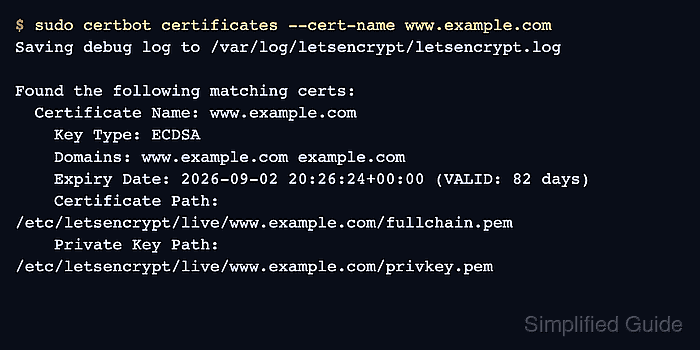
Certbot records a key type for each managed certificate and shows it in certbot certificates output. Current releases support --key-type rsa and --key-type ecdsa, with --elliptic-curve for ECDSA curves and --rsa-key-size for RSA key size. Existing certificates keep their current key type at renewal unless a key type change is requested.
A forced renewal contacts the certificate authority and can spend production rate-limit budget, so test the selected lineage with a dry run before replacing the live certificate. Reload the TLS service after the successful renewal unless the Certbot installer plugin already handles that service, then check both the local lineage and the public endpoint.
Related: List Certbot certificates
Related: Test Certbot certificate renewal
Related: Check a Certbot certificate chain
Steps to change a Certbot certificate key type:
- Open a terminal on the server that owns the Certbot lineage.
- List the certificate and confirm the current key type.
$ sudo certbot certificates --cert-name www.example.com
Saving debug log to /var/log/letsencrypt/letsencrypt.log

Found the following matching certs:
  Certificate Name: www.example.com
    Key Type: RSA
    Domains: www.example.com example.com
    Expiry Date: 2026-09-02 20:26:24+00:00 (VALID: 82 days)
    Certificate Path: /etc/letsencrypt/live/www.example.com/fullchain.pem
    Private Key Path: /etc/letsencrypt/live/www.example.com/privkey.pem
Use the exact Certificate Name value in later commands. Do not guess from an alias in Domains.
Related: List Certbot certificates - Back up the Certbot configuration tree before replacing the lineage.
$ sudo tar -C /etc -czf /root/letsencrypt-before-key-type-change.tgz letsencrypt
The backup contains certificate private keys and ACME account material. Store it with the same access controls as /etc/letsencrypt.
- Dry-run the renewal with the intended key type.
$ sudo certbot renew --cert-name www.example.com --dry-run --key-type ecdsa --new-key
Saving debug log to /var/log/letsencrypt/letsencrypt.log

Processing /etc/letsencrypt/renewal/www.example.com.conf
Simulating renewal of an existing certificate for www.example.com and example.com

Congratulations, all simulated renewals succeeded:
  /etc/letsencrypt/live/www.example.com/fullchain.pem (success)
--dry-run uses the Let's Encrypt staging service and does not replace the active certificate. To move the lineage to RSA instead, use --key-type rsa with the intended --rsa-key-size value.
Related: Test Certbot certificate renewal - Force-renew the selected production lineage with the new key type.
$ sudo certbot renew --cert-name www.example.com --force-renewal --key-type ecdsa --new-key
Saving debug log to /var/log/letsencrypt/letsencrypt.log

Processing /etc/letsencrypt/renewal/www.example.com.conf
Renewing an existing certificate for www.example.com and example.com

Successfully renewed certificate.
Certificate is saved at: /etc/letsencrypt/live/www.example.com/fullchain.pem
Key is saved at:         /etc/letsencrypt/live/www.example.com/privkey.pem
This certificate expires on 2026-09-02.
A forced production renewal contacts the CA and can consume rate-limit budget. The --new-key option is included so a lineage with saved --reuse-key does not keep the old private key.
- Reload the service that terminates TLS for the certificate.
$ sudo systemctl reload nginx
Use the service that reads the Certbot live path, such as nginx, apache2, haproxy, or an application-specific reload command.
- List the lineage again and confirm the new Key Type value.
$ sudo certbot certificates --cert-name www.example.com Saving debug log to /var/log/letsencrypt/letsencrypt.log Found the following matching certs: Certificate Name: www.example.com Key Type: ECDSA Domains: www.example.com example.com Expiry Date: 2026-09-02 20:26:24+00:00 (VALID: 82 days) Certificate Path: /etc/letsencrypt/live/www.example.com/fullchain.pem Private Key Path: /etc/letsencrypt/live/www.example.com/privkey.pem - Inspect the local certificate file for the public key algorithm.
$ sudo openssl x509 -in /etc/letsencrypt/live/www.example.com/cert.pem -noout -text
Certificate:
    Data:
        Version: 3 (0x2)
        Signature Algorithm: ecdsa-with-SHA384
        Issuer: C = US, O = Let's Encrypt, CN = E7
        Subject: CN = www.example.com
        Subject Public Key Info:
            Public Key Algorithm: id-ecPublicKey
                Public-Key: (256 bit)
                ASN1 OID: prime256v1
##### snipped #####
id-ecPublicKey confirms an ECDSA certificate. An RSA certificate shows rsaEncryption instead.
Tool: SSL Certificate Decoder - Check the served endpoint after the reload.
$ openssl s_client -connect www.example.com:443 -servername www.example.com -brief </dev/null
CONNECTION ESTABLISHED
Protocol version: TLSv1.3
Ciphersuite: TLS_AES_256_GCM_SHA384
Peer certificate: CN = www.example.com
Hash used: SHA256
Signature type: ECDSA
Verification: OK
Server Temp Key: X25519, 253 bits
DONE
If the endpoint still exposes the old certificate, reload the actual TLS terminator, load balancer, or CDN edge before running another forced renewal.

Mohd Shakir Zakaria is a cloud architect with deep roots in software development and open-source advocacy. Certified in AWS, Red Hat, VMware, ITIL, and Linux, he specializes in designing and managing robust cloud and on-premises infrastructures.


