AWS CLI help should open in a place that matches the shell where the command runs. A desktop session can use browser-rendered help, while a remote terminal, jump host, or automation shell usually needs help to stay in the terminal or print a reference URL without trying to launch a graphical browser.
AWS CLI v2.31.0 and later reads the cli_help_output setting for aws help, service help, and operation help pages. The setting lives in the shared config file, so aws configure set can save one value for the default profile and another value for a named profile.
The default terminal mode opens the local man page in the terminal. browser opens local HTML help in the default browser, and url prints the online command reference URL for the installed CLI version. Pager settings such as AWS_PAGER still matter when URL output should print directly instead of opening less or more.
Related: Find the AWS CLI config file
Related: Disable the AWS CLI pager
Related: Check AWS CLI version
Steps to set AWS CLI help output mode:
- Confirm that the shell is running AWS CLI v2.31.0 or later.
$ aws --version
aws-cli/2.35.3 Python/3.14.5 Linux/6.12.76-linuxkit exe/aarch64.ubuntu.26
The exact runtime and platform string changes by system. The important part is an aws-cli/2.31.0 or later version line.
Related: How to check AWS CLI version - Choose the help output mode for the profile.
Mode Behavior terminal Opens the local man page in the terminal. browser Opens the local HTML help page in the default browser. url Prints the online AWS CLI reference URL for the installed CLI version. - Save the selected mode for the default profile.
$ aws configure set cli_help_output url --profile default
Replace url with terminal or browser when that mode fits the shell better. This writes cli_help_output to the shared config file, not to the credentials file.
- Save a different mode for a named profile when another workflow needs different help behavior.
$ aws configure set cli_help_output terminal --profile ops
This writes the setting under [profile ops] and leaves [default] unchanged. Use aws --profile ops <service> <operation> help when verifying that profile's help behavior.
Related: How to configure multiple AWS CLI profiles - Read the saved value back from the target profile.
$ aws configure get cli_help_output --profile default
url
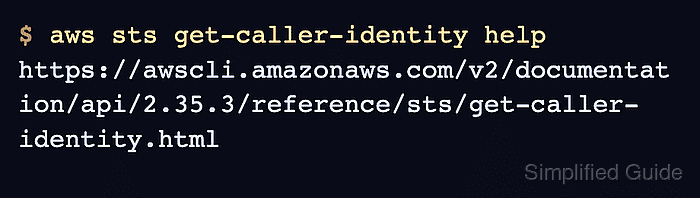
- Run an AWS CLI help command and confirm that the selected mode is active.
$ aws sts get-caller-identity help
https://awscli.amazonaws.com/v2/documentation/api/2.35.3/reference/sts/get-caller-identity.html
aws ... help reads local help metadata and does not call the AWS service. In url mode, the printed path includes the installed CLI version.
- Switch back to terminal mode when local man pages should open in the shell again.
$ aws configure set cli_help_output terminal --profile default
- Inspect the shared config file if help still opens in the wrong place.
$ cat ~/.aws/config
[default]
cli_help_output = terminal
[profile ops]
cli_help_output = terminal
On Windows, inspect %USERPROFILE%\.aws\config instead. If AWS_CONFIG_FILE is set, inspect that override path.
Related: How to find the AWS CLI config file location

Mohd Shakir Zakaria is a cloud architect with deep roots in software development and open-source advocacy. Certified in AWS, Red Hat, VMware, ITIL, and Linux, he specializes in designing and managing robust cloud and on-premises infrastructures.


