Access logging can become a measurable part of request cost on busy Apache hosts because every request still has to be formatted, filtered, and written before the transaction is fully out of the worker's path. Trimming log volume and log line width reduces disk churn, lowers CPU spent on formatting, and keeps high-frequency endpoints such as probes and static assets from dominating the access log.
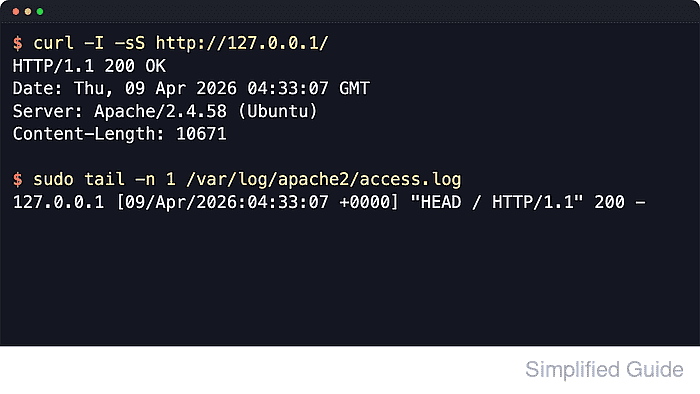
Apache writes access logs through mod_log_config, mainly with LogFormat and CustomLog. Performance usually improves most by logging fewer fields, keeping HostnameLookups off so reverse DNS does not run per request, and excluding low-value traffic with environment-variable conditions instead of sending every hit through the same verbose format.
Examples below use the Debian and Ubuntu layout with /etc/apache2/, /var/log/apache2/, and the apache2 service name. RHEL-family systems usually use /etc/httpd/, /var/log/httpd/, and the httpd service name instead. HostnameLookups Off remains the right default for busy sites, but hostname-based Require rules can still trigger DNS work for access control, and BufferedLogs should be enabled only after the lighter format is verified because buffered writes can delay new log entries and can lose the newest entries after a crash.
Related: How to test Apache configuration
Related: How to enable or disable Apache modules
Steps to optimize Apache access log performance:
- Locate the active access-log directives before changing anything.
$ sudo grep -R --line-number --perl-regexp '^\s*(CustomLog|LogFormat|HostnameLookups|BufferedLogs)' /etc/apache2
/etc/apache2/conf-enabled/other-vhosts-access-log.conf:2:CustomLog ${APACHE_LOG_DIR}/other_vhosts_access.log vhost_combined
/etc/apache2/conf-available/other-vhosts-access-log.conf:2:CustomLog ${APACHE_LOG_DIR}/other_vhosts_access.log vhost_combined
/etc/apache2/apache2.conf:126:HostnameLookups Off
/etc/apache2/apache2.conf:212:LogFormat "%v:%p %h %l %u %t \"%r\" %>s %O \"%{Referer}i\" \"%{User-Agent}i\"" vhost_combined
/etc/apache2/apache2.conf:213:LogFormat "%h %l %u %t \"%r\" %>s %O \"%{Referer}i\" \"%{User-Agent}i\"" combined
/etc/apache2/apache2.conf:214:LogFormat "%h %l %u %t \"%r\" %>s %O" common
/etc/apache2/apache2.conf:215:LogFormat "%{Referer}i -> %U" referer
/etc/apache2/apache2.conf:216:LogFormat "%{User-agent}i" agent
/etc/apache2/sites-available/000-default.conf:21:	CustomLog ${APACHE_LOG_DIR}/access.log combined
/etc/apache2/sites-available/default-ssl.conf:13:	CustomLog ${APACHE_LOG_DIR}/access.log combined
/etc/apache2/sites-enabled/000-default.conf:21:	CustomLog ${APACHE_LOG_DIR}/access.log combined
On RHEL-family systems, search /etc/httpd/ instead of /etc/apache2/.
- Back up the active virtual-host file before editing it.
$ sudo cp -a /etc/apache2/sites-available/000-default.conf /etc/apache2/sites-available/000-default.conf.bak
Use the file path returned by the previous grep when the active CustomLog lives in a different include or virtual-host file.
- Back up the main Apache configuration before adding a format nickname.
$ sudo cp -a /etc/apache2/apache2.conf /etc/apache2/apache2.conf.bak
- Confirm that HostnameLookups is still disabled.
$ sudo grep --line-number --perl-regexp '^\s*HostnameLookups' /etc/apache2/apache2.conf
126:HostnameLookups Off
Apache 2.4 defaults HostnameLookups to Off, and heavily loaded sites should leave it there. If hostnames are needed later, run logresolve on saved IP addresses offline instead of forcing reverse DNS into every request.
- Add a lighter log-format nickname near the existing LogFormat lines in /etc/apache2/apache2.conf.
LogFormat "%a %t \"%r\" %>s %b" access_lite
The %a field logs the client IP address directly, and %b records response-body bytes without depending on mod_logio. Use %O only when exact on-wire bytes, including headers, matter. Append duration=%D when request timing is worth the extra field. Tool: HTTP Access Latency Log Analyzer
- Define skip rules for low-value requests in the same configuration context as the active CustomLog directive.
SetEnvIfNoCase Request_URI "\.(css|js|png|jpg|jpeg|gif|ico|svg|woff|woff2|ttf|eot)$" dontlog
SetEnvIf Request_URI "^/healthz$" dontlog
SetEnvIfNoCase User-Agent "^kube-probe/" dontlog
The Request_URI attribute matches the path portion of the request line without the query string. If SetEnvIf or SetEnvIfNoCase is reported as an unknown directive, enable mod_setenvif first.
- Replace the existing CustomLog line with the lighter format and an exclusion condition.
CustomLog ${APACHE_LOG_DIR}/access.log access_lite env=!dontlogKeep the backup files until the new format and skip rules are verified against real requests.
- Test the updated configuration before reloading Apache.
$ sudo apache2ctl configtest
Syntax OK
Use sudo apachectl -t or sudo httpd -t on platforms that do not ship apache2ctl. The AH00558 message is a hostname warning, not a syntax failure.
Related: How to test Apache configuration
- Reload Apache so the new log format takes effect without dropping active connections.
$ sudo systemctl reload apache2
Use sudo systemctl reload httpd on most RHEL-family systems.
- Send one request that should still be logged.
$ curl -I -sS http://127.0.0.1/
HTTP/1.1 200 OK
Date: Sat, 06 Jun 2026 08:14:24 GMT
Server: Apache/2.4.66 (Ubuntu)
Last-Modified: Sat, 06 Jun 2026 08:14:23 GMT
ETag: "29b0-653915d6c46fe"
Accept-Ranges: bytes
Content-Length: 10672
Vary: Accept-Encoding
Content-Type: text/html
Use the actual virtual-host hostname instead of 127.0.0.1 when the site is not served by the default host.
- Send a static-file request that should be excluded by the extension rule.
$ curl -I -sS http://127.0.0.1/favicon.ico
HTTP/1.1 404 Not Found
Date: Sat, 06 Jun 2026 08:14:24 GMT
Server: Apache/2.4.66 (Ubuntu)
Content-Type: text/html; charset=iso-8859-1
A 404 response can still prove the skip rule because the request URI matches favicon.ico before the access-log condition is evaluated.
- Send a health-probe request that should be excluded by the probe rules.
$ curl -I -sS -A 'kube-probe/1.31' http://127.0.0.1/healthz
HTTP/1.1 200 OK
Date: Sat, 06 Jun 2026 08:14:24 GMT
Server: Apache/2.4.66 (Ubuntu)
Last-Modified: Sat, 06 Jun 2026 08:14:24 GMT
ETag: W/"3-653915d8397be"
Accept-Ranges: bytes
Content-Length: 3
Use the real probe path and user agent from the load balancer, orchestrator, or monitoring system that generates low-value traffic on the site.
- Read the access log and confirm that only the request meant to be logged appears.
$ sudo cat /var/log/apache2/access.log
127.0.0.1 [06/Jun/2026:08:14:24 +0000] "HEAD / HTTP/1.1" 200 -
The shorter line drops logname, authenticated user, referer, and user-agent fields from the default combined format. The missing favicon.ico and healthz requests confirm that env=!dontlog is active.
- Optionally enable buffered logging after the new format and skip rules are already proven.
BufferedLogs On
BufferedLogs is a global server setting, not a per-virtual-host setting. Apache 2.4 defaults it to Off. When it is enabled, low-traffic servers can delay writes enough that a new request may not appear immediately in a live log-following session, and a crash can lose buffered entries.
- Test the configuration again if BufferedLogs was enabled.
$ sudo apache2ctl configtest
Syntax OK
Related: How to test Apache configuration
- Reload Apache again if BufferedLogs was enabled.
$ sudo systemctl reload apache2
- Restore the main Apache configuration backup if the lighter format removes fields that are still needed for troubleshooting or audit work.
$ sudo cp -a /etc/apache2/apache2.conf.bak /etc/apache2/apache2.conf
- Restore the virtual-host backup if the access-log condition needs to be rolled back.
$ sudo cp -a /etc/apache2/sites-available/000-default.conf.bak /etc/apache2/sites-available/000-default.conf
- Reload Apache after restoring the backup files.
$ sudo systemctl reload apache2

Mohd Shakir Zakaria is a cloud architect with deep roots in software development and open-source advocacy. Certified in AWS, Red Hat, VMware, ITIL, and Linux, he specializes in designing and managing robust cloud and on-premises infrastructures.


