How to reset test data before XCUITest tests
UI tests are easiest to trust when every case starts from the same app state. Persisted sessions, cached responses, database rows, and defaults can make XCUITest pass or fail because of a previous run instead of the screen being tested.
The safest reset for most app-owned data belongs inside the app under test, gated by a UI-test launch argument. XCUITest sets the flag before launch(), then the app clears only the test-owned stores before its first scene, view controller, or persistence stack is built.
App-scoped reset keeps simulator-wide state out of the main path and avoids erasing unrelated apps on the same destination. Keychain items, Core Data stores, SwiftData stores, and fixture accounts need service-specific cleanup when those stores hold the state being tested; a signed-out or empty first screen is the proof that the reset ran before the UI test continued.
Related: How to use launch arguments in XCUITest
Related: How to run XCUITest tests locally
Steps to reset test data before XCUITest tests:
- Add a test-only reset helper to the app target.
- UITestStateReset.swift
#if DEBUG
import Foundation

enum UITestStateReset {
    static let argument = "-UITestResetData"

    static func runIfRequested() {
        guard ProcessInfo.processInfo.arguments.contains(argument) else {
            return
        }

        if let bundleID = Bundle.main.bundleIdentifier {
            UserDefaults.standard.removePersistentDomain(forName: bundleID)
        }

        URLCache.shared.removeAllCachedResponses()

        let fileManager = FileManager.default
        let supportURL = fileManager.urls(
            for: .applicationSupportDirectory,
            in: .userDomainMask
        )[0]

        for name in ["MyApp.sqlite", "MyApp.sqlite-shm", "MyApp.sqlite-wal"] {
            try? fileManager.removeItem(at: supportURL.appendingPathComponent(name))
        }
    }
}
#endif
Keep the helper in the app target so it runs inside the launched application. Add only the stores the app owns, such as a local database file, cache directory, or test fixture store.
Do not delete a whole container directory unless every file inside it is disposable test state. Keychain cleanup needs a service-specific delete because UserDefaults and file removal do not clear keychain items.
- Call the reset helper before the app builds its first UI or persistence stack.
- MyApp.swift
import SwiftUI

@main
struct MyApp: App {
    init() {
        #if DEBUG
        UITestStateReset.runIfRequested()
        #endif
    }

    var body: some Scene {
        WindowGroup {
            ContentView()
        }
    }
}
For a UIKit app delegate, call the same helper near the start of application(_:didFinishLaunchingWithOptions:). The reset must run before the app reads a saved session or opens the database that the test expects to clear.
- Expose stable selectors for the reset proof screen.
- LoginView.swift
Button("Demo Login") {
    session.signInWithFixtureAccount()
}
.accessibilityIdentifier("demo-login-button")

Button("Sign In") {
    showLoginForm = true
}
.accessibilityIdentifier("sign-in-button")

Text("Account")
    .accessibilityIdentifier("account-home")
Use identifiers that describe the automation contract rather than the marketing text shown to users. Localized labels can change while the UI test selector remains stable.
- Launch the app with the reset argument in UI test setup.
- MyAppUITests/LoginUITests.swift
import XCTest

final class LoginUITests: XCTestCase {
    private var app: XCUIApplication!

    override func setUpWithError() throws {
        continueAfterFailure = false

        app = XCUIApplication()
        app.launchArguments.append("-UITestResetData")
        app.launch()
    }
}
Set launchArguments before app.launch(). Relaunch the app when a test needs to change startup arguments or prove a reset after writing state.
- Add a focused reset verification test.
- MyAppUITests/LoginUITests.swift
func testResetArgumentClearsSavedLogin() throws {
    app.buttons["demo-login-button"].tap()
    XCTAssertTrue(app.staticTexts["account-home"].waitForExistence(timeout: 5))

    app.terminate()

    app = XCUIApplication()
    app.launchArguments.append("-UITestResetData")
    app.launch()

    XCTAssertTrue(app.buttons["sign-in-button"].waitForExistence(timeout: 5))
}
The first launch creates disposable login state, and the second launch proves the reset argument cleared it before the app showed the first screen.
Use a fixture login, local seed data, or a test backend for this proof. A reset test should not create or delete real customer accounts.
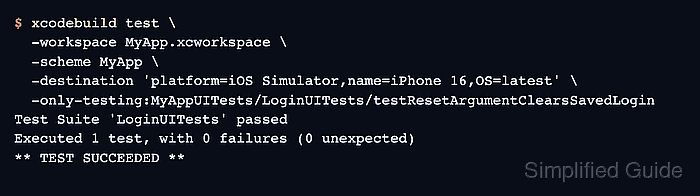
- Run only the reset verification test on an iOS Simulator.
$ xcodebuild test \
  -workspace MyApp.xcworkspace \
  -scheme MyApp \
  -destination 'platform=iOS Simulator,name=iPhone 16,OS=latest' \
  -only-testing:MyAppUITests/LoginUITests/testResetArgumentClearsSavedLogin
Test Suite 'LoginUITests' passed
Executed 1 test, with 0 failures (0 unexpected)
** TEST SUCCEEDED **
A passing run shows that the app accepted the launch argument, created state, relaunched, and returned to the clean sign-in screen. Use the real workspace, scheme, simulator name, UI test target, class, and method from the project.
Related: How to run XCUITest tests locally
Related: How to run XCUITest with xcodebuild in CI