How to run XCUITest tests in parallel
Parallel XCUITest runs let Xcode split a UI test bundle across more than one test runner instead of executing every class through a single simulator session. This helps long UI suites finish sooner when the tests do not depend on shared app state, fixed accounts, or a strict execution order.
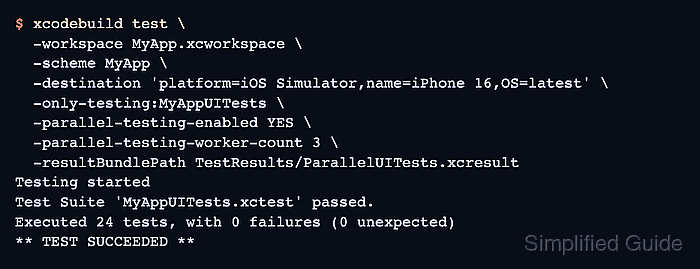
The xcodebuild options -parallel-testing-enabled and -parallel-testing-worker-count control parallel test execution from Terminal or CI. The worker count applies to test runners for the selected destination, while multi-destination options control how many separate devices or simulators run an entire destination test pass.
Start with a small worker count and a result bundle so failures remain inspectable. Parallel UI tests can expose hidden coupling, such as tests sharing the same backend account, keychain state, pasteboard, mock server port, or fixture data, so treat the first run as both a speed check and an isolation check.
Related: How to run XCUITest with xcodebuild in CI
Related: How to run XCUITest tests locally
Related: How to save XCUITest result bundles
Related: How to debug a flaky XCUITest test
Steps to run XCUITest tests in parallel with xcodebuild:
- Confirm the Mac or CI runner is using full Xcode.
$ xcodebuild -version
Xcode 16.4
Build version 16F6
If this command reports /Library/Developer/CommandLineTools, the active developer directory is only the Command Line Tools package and cannot run iOS Simulator UI tests.
- List the simulator destinations available to the app scheme.
$ xcodebuild -workspace MyApp.xcworkspace -scheme MyApp -showdestinations

Available destinations for the "MyApp" scheme:
    { platform:iOS Simulator, id:<SIMULATOR-UDID>, OS:18.5, name:iPhone 16 }
    { platform:iOS Simulator, id:<SIMULATOR-UDID>, OS:18.5, name:iPhone 16 Pro }
Use -project MyApp.xcodeproj instead of -workspace MyApp.xcworkspace when the scheme belongs to a standalone project.
- Choose a conservative worker count for the first parallel run.
Use 2 or 3 workers first on a shared CI runner. Increase the count only after the result bundle shows the same pass rate and no simulator, backend, or fixture collisions.
- Remove any existing result bundle at the target path.
$ rm -rf TestResults/ParallelUITests.xcresult
xcodebuild fails when -resultBundlePath already exists. Remove only a result bundle path inside the project or CI workspace.
- Run the UI test bundle with parallel testing enabled.
$ xcodebuild test \
  -workspace MyApp.xcworkspace \
  -scheme MyApp \
  -destination 'platform=iOS Simulator,name=iPhone 16,OS=latest' \
  -only-testing:MyAppUITests \
  -parallel-testing-enabled YES \
  -parallel-testing-worker-count 3 \
  -resultBundlePath TestResults/ParallelUITests.xcresult
Testing started
Test Suite 'MyAppUITests.xctest' started.
Test Case '-[MyAppUITests.LoginUITests testValidLogin]' passed (4.218 seconds).
Test Case '-[MyAppUITests.SettingsUITests testChangeDisplayName]' passed (5.104 seconds).
Test Suite 'MyAppUITests.xctest' passed.
Executed 24 tests, with 0 failures (0 unexpected)
** TEST SUCCEEDED **
Result bundle written to path:
    TestResults/ParallelUITests.xcresult
-parallel-testing-worker-count requests an exact number of test runners. Use -maximum-parallel-testing-workers instead when CI should allow Xcode to choose fewer workers on smaller machines.
- Confirm that the result bundle was written.
$ ls -ld TestResults/ParallelUITests.xcresult
drwxr-xr-x  6 ci  staff  192 Jun 26 09:45 TestResults/ParallelUITests.xcresult
Upload the .xcresult bundle even when the job fails, because it contains logs, screenshots, attachments, and the per-test timing needed to inspect worker imbalance.
Related: How to save XCUITest result bundles - Reduce the worker count if the parallel run exposes shared-state failures.
$ xcodebuild test \
  -workspace MyApp.xcworkspace \
  -scheme MyApp \
  -destination 'platform=iOS Simulator,name=iPhone 16,OS=latest' \
  -only-testing:MyAppUITests \
  -parallel-testing-enabled YES \
  -parallel-testing-worker-count 2 \
  -resultBundlePath TestResults/ParallelUITests-Retry.xcresult
Testing started
Test Suite 'MyAppUITests.xctest' passed.
Executed 24 tests, with 0 failures (0 unexpected)
** TEST SUCCEEDED **
If the lower worker count passes while the higher count fails, inspect tests that share users, files, app group containers, simulator defaults, mock server state, or fixed network ports before raising the count again.
Related: How to debug a flaky XCUITest test