How to debug wget connections
When a wget request fails, the first useful answer is whether it stopped before the connection, during encrypted setup, or after the server answered. The --debug trace shows name resolution, selected addresses, socket setup, request headers, and response status so a missing path can be separated from a reachability or protocol failure.
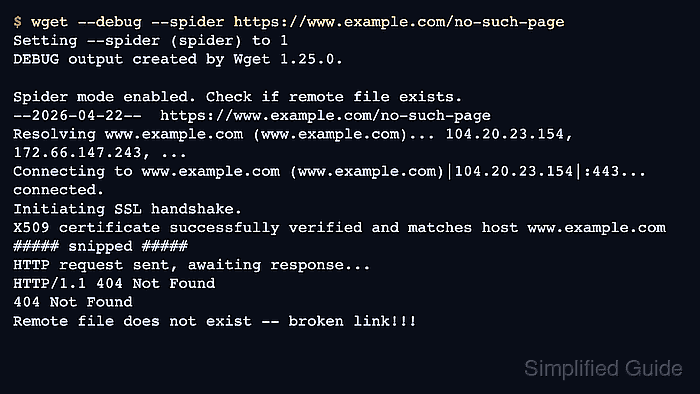
Current GNU Wget keeps --debug for diagnostic output, --spider for checking a target without saving its body, and --output-file for moving the same messages into a log file. In spider mode, wget sends a check request and reports whether the remote file exists; on HTTPS targets, a request block and HTTP response mean name resolution, the TCP connection, and TLS setup already got far enough for the server to answer.
Debug output can expose full URLs, redirect targets, proxy details, request headers, certificate errors, and server identifiers. Save longer captures in a private directory, share only sanitized excerpts, and use a TLS-specific trace when the wget output stops before the request block or reports a certificate error.
Related: How to log wget output to a file
Related: How to use an HTTP proxy with wget
Related: How to set connection and read timeouts in wget
Steps to debug wget connections:
- Reproduce the failing request with --debug and --spider so wget prints the connection trace without saving the response body.
$ wget --debug --spider https://www.example.com/no-such-page
Setting --spider (spider) to 1
DEBUG output created by Wget 1.25.0 on linux-gnu.

Reading HSTS entries from /home/admin/.wget-hsts
Spider mode enabled. Check if remote file exists.
--2026-06-06 02:24:35--  https://www.example.com/no-such-page
Certificates loaded: 144
Resolving www.example.com (www.example.com)... 104.20.23.154, 172.66.147.243, ...
Connecting to www.example.com (www.example.com)|104.20.23.154|:443... connected.
Created socket 3.

---request begin---
HEAD /no-such-page HTTP/1.1
Host: www.example.com
User-Agent: Wget/1.25.0
Accept: */*
Accept-Encoding: identity
Connection: Keep-Alive

---request end---
HTTP request sent, awaiting response...
---response begin---
HTTP/1.1 404 Not Found
Content-Type: text/html
Connection: keep-alive
Server: cloudflare
##### snipped #####
---response end---
404 Not Found
Remote file does not exist -- broken link!!!
If the trace stops before Connecting to, check name resolution or proxy setup. If Connecting to succeeds but no ---request begin--- block appears, check TLS, certificate handling, or an intercepting proxy. A trace that reaches an HTTP status line means the network path already worked.
Tool: TLS Handshake Trace
- Create a private directory before saving diagnostic traces to disk.
$ install -d -m 700 ~/wget-debug
Restricted permissions reduce the chance of exposing internal URLs, tokens, or proxy details later.
- Save the same trace to a log file when the terminal view is too noisy to keep or compare.
$ wget --debug --output-file="$HOME/wget-debug/example-404.log" --spider https://www.example.com/no-such-page
Setting --output-file (logfile) to /home/admin/wget-debug/example-404.log
Setting --spider (spider) to 1
--output-file moves Wget's detailed messages out of terminal scrollback and into a file that can be reviewed after the run. Use $HOME in this form; --output-file=~/wget-debug/example-404.log is passed to wget literally by common shells.
- Re-run the request with the corrected URL, proxy, headers, or certificate path and confirm the trace now ends with the expected response.
$ wget --debug --spider https://www.example.com/
Setting --spider (spider) to 1
DEBUG output created by Wget 1.25.0.

Spider mode enabled. Check if remote file exists.
--2026-06-06 02:24:35--  https://www.example.com/
Certificates loaded: 144
Resolving www.example.com (www.example.com)... 104.20.23.154, 172.66.147.243, ...
Connecting to www.example.com (www.example.com)|104.20.23.154|:443... connected.
Created socket 3.

---request begin---
HEAD / HTTP/1.1
Host: www.example.com
User-Agent: Wget/1.25.0
Accept: */*
Accept-Encoding: identity
Connection: Keep-Alive

---request end---
HTTP request sent, awaiting response...
---response begin---
HTTP/1.1 200 OK
Content-Type: text/html
Connection: keep-alive
Server: cloudflare
##### snipped #####
---response end---
200 OK
Remote file exists and could contain further links,
but recursion is disabled -- not retrieving.
A successful rerun that reaches 200 OK or the expected redirect proves the request path is working again.
- Remove the saved trace after the diagnostic session is complete.
$ rm -f "$HOME/wget-debug/example-404.log"
Verbose traces can keep sensitive request details, proxy information, and certificate errors longer than needed if they are left in shared locations.