How to troubleshoot Tomcat WAR deployment failures
A Tomcat WAR deployment failure usually starts after the container is already running. The new context may return 404, Tomcat Manager may list the application as stopped, or the expanded directory may appear without serving traffic.
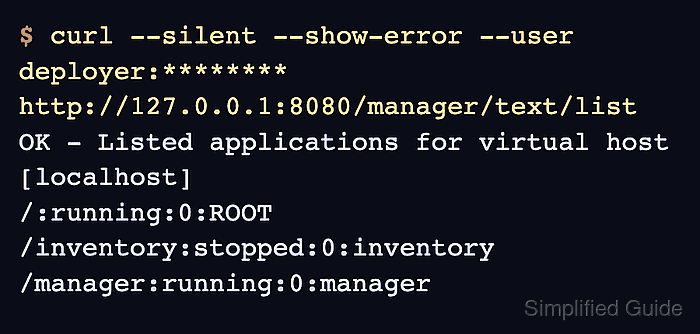
Tomcat derives deployed context names from the WAR or directory name when Host auto deployment handles files in the application base. The Manager text interface shows whether the context is running, stopped, or missing, while the localhost deployment log records why a context failed during startup.
Package-managed Debian and Ubuntu hosts commonly use /var/lib/tomcat10/webapps as the application base and /var/log/tomcat10 for deployment logs. Source installs usually keep the same evidence under $CATALINA_BASE/webapps and $CATALINA_BASE/logs. Fix the first concrete error for the target context, then redeploy and retest the original URL instead of treating a copied WAR file as success.
Steps to troubleshoot Tomcat WAR deployment failures:
- Confirm that Tomcat itself answers before focusing on the deployed application.
$ curl --head --silent --show-error http://127.0.0.1:8080/
HTTP/1.1 200
Accept-Ranges: bytes
ETag: W/"1905-1781123096645"
Last-Modified: Wed, 10 Jun 2026 20:24:56 GMT
Content-Type: text/html
Content-Length: 1905
Date: Wed, 10 Jun 2026 20:42:08 GMT
If the root connector does not answer, diagnose the service or connector first instead of redeploying the application. Related: How to troubleshoot Tomcat startup failures with systemd
- Reproduce the failing application URL with the exact context path users request.
$ curl --include --silent --show-error http://127.0.0.1:8080/inventory/
HTTP/1.1 404
Content-Type: text/html;charset=utf-8
Content-Language: en
Content-Length: 765
Date: Wed, 10 Jun 2026 20:42:10 GMT
A 404 under the application context can mean the context never started, the request path is wrong, or the deployed application lacks a handler for that URL. Keep the same URL for the final retest.
- List deployed applications through the Manager text interface.
$ curl --silent --show-error --user deployer:******** http://127.0.0.1:8080/manager/text/list
OK - Listed applications for virtual host [localhost]
/:running:0:ROOT
/inventory:stopped:0:inventory
/manager:running:0:manager
The account needs the manager-script role. A stopped row means Tomcat created the context but failed to start it; a missing row points back to the WAR path, filename, deployment settings, or permissions. Related: How to create a Tomcat Manager user
- Check that the WAR and expanded directory are present in the active application base.
$ sudo ls -l /var/lib/tomcat10/webapps/inventory.war /var/lib/tomcat10/webapps/inventory
-rw-r----- 1 tomcat tomcat 8421 Jun 10 20:42 /var/lib/tomcat10/webapps/inventory.war
drwxr-x--- 4 tomcat tomcat 4096 Jun 10 20:42 /var/lib/tomcat10/webapps/inventory
Use the application base for the running instance. On a source install, replace /var/lib/tomcat10/webapps with $CATALINA_BASE/webapps.
- Open the localhost deployment log for the context startup error.
$ sudo cat /var/log/tomcat10/localhost.2026-06-10.log
10-Jun-2026 20:42:09.117 SEVERE [main] org.apache.catalina.core.StandardContext.listenerStart Error configuring application listener of class [com.example.MissingInventoryListener]
java.lang.ClassNotFoundException: com.example.MissingInventoryListener
##### snipped #####
10-Jun-2026 20:42:09.129 SEVERE [main] org.apache.catalina.core.StandardContext.startInternal One or more listeners failed to start. Full details will be found in the appropriate container log file
10-Jun-2026 20:42:09.130 SEVERE [main] org.apache.catalina.core.StandardContext.startInternal Context [/inventory] startup failed due to previous errors
Replace the date with the current log file on the host. The first SEVERE entry for the context usually names the missing class, invalid descriptor, dependency failure, or listener error that blocked deployment.
- Verify that the corrected build artifact contains the descriptor or library named by the log.
$ jar --list --file target/inventory.war WEB-INF/web.xml WEB-INF/lib/inventory-core.jar
WEB-INF/web.xml
WEB-INF/lib/inventory-core.jar
Run this from the application build workspace before copying the artifact to Tomcat. For Tomcat 10 and later, rebuild older applications for the Jakarta Servlet package names when the log shows javax.servlet class errors.
- Replace the failed WAR with the corrected artifact and ownership.
$ sudo install -o tomcat -g tomcat -m 640 target/inventory.war /var/lib/tomcat10/webapps/inventory.war
Keep the file name aligned with the intended context path. /var/lib/tomcat10/webapps/inventory.war maps to /inventory; the root context normally uses ROOT.war.
- Redeploy the corrected context through Tomcat Manager.
$ curl --silent --show-error --user deployer:******** 'http://127.0.0.1:8080/manager/text/deploy?path=/inventory&update=true&war=file:/var/lib/tomcat10/webapps/inventory.war'
OK - Deployed application at context path [/inventory]
update=true undeploys an existing context before deploying the replacement. Use a maintenance window or a rolling deployment pattern when the application has active users.
- Confirm that Manager now reports the context as running.
$ curl --silent --show-error --user deployer:******** http://127.0.0.1:8080/manager/text/list
OK - Listed applications for virtual host [localhost]
/:running:0:ROOT
/inventory:running:0:inventory
/manager:running:0:manager
- Retest the original application URL.
$ curl --silent --show-error http://127.0.0.1:8080/inventory/
Inventory application is running