Tomcat startup failures, deployment problems, and request errors often leave evidence in different log sources. Checking the matching source first keeps service-manager messages, Catalina startup entries, application messages, and HTTP access rows from being treated as the same kind of log.
On systemd-managed package installs, Tomcat exposes two logging layers. The service manager records unit startup and process output in the system journal, while Tomcat's JULI logging writes date-stamped Catalina, localhost, manager, and host-manager files under the instance log directory.
The commands below use the Ubuntu and Debian tomcat10 layout, where CATALINA_BASE is /var/lib/tomcat10 and /var/lib/tomcat10/logs points to /var/log/tomcat10. Other Linux packages may use tomcat9, tomcat11, or a custom /opt/tomcat instance, so replace the unit name and log directory with the active instance before reading logs.
Steps to view Tomcat logs on Linux:
- Confirm the log directory for the Tomcat instance.
$ sudo ls -ld /var/log/tomcat10 /var/lib/tomcat10/logs
drwxrws--- 2 tomcat adm 4096 Jun 10 20:47 /var/log/tomcat10
lrwxrwxrwx 1 root   root  18 Jun  9 12:08 /var/lib/tomcat10/logs -> ../../log/tomcat10
On package-managed Ubuntu and Debian systems, /var/lib/tomcat10/logs resolves to /var/log/tomcat10. For a manually installed instance, check the logs directory below the active CATALINA_BASE, such as /opt/tomcat/logs.
- Check the systemd journal when the symptom is service startup, restart, permissions, or a JVM option passed by the unit.
$ sudo journalctl -u tomcat10 --since today
Jun 10 20:47:19 web01 systemd[1]: Started tomcat10.service - Apache Tomcat 10 Web Application Server.
Jun 10 20:47:20 web01 tomcat10[7314]: Server startup in [602] milliseconds
If the journal returns no entries, confirm the unit name first. Package names commonly match the unit name, such as tomcat10 or tomcat11, while custom instances may use tomcat or tomcat@instance.
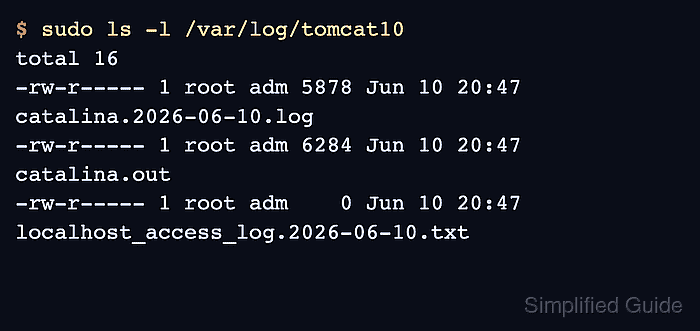
- List the Tomcat log files before opening one.
$ sudo ls -l /var/log/tomcat10
total 16
-rw-r----- 1 root adm 5878 Jun 10 20:47 catalina.2026-06-10.log
-rw-r----- 1 root adm 6284 Jun 10 20:47 catalina.out
-rw-r----- 1 root adm    0 Jun 10 20:47 localhost_access_log.2026-06-10.txt
catalina.YYYY-MM-DD.log contains Tomcat JULI startup, shutdown, deployment, and container messages. catalina.out contains console output, including stdout, stderr, and thread dumps when the startup script redirects them there. localhost_access_log.YYYY-MM-DD.txt contains request rows from the access log valve.
- Read the date-stamped Catalina log for startup, connector, deployment, and container errors.
$ sudo cat /var/log/tomcat10/catalina.2026-06-10.log
10-Jun-2026 20:47:19.267 INFO [main] org.apache.catalina.startup.VersionLoggerListener.log Server version name:   Apache Tomcat/10.1.40 (Ubuntu)
10-Jun-2026 20:47:19.413 INFO [main] org.apache.coyote.AbstractProtocol.init Initializing ProtocolHandler ["http-nio-8080"]
##### snipped #####
10-Jun-2026 20:47:20.010 INFO [main] org.apache.coyote.AbstractProtocol.start Starting ProtocolHandler ["http-nio-8080"]
10-Jun-2026 20:47:20.028 INFO [main] org.apache.catalina.startup.Catalina.start Server startup in [602] milliseconds
Use this file when Tomcat starts, stops, reloads applications, initializes connectors, or reports XML and deployment errors.
- Read catalina.out when the application writes to stdout or stderr, or when a thread dump was requested.
$ sudo cat /var/log/tomcat10/catalina.out
10-Jun-2026 20:47:19.267 INFO [main] org.apache.catalina.startup.VersionLoggerListener.log Server version name:   Apache Tomcat/10.1.40 (Ubuntu)
10-Jun-2026 20:47:19.269 INFO [main] org.apache.catalina.startup.VersionLoggerListener.log CATALINA_BASE:         /var/lib/tomcat10
##### snipped #####
10-Jun-2026 20:47:20.028 INFO [main] org.apache.catalina.startup.Catalina.start Server startup in [602] milliseconds
Apache Tomcat's default logging can write some messages both to a file handler and to the console, which is why catalina.out may overlap with catalina.YYYY-MM-DD.log. Treat stdout and stderr messages here as application or JVM evidence, not as HTTP access rows.
- Send one request, or note the timestamp of the request already being investigated, before checking access rows.
$ curl --include --silent http://127.0.0.1:8080/
HTTP/1.1 200
##### snipped #####
Content-Type: text/html
Content-Length: 1905
Startup or deployment failures may appear only in the journal and Catalina logs because the request never reached a running web application.
- Read the access log when the question is whether an HTTP request reached Tomcat and which status code Tomcat returned.
$ sudo cat /var/log/tomcat10/localhost_access_log.2026-06-10.txt
127.0.0.1 - - [10/Jun/2026:20:47:24 +0000] "GET / HTTP/1.1" 200 1905
The request timestamp should line up with an access-log row when access logging is enabled and flushed. An empty access-log file can mean no request rows have been flushed yet. If no access-log file exists, check whether an AccessLogValve is enabled in server.xml before assuming Tomcat did not receive requests.
Related: How to enable Tomcat access logs

Mohd Shakir Zakaria is a cloud architect with deep roots in software development and open-source advocacy. Certified in AWS, Red Hat, VMware, ITIL, and Linux, he specializes in designing and managing robust cloud and on-premises infrastructures.


