How to troubleshoot Tomcat startup failures with systemd
Tomcat startup failures under systemd can look like a successful restart when the service wrapper launches, but the Java process may exit seconds later after parsing server.xml, loading Java, or opening connector ports. Checking the unit, the journal, and the Tomcat startup log in order keeps the diagnosis tied to the service that actually failed.
Package-managed Tomcat on Debian and Ubuntu usually runs as tomcat10.service with CATALINA_BASE under /var/lib/tomcat10 and configuration under /etc/tomcat10. The journal may report paths under /var/lib/tomcat10/conf because that directory points back to the active config directory; follow the path from the log before editing or restoring a file.
A tomcat10 XML startup error is a useful pattern because the unit state, journal, and Catalina log all point back to the same configuration file. The same order also handles a bad Java path, port conflict, unreadable keystore, or permission issue; correct the first concrete error from the journal or Catalina log, then restart Tomcat and retest the HTTP endpoint rather than treating a clean systemctl restart return as proof.
Steps to troubleshoot Tomcat startup failures with systemd:
- Identify the Tomcat unit name that systemd knows about.
$ systemctl list-units --type=service --all 'tomcat*.service'
  UNIT              LOAD   ACTIVE SUB     DESCRIPTION
  tomcat10.service loaded active running Apache Tomcat 10 Web Application Server

1 loaded units listed.
Use the returned unit name in the later commands. Source installs and older packages may use tomcat.service, tomcat9.service, or an instance unit such as tomcat@site.service.
- Check the failed unit state after the startup attempt.
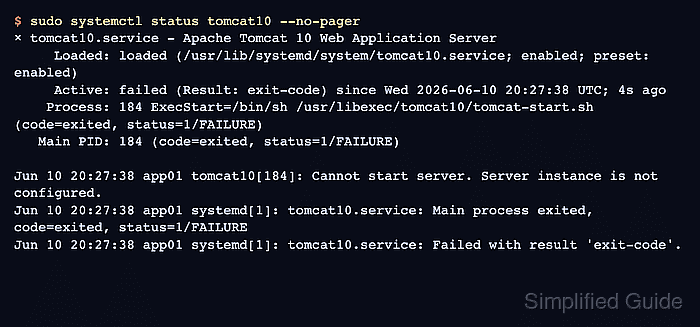
$ sudo systemctl status tomcat10 --no-pager
× tomcat10.service - Apache Tomcat 10 Web Application Server
     Loaded: loaded (/usr/lib/systemd/system/tomcat10.service; enabled; preset: enabled)
     Active: failed (Result: exit-code) since Wed 2026-06-10 20:27:38 UTC; 4s ago
    Process: 184 ExecStart=/bin/sh /usr/libexec/tomcat10/tomcat-start.sh (code=exited, status=1/FAILURE)
   Main PID: 184 (code=exited, status=1/FAILURE)
##### snipped #####
Jun 10 20:27:38 app01 tomcat10[184]: Cannot start server. Server instance is not configured.
Jun 10 20:27:38 app01 systemd[1]: tomcat10.service: Main process exited, code=exited, status=1/FAILURE
Jun 10 20:27:38 app01 systemd[1]: tomcat10.service: Failed with result 'exit-code'.
If the status still shows active immediately after a restart but the site is down, wait a few seconds and check again. Some packaged units report that the wrapper started before Tomcat has finished parsing its own configuration.
- Retest the local connector when the service state and application symptom do not match.
$ curl --head --silent --show-error http://127.0.0.1:8080/
curl: (7) Failed to connect to 127.0.0.1 port 8080 after 0 ms: Could not connect to server
Use the local connector port from your server.xml or reverse-proxy backend. A refused connection confirms that the Java process is not accepting requests, even if an earlier restart command returned without an error.
- Read the Tomcat journal entries from the current boot.
$ sudo journalctl -u tomcat10 -b --no-pager
Jun 10 20:27:37 app01 systemd[1]: Starting tomcat10.service - Apache Tomcat 10 Web Application Server...
Jun 10 20:27:37 app01 systemd[1]: Started tomcat10.service - Apache Tomcat 10 Web Application Server.
Jun 10 20:27:38 app01 tomcat10[184]: Parse fatal error at line [2] column [1]
Jun 10 20:27:38 app01 tomcat10[184]: org.xml.sax.SAXParseException; systemId: file:/var/lib/tomcat10/conf/server.xml; lineNumber: 2; columnNumber: 1; XML document structures must start and end within the same entity.
##### snipped #####
Jun 10 20:27:38 app01 tomcat10[184]: Unable to load server configuration from [/var/lib/tomcat10/conf/server.xml]
Jun 10 20:27:38 app01 tomcat10[184]: Cannot start server. Server instance is not configured.
The first specific error is usually more useful than the final status=1/FAILURE line. In this example, Tomcat names server.xml and the XML parser error before systemd records the process exit.
Related: How to view Tomcat logs on Linux
- Confirm where the reported configuration path points on this package.
$ ls -ld /etc/tomcat10 /var/lib/tomcat10/conf
drwxr-xr-x 1 root root 4096 Jun 10 20:24 /etc/tomcat10
lrwxrwxrwx 1 root root   13 Jun  9 12:08 /var/lib/tomcat10/conf -> /etc/tomcat10
When the journal reports /var/lib/tomcat10/conf/server.xml on Debian or Ubuntu packages, the file normally resolves to /etc/tomcat10/server.xml.
- List the Tomcat log directory for the matching startup log.
$ sudo ls -l /var/log/tomcat10
total 16
-rw-r----- 1 tomcat adm 10581 Jun 10 20:27 catalina.2026-06-10.log
-rw-r----- 1 tomcat adm    67 Jun 10 20:26 localhost_access_log.2026-06-10.txt
Upstream Tomcat documents catalina.out for Unix console output, but distro packages may write dated catalina.YYYY-MM-DD.log files instead. Use the file that changed during the failed startup.
- Open the dated Catalina startup log for the same error.
$ sudo cat /var/log/tomcat10/catalina.2026-06-10.log
10-Jun-2026 20:27:38.208 SEVERE [main] org.apache.tomcat.util.digester.Digester.fatalError Parse fatal error at line [2] column [1]
org.xml.sax.SAXParseException; systemId: file:/var/lib/tomcat10/conf/server.xml; lineNumber: 2; columnNumber: 1; XML document structures must start and end within the same entity.
##### snipped #####
10-Jun-2026 20:27:38.211 WARNING [main] org.apache.catalina.startup.Catalina.parseServerXml Unable to load server configuration from [/var/lib/tomcat10/conf/server.xml]
10-Jun-2026 20:27:38.212 SEVERE [main] org.apache.catalina.startup.Bootstrap.main Cannot start server. Server instance is not configured.
Replace the date in the filename with the current log file on your host. The Catalina log is useful when systemctl status has already truncated the Java stack trace.
- Fix the file or runtime layer named by the first concrete error.
$ sudoedit /etc/tomcat10/server.xml
For the XML failure above, restore the missing structure in server.xml or roll back the recent edit. If the journal names JAVA_HOME, fix the service environment instead of editing shell profiles; if it reports an address already in use, free the port or change the connector before restarting.
- Restart Tomcat after applying the correction.
$ sudo systemctl restart tomcat10
A restart command returning to the shell only means systemd accepted the request. Check the unit and the connector again after Tomcat has had time to initialize.
- Confirm that the service stays active after the corrected startup.
$ sudo systemctl status tomcat10 --no-pager ● tomcat10.service - Apache Tomcat 10 Web Application Server Loaded: loaded (/usr/lib/systemd/system/tomcat10.service; enabled; preset: enabled) Active: active (running) since Wed 2026-06-10 20:27:43 UTC; 5s ago ##### snipped ##### Jun 10 20:27:43 app01 tomcat10[239]: Starting ProtocolHandler ["http-nio-8080"] Jun 10 20:27:43 app01 tomcat10[239]: Server startup in [1045] milliseconds - Retest the local HTTP endpoint.
$ curl --head --silent --show-error http://127.0.0.1:8080/
HTTP/1.1 200
Accept-Ranges: bytes
ETag: W/"1905-1781123096645"
Last-Modified: Wed, 10 Jun 2026 20:24:56 GMT
Content-Type: text/html
Content-Length: 1905
Date: Wed, 10 Jun 2026 20:27:48 GMT