How to configure Nginx as a reverse proxy for Tomcat
Putting Nginx in front of Tomcat lets a Java web application answer on a normal site hostname while the Tomcat connector stays on a loopback or private network address. The proxy layer must forward the request to the right connector and pass enough public request metadata for Tomcat applications to build links, redirects, cookies, and logs around the public URL rather than the backend port.
Nginx handles the frontend server and location match, then sends the request to Tomcat with proxy_pass. For Tomcat, the important handoff fields are the public Host value, the forwarded client address chain, the original scheme, and the public port when TLS or a nondefault listener is involved.
The examples below use a package-style Nginx configuration under /etc/nginx/conf.d/ and a Tomcat HTTP connector on 127.0.0.1:8080. Use the same pattern for a private backend address on another host, but restrict direct access to the Tomcat connector and configure Tomcat proxy metadata when the application depends on servlet request values such as scheme, server name, server port, or client address.
Related: Configure Nginx as a reverse proxy
Related: Test Nginx configuration
Related: How to configure RemoteIpValve in Tomcat
Tool: NGINX Proxy Headers Checker
Tool: Nginx Server Block Generator
Steps to configure Nginx as a reverse proxy for Tomcat:
- Confirm the Tomcat application answers from the Nginx host.
$ curl -isS http://127.0.0.1:8080/
HTTP/1.1 200
Content-Type: text/plain;charset=UTF-8
Content-Length: 31

Tomcat backend reached directly
Run this check on the server that will run Nginx. A Tomcat URL that works from a workstation can still be blocked from the reverse proxy host by a listener, firewall, container network, or bind-address setting.
If the connector listens on the wrong port, change the Tomcat HTTP connector before building the proxy block. Related: How to change the Tomcat connector port
- Create an Nginx configuration file for the public Tomcat hostname.
$ sudoedit /etc/nginx/conf.d/tomcat-app.conf
Use the include directory that is active on the host. Common package layouts load files from /etc/nginx/conf.d/, /etc/nginx/sites-enabled/, or another path included from /etc/nginx/nginx.conf.
- Add an upstream and server block that proxies requests to the Tomcat connector.
- /etc/nginx/conf.d/tomcat-app.conf
upstream tomcat_backend {
    server 127.0.0.1:8080;
    keepalive 16;
}

server {
    listen 80;
    server_name app.example.net;

    location / {
        proxy_pass http://tomcat_backend;

        proxy_http_version 1.1;
        proxy_set_header Connection "";

        proxy_set_header Host $host;
        proxy_set_header X-Forwarded-Host $host;
        proxy_set_header X-Real-IP $remote_addr;
        proxy_set_header X-Forwarded-For $proxy_add_x_forwarded_for;
        proxy_set_header X-Forwarded-Proto $scheme;
        proxy_set_header X-Forwarded-Port $server_port;

        proxy_connect_timeout 5s;
        proxy_send_timeout 60s;
        proxy_read_timeout 60s;
    }
}
proxy_pass http://tomcat_backend has no URI suffix, so Nginx sends the original request URI to Tomcat. If the public site should expose only a Tomcat context path such as /inventory/, keep the public path and Tomcat context path aligned unless the application was built for path rewriting.
Keep Nginx responsible for setting the forwarded headers. Do not pass client-supplied X-Forwarded-* headers through unchanged when Nginx is the public edge.
Do not expose Tomcat management paths such as /manager or /host-manager through this public block unless they are intentionally protected by network policy and authentication.
- Configure Tomcat proxy metadata when the application builds absolute redirects or public URLs from servlet request values.
- /etc/tomcat10/server.xml
<Connector
    port="8080"
    protocol="HTTP/1.1"
    connectionTimeout="20000"
    proxyName="app.example.net"
    proxyPort="80"
    scheme="http" />
For a public HTTPS site terminated at Nginx, use proxyPort="443", scheme="https", and secure="true". For multiple public hostnames or client-IP-sensitive controls, configure a trusted forwarded-header path with RemoteIpValve instead. Related: How to configure RemoteIpValve in Tomcat
- Test the Nginx configuration syntax.
$ sudo nginx -t
nginx: the configuration file /etc/nginx/nginx.conf syntax is ok
nginx: configuration file /etc/nginx/nginx.conf test is successful
Fix any syntax error before reloading Nginx. A saved file is not proof that the running proxy can parse the block.
Related: How to test Nginx configuration
- Restart Tomcat if /etc/tomcat10/server.xml changed.
$ sudo systemctl restart tomcat10
Skip this restart when the Nginx file was the only configuration change. Use the installed unit name for the host, such as tomcat10, tomcat11, or a custom tomcat service.
- Reload Nginx so the reverse proxy block starts serving the public hostname.
$ sudo systemctl reload nginx
Use sudo nginx -s reload when Nginx is running without systemd, such as in some containers or hand-started test environments.
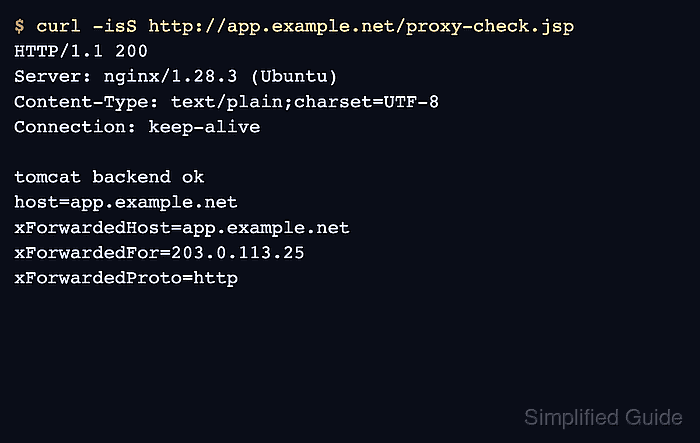
- Request the public Nginx URL and confirm the response comes from Tomcat through the proxy.
$ curl -isS http://app.example.net/proxy-check.jsp
HTTP/1.1 200
Server: nginx/1.28.3 (Ubuntu)
Content-Type: text/plain;charset=UTF-8
##### snipped #####

tomcat backend ok
host=app.example.net
xForwardedHost=app.example.net
xForwardedFor=203.0.113.25
xForwardedProto=http
xForwardedPort=80
The Server header shows Nginx answered the client-facing request, while the response body should be generated by the Tomcat application endpoint.
If public DNS is not active yet, test the server block with a controlled host mapping such as curl --resolve app.example.net:80:203.0.113.10 http://app.example.net/proxy-check.jsp.
- Check the Nginx access log for the proxied request.
$ sudo cat /var/log/nginx/access.log
203.0.113.25 - - [10/Jun/2026:21:04:01 +0000] "GET /proxy-check.jsp HTTP/1.1" 200 184 "-" "curl/8.18.0"
Use Tomcat access logs or a temporary request diagnostic endpoint when the application must prove the forwarded scheme, port, or client address from Tomcat's point of view. Related: How to enable Tomcat access logs