How to share a tmux session
Sharing a tmux session lets a second terminal watch or control an existing workspace when a pairing partner, handoff recipient, or troubleshooter needs to see the same panes. Both clients attach to the same server-side session, so commands typed by a read-write client land in the live workspace instead of a copied shell transcript.
The normal sharing path is another attach-session client pointed at the same session. That assumes the second terminal can reach the same tmux server socket, which usually means the same Unix account on the same host; cross-user socket sharing needs deliberate permissions and belongs in a separate access-control workflow.
Use a read-only client when the second terminal should observe without sending keys to the pane. Current tmux accepts attach-session -f read-only, the older -r shorthand is still common, and list-clients is the proof command because it shows each attached client and its read-only state.
Related: How to list tmux sessions
Related: How to attach to a tmux session
Related: How to detach from a tmux session
Related: How to create a tmux session
Steps to share a tmux session:
- List the available sessions and choose the session name that should be shared.
$ tmux list-sessions
shared: 1 windows (created Fri Jun  5 08:01:25 2026)
The text before the colon is the session target. Use How to create a tmux session first if the workspace to share does not exist yet.
Related: How to list tmux sessions
Related: How to create a tmux session - Attach from the second terminal when both clients should have normal read-write control.
$ tmux attach-session -t shared
Any attached read-write client can type into panes and run tmux commands, so use read-write sharing only when the second operator should control the session.
Related: How to attach to a tmux session
- Attach the second terminal as read-only when it should observe without changing the session.
$ tmux attach-session -f read-only -t shared
Many tmux builds also accept tmux attach-session -r -t shared. The -r shorthand creates a read-only client and may add the ignore-size client flag, so -f read-only is clearer when only the read-only behavior matters.
- Verify which clients are attached and whether the observer is read-only.
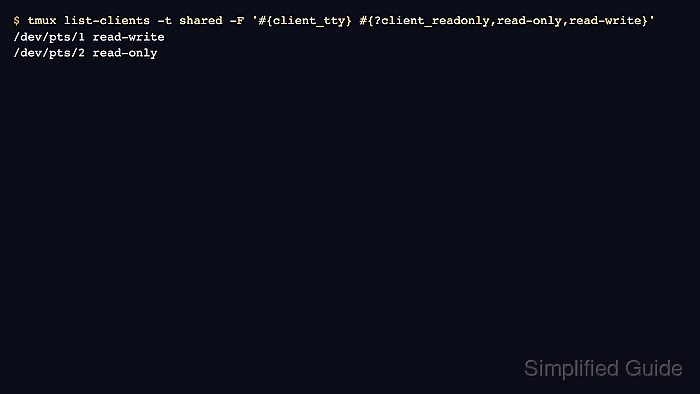
$ tmux list-clients -t shared -F '#{client_tty} #{?client_readonly,read-only,read-write}'
/dev/pts/1 read-write
/dev/pts/2 read-only
The first field is the client terminal, and the second field comes from #{client_readonly}. The -t shared target keeps the list scoped to the shared session.
- Inspect raw client flags when the shorthand attach form or terminal sizing behavior matters.
$ tmux list-clients -t shared -F '#{client_tty} #{client_flags}'
/dev/pts/1 attached,focused,UTF-8
/dev/pts/2 attached,focused,read-only,UTF-8
Terminal-dependent flags such as UTF-8 may appear in this list. A client attached with -r can show both read-only and ignore-size.
- Detach the observer from that terminal when sharing is finished.
C-b d
The default prefix is Ctrl-b. A read-only client can still use detach-related keys because tmux must allow the observer to leave the session.
Related: How to detach from a tmux session
- Detach a client from another terminal when the observer cannot detach itself.
$ tmux detach-client -t /dev/pts/2
Use the client terminal name shown by list-clients as the -t target. Detaching a client does not stop the session or the commands running inside it.