Table of Contents
How to increase PHP maximum execution time
Long-running imports, report generation, archive exports, and administrative jobs can hit PHP's request timer before legitimate work finishes. Raising the limit prevents avoidable Maximum execution time of 30 seconds exceeded failures while still keeping one slow request from tying up workers indefinitely.
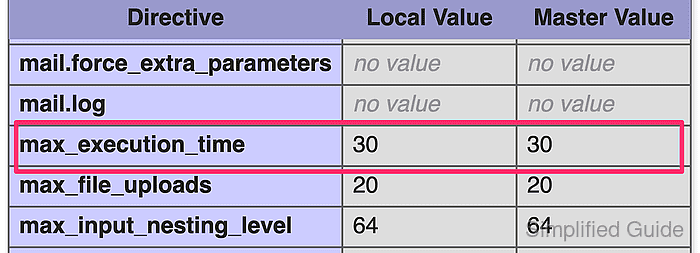
The effective limit comes from max_execution_time in the SAPI that actually serves the request. Current PHP documentation lists the directive as INI_ALL, so it can be changed in the main php.ini file, per-directory .user.ini or .htaccess overrides when that runtime allows them, or inside code with ini_set() or set_time_limit().
Verification has to happen through the same site path, pool, or virtual host that runs the slow request. CLI commonly reports 0, .user.ini changes follow the user_ini.cache_ttl refresh interval, and shorter Apache, Nginx, proxy, or input-parsing limits such as max_input_time can still end the request first. Use the smallest value that fits the workload, and move recurring heavy jobs into a queue or CLI worker instead of removing the timeout for normal traffic.
Related: How to find PHP configuration files
Related: How to increase PHP memory limit
Related: How to increase PHP maximum execution time in cPanel
Methods to increase PHP maximum execution time:
Change PHP maximum execution time limit in php.ini
Changing max_execution_time in the web-facing php.ini file is the safest default when the same application or host regularly needs more time. The flow below uses a common PHP-FPM layout on Ubuntu or Debian, but the same directive and verification pattern still apply when PHP runs as an Apache module.
- Create a temporary diagnostic script in the same document root or application path that needs more runtime.
$ sudo tee /var/www/app.example.test/public/php-timeout-check.php >/dev/null <<'PHP'
<?php
header('Content-Type: text/plain');
printf("SAPI=%s\n", PHP_SAPI);
printf("Loaded php.ini=%s\n", php_ini_loaded_file() ?: 'none');
printf("max_execution_time=%s\n", ini_get('max_execution_time'));
PHP
Keep the file temporary and remove it after the new value is confirmed because it exposes runtime details to anyone who can reach the URL.
- Request the diagnostic script through the same site path, virtual host, or PHP-FPM pool that handles the slow task.
$ curl -s https://app.example.test/php-timeout-check.php
SAPI=fpm-fcgi
Loaded php.ini=/etc/php/8.5/fpm/php.ini
max_execution_time=30
If the response shows apache2handler, follow the Apache module configuration tree instead of assuming the PHP-FPM paths below apply unchanged.
- Search PHP-FPM pool files and web-server configuration for a later max_execution_time override before editing the main php.ini file.
$ sudo grep -RIn 'max_execution_time' /etc/php/8.5/fpm/pool.d /etc/nginx /etc/apache2 /etc/httpd 2>/dev/null
If this finds an active pool, virtual host, or FastCGI override, change or remove that layer first or the php.ini edit may never become the effective request value.
- Back up the active php.ini file before changing the timeout.
$ sudo cp /etc/php/8.5/fpm/php.ini /etc/php/8.5/fpm/php.ini.bak-$(date +%Y%m%d%H%M%S)
Keep the timestamped backup until the new limit is confirmed from the diagnostic request.
- Open the web-facing php.ini file in a text editor.
$ sudoedit /etc/php/8.5/fpm/php.ini
On Ubuntu or Debian with PHP-FPM, the path is commonly /etc/php/8.5/fpm/php.ini. With the Apache module, it is commonly /etc/php/8.5/apache2/php.ini. Replace 8.5 with the installed PHP branch when the host uses a different package version.
- Set the max_execution_time directive to the required number of seconds.
; Maximum execution time of each script, in seconds
max_execution_time = 300
Use a bounded value that matches the workload. Setting the directive to 0 removes the limit entirely and can let one stuck request occupy workers indefinitely.
If uploads stall before the script body starts running, adjust max_input_time or the surrounding request-body limit instead of assuming the execution timer is the first bottleneck.
- Test the PHP-FPM configuration before reloading workers.
$ sudo php-fpm8.5 -t
[06-Jun-2026 01:30:07] NOTICE: configuration file /etc/php/8.5/fpm/php-fpm.conf test is successful
Skip this step when PHP runs as an Apache module instead of PHP-FPM. On an Apache module deployment, run the matching web-server configuration test first, such as apachectl configtest.
Do not reload the runtime until the configuration test succeeds.
Related: How to test Apache configuration
- Reload the runtime that serves the application so new workers pick up the updated value.
$ sudo systemctl reload php8.5-fpm
Reload Apache instead, for example with sudo systemctl reload apache2, when the diagnostic script reported apache2handler.
- Request the diagnostic script again and confirm the higher timeout from the site runtime.
$ curl -s https://app.example.test/php-timeout-check.php
SAPI=fpm-fcgi
Loaded php.ini=/etc/php/8.5/fpm/php.ini
max_execution_time=300
If the old value still appears, inspect later PHP-FPM pool directives, per-directory .user.ini files, or Apache php_value / php_admin_value overrides that still win for that request path.
- Remove the temporary diagnostic script after the new value is confirmed.
$ sudo rm /var/www/app.example.test/public/php-timeout-check.php
Leaving the file reachable keeps the site's SAPI, loaded configuration path, and active timeout exposed to the public.
Change PHP maximum execution time limit via ini_set() function
ini_set() fits one bootstrap path, admin action, or maintenance endpoint that needs more time without raising the baseline for every request. The change starts when the line executes and lasts only for the rest of that request.
- Add a guarded ini_set() call before the slow work begins.
<?php
if (ini_set('max_execution_time', '300') === false) {
    throw new RuntimeException('max_execution_time cannot be changed here');
}
?>
Current PHP documentation still lists max_execution_time as INI_ALL. ini_set() returns the old value on success and false on failure.
- Place the override in the bootstrap or entry file that always runs before the slow code path.
On WordPress, that is commonly wp-config.php or another early bootstrap file that runs before plugins, imports, or administrative jobs trigger the heavy work.
- Confirm the resolved value inside the same request while testing the change.
<?php
if (ini_set('max_execution_time', '300') === false) {
    exit('max_execution_time cannot be changed here');
}
echo 'max_execution_time=' . ini_get('max_execution_time') . PHP_EOL;
?>
max_execution_time=300
The new value applies only after the ini_set() line executes in that request. A pool or virtual host that forces the directive with an admin-level override can still block the change.
- Remove any temporary probe output after testing the code path.
If the request still stops before the slow work begins, or if the wall-clock failure time does not change, adjust max_input_time or the web-server or proxy timeout instead because ini_set() only changes PHP's script timer.
Change PHP maximum execution time limit via set_time_limit() function
set_time_limit() is useful for long-running code that already controls its own batching or checkpoints. Each call restarts the timer from zero, which makes it practical for imports, exports, and queue-style loops that need a fresh execution window between chunks.
- Call set_time_limit() before the slow section starts.
<?php
set_time_limit(300);
?>
Passing 0 removes the limit for that request, but the request can still be cut short by the web server, proxy, or host policy.
- Reset the timer inside long loops when each batch needs a new execution window.
<?php
foreach ($jobs as $job) {
    set_time_limit(30);
    process_job($job);
}
?>
Each call restarts the timeout counter from zero instead of adding seconds to time already spent.
- Print the current limit after the call when testing the code path.
<?php
set_time_limit(45);
echo 'max_execution_time=' . ini_get('max_execution_time') . PHP_EOL;
?>
max_execution_time=45
- Keep platform-specific timing behavior in mind when diagnosing edge cases.
Current PHP documentation notes that set_time_limit() and max_execution_time cover only script execution time. On Unix-like systems, time spent in system calls, stream operations, database queries, and sleep functions is usually not counted, while on Windows the measured time is real elapsed time.
Hosts can still disable set_time_limit(), and shorter web-server or reverse-proxy timeouts still win.
Change PHP maximum execution time limit in .htaccess
Per-directory overrides are useful when only one application tree needs more runtime and the main php.ini file is not writable. The correct file depends on the active PHP SAPI: .htaccess for the Apache module and .user.ini for CGI or FastCGI deployments such as PHP-FPM.
- Choose .htaccess only when PHP runs as an Apache module, or choose .user.ini when the request is handled through CGI or FastCGI.
Do not place php_value directives in .htaccess on CGI or FastCGI hosts because that syntax applies only to the Apache module runtime.
- Open the per-directory .htaccess file when the application is served through mod_php.
$ sudoedit .htaccess
- Add the Apache module override when the directory is handled by mod_php.
php_value max_execution_time 300
- Open .user.ini when the application directory is served through CGI or FastCGI.
$ sudoedit .user.ini
Current PHP documentation states that .user.ini files are processed only by CGI/FastCGI, are searched from the requested script directory up to the document root, and accept only INI_PERDIR or INI_USER directives.
- Add the per-directory CGI/FastCGI override in .user.ini.
max_execution_time = 300
- Wait for the user_ini.cache_ttl interval to expire, or recycle PHP-FPM when the host is self-managed and an immediate reread is needed.
Current PHP documentation lists the default user_ini.cache_ttl as 300 seconds and the default filename as .user.ini.
- Verify the resolved value from a request served by that directory.
<?php
echo 'max_execution_time=' . ini_get('max_execution_time') . PHP_EOL;
?>
max_execution_time=300
Remove any temporary diagnostic script after testing so the application does not keep exposing runtime details.
Change PHP maximum execution time limit for cPanel hosting
When a shared host exposes PHP directives through cPanel, the control panel is usually the safest place to raise max_execution_time because the provider writes the change in the layer that hosting stack actually uses. Menu names vary, but the job stays the same: change the PHP directive rather than an unrelated web-server timeout.
- Log in to cPanel and open the host's PHP settings editor, such as MultiPHP INI Editor or Select PHP Version → Options.
- Change max_execution_time to the required number of seconds and save the new value.
Shared hosts label the same control differently, so use the page that edits PHP options or INI values instead of a general performance or security page.
- Re-run the slow task or check phpinfo() after the host applies the change.
Some hosts cache or stage PHP option changes for a short period before new workers pick them up.
If the directive is unavailable or capped below the required value, contact the hosting provider or move the work into a queue or CLI job instead of forcing an unlimited web timeout.