How to clean string columns in pandas
Text columns from forms, spreadsheets, and exports often carry invisible edge whitespace, irregular internal spacing, inconsistent letter case, and placeholder values such as n/a. Those differences create false categories and failed matches even when rows look alike in a table.
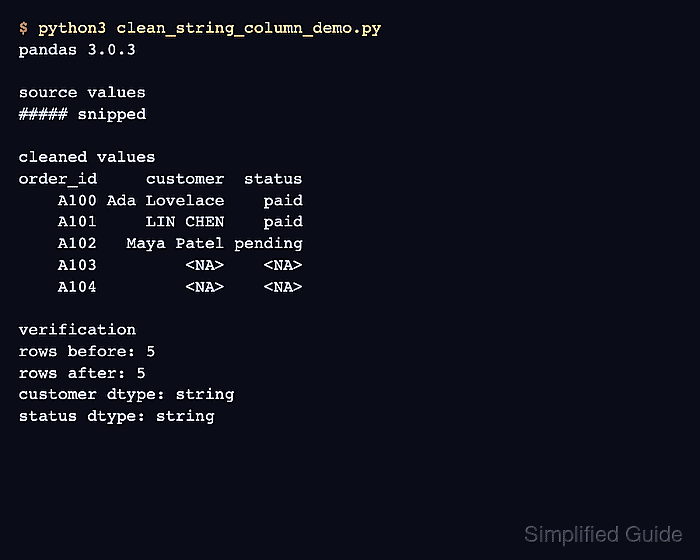
The Series.str accessor applies text operations to each value while preserving missing entries. Converting selected columns to the nullable string dtype makes the text boundary explicit and keeps missing data as <NA> instead of the literal strings None or nan.
Case normalization belongs only on labels whose capitalization is not meaningful. Keep names or codes in their original case when case carries identity, and retain the source DataFrame until row counts and expected cleaned values have been checked.
Related: How to read CSV files with pandas
Related: How to convert data types in pandas
Related: How to find missing values in pandas
Steps to clean string columns in pandas:
- Define the source DataFrame in clean_string_columns.py.
- clean_string_columns.py
import pandas as pd


orders = pd.DataFrame(
    {
        "order_id": ["A100", "A101", "A102", "A103", "A104"],
        "customer": [
            " Ada Lovelace ",
            "LIN   CHEN",
            "Maya Patel",
            "  n/a ",
            None,
        ],
        "status": [" Paid ", "PAID", " pending", "", pd.NA],
    }
)
The orders name represents the DataFrame already loaded by the project. The target columns should contain text or missing values.
- Create a working copy after the DataFrame definition.
cleaned = orders.copy()
The unchanged orders DataFrame provides a comparison and rollback surface until the cleaned values pass review.
- Add customer-name whitespace cleanup after the working copy.
cleaned["customer"] = (
    cleaned["customer"]
    .astype("string")
    .str.strip()
    .str.replace(r"\s+", " ", regex=True)
    .replace({"n/a": pd.NA})
)
astype(“string”) converts non-missing numbers, booleans, and dates to text, so non-text columns require a different dtype policy.
- Add status-label normalization after the customer cleanup block.
cleaned["status"] = (
    cleaned["status"]
    .astype("string")
    .str.strip()
    .str.casefold()
    .replace({"": pd.NA, "n/a": pd.NA})
)
str.casefold() makes capitalization-insensitive labels comparable. Case-sensitive values such as identifiers and display names should retain their original form.
Related: How to fill missing values in pandas
Related: How to drop missing values in pandas - Append fail-capable assertions after both cleanup blocks.
expected_customer = pd.Series(
    ["Ada Lovelace", "LIN CHEN", "Maya Patel", pd.NA, pd.NA],
    name="customer",
    dtype="string",
)
expected_status = pd.Series(
    ["paid", "paid", "pending", pd.NA, pd.NA],
    name="status",
    dtype="string",
)

assert len(cleaned) == len(orders)
pd.testing.assert_series_equal(cleaned["customer"], expected_customer)
pd.testing.assert_series_equal(cleaned["status"], expected_status)

print(cleaned.to_string(index=False))
print()
print(f"rows retained: {len(cleaned)}")
print(f"missing customers: {cleaned['customer'].isna().sum()}")
print(f"missing statuses: {cleaned['status'].isna().sum()}")
The expected Series represents the project's cleanup policy. A wrong value, row loss, or dtype mismatch stops the script with an assertion error.
- Inspect the consolidated script for reconstruction errors.
- clean_string_columns.py
import pandas as pd


orders = pd.DataFrame(
    {
        "order_id": ["A100", "A101", "A102", "A103", "A104"],
        "customer": [
            " Ada Lovelace ",
            "LIN   CHEN",
            "Maya Patel",
            "  n/a ",
            None,
        ],
        "status": [" Paid ", "PAID", " pending", "", pd.NA],
    }
)
cleaned = orders.copy()

cleaned["customer"] = (
    cleaned["customer"]
    .astype("string")
    .str.strip()
    .str.replace(r"\s+", " ", regex=True)
    .replace({"n/a": pd.NA})
)

cleaned["status"] = (
    cleaned["status"]
    .astype("string")
    .str.strip()
    .str.casefold()
    .replace({"": pd.NA, "n/a": pd.NA})
)

expected_customer = pd.Series(
    ["Ada Lovelace", "LIN CHEN", "Maya Patel", pd.NA, pd.NA],
    name="customer",
    dtype="string",
)
expected_status = pd.Series(
    ["paid", "paid", "pending", pd.NA, pd.NA],
    name="status",
    dtype="string",
)

assert len(cleaned) == len(orders)
pd.testing.assert_series_equal(cleaned["customer"], expected_customer)
pd.testing.assert_series_equal(cleaned["status"], expected_status)

print(cleaned.to_string(index=False))
print()
print(f"rows retained: {len(cleaned)}")
print(f"missing customers: {cleaned['customer'].isna().sum()}")
print(f"missing statuses: {cleaned['status'].isna().sum()}")
- Run the completed script under its fail-capable assertions.
$ python3 clean_string_columns.py
order_id     customer  status
    A100 Ada Lovelace    paid
    A101     LIN CHEN    paid
    A102   Maya Patel pending
    A103         <NA>    <NA>
    A104         <NA>    <NA>

rows retained: 5
missing customers: 2
missing statuses: 2