Finding missing values in pandas before cleanup shows which records need review and which columns will change if data is dropped, filled, grouped, or exported. DataFrame.isna() builds a boolean mask that marks missing cells, so the same check can drive column counts, row filters, and required-field checks.
pandas treats None, numpy.nan, pd.NaT, and nullable pd.NA as missing values. Empty strings and infinity remain ordinary values unless an import or preprocessing step converts them to missing markers.
A DataFrame named df is enough for column and row inspection. Use notna() when the next operation should keep only present values, and use isna() when the next operation should inspect or isolate gaps.
Related: How to drop missing values in pandas
Related: How to fill missing values in pandas
Steps to find missing values in pandas:
- Start the Python 3 interpreter in an environment with pandas installed.
$ python3
Python 3.13.14
>>>
- Import pandas and NumPy.
>>> import pandas as pd
>>> import numpy as np
- Create or load the DataFrame that needs checking.
>>> df = pd.DataFrame(
...     {
...         "customer": ["Ava", "Ben", "Cy", "Dana"],
...         "email": ["ava@example.net", None, "", "dana@example.net"],
...         "signup": [
...             pd.Timestamp("2026-01-05"),
...             pd.NaT,
...             pd.Timestamp("2026-01-07"),
...             pd.Timestamp("2026-01-08"),
...         ],
...         "amount": pd.Series([120.0, np.nan, 75.5, 0.0], dtype="float64"),
...         "plan": pd.Series(["pro", "basic", pd.NA, "pro"], dtype="string"),
...     }
... )
>>> df
  customer             email     signup  amount   plan
0      Ava   ava@example.net 2026-01-05   120.0    pro
1      Ben               NaN        NaT     NaN  basic
2       Cy                   2026-01-07    75.5   <NA>
3     Dana  dana@example.net 2026-01-08     0.0    pro
Use the same variable name for an imported CSV, Excel, SQL, or Parquet DataFrame when checking real data.
- Show the missing-value mask for each cell.
>>> df.isna()
   customer  email  signup  amount   plan
0     False  False   False   False  False
1     False   True    True    True  False
2     False  False   False   False   True
3     False  False   False   False  False
Do not use equality checks against np.nan or pd.NA to find missing cells. Missing sentinels do not compare like ordinary values.
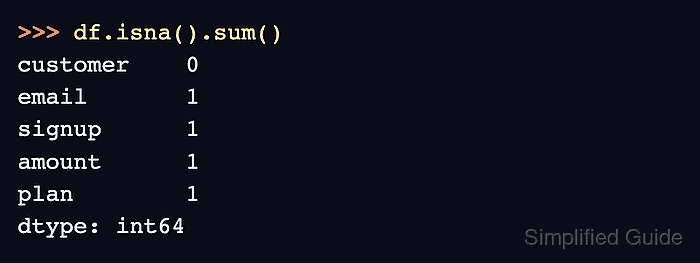
- Count missing values in each column.
>>> df.isna().sum()
customer    0
email       1
signup      1
amount      1
plan        1
dtype: int64
- List rows that contain at least one missing value.
>>> df[df.isna().any(axis="columns")]
  customer email     signup  amount   plan
1      Ben   NaN        NaT     NaN  basic
2       Cy       2026-01-07    75.5   <NA>
axis=“columns” checks across each row. The default axis checks down each column.
- Set the required columns for a complete-row check.
>>> required = ["customer", "amount"]
- Keep rows where required columns are present.
>>> df[df[required].notna().all(axis="columns")]
  customer             email     signup  amount  plan
0      Ava   ava@example.net 2026-01-05   120.0   pro
2       Cy                   2026-01-07    75.5  <NA>
3     Dana  dana@example.net 2026-01-08     0.0   pro
Change the column list to the fields that must be present before analysis, export, or reporting.
- Build a small series of candidate missing-value markers.
>>> sentinels = pd.Series(
...     [None, np.nan, pd.NA, pd.NaT, "", np.inf],
...     index=["None", "np.nan", "pd.NA", "pd.NaT", "empty string", "np.inf"],
...     dtype="object",
... )
- Check which marker values pandas treats as missing.
>>> pd.DataFrame({"value": sentinels, "is_missing": pd.isna(sentinels)})
             value  is_missing
None          None        True
np.nan         NaN        True
pd.NA         <NA>        True
pd.NaT         NaT        True
empty string             False
np.inf         inf       False
Empty strings and np.inf return False here. Normalize them before using isna() if a source system uses those values to mean missing data.

Mohd Shakir Zakaria is a cloud architect with deep roots in software development and open-source advocacy. Certified in AWS, Red Hat, VMware, ITIL, and Linux, he specializes in designing and managing robust cloud and on-premises infrastructures.


