Duplicate rows in a pandas DataFrame can double-count orders, inflate totals, or send repeated records into an export. Removing them with drop_duplicates() keeps one row per chosen match rule while leaving enough evidence to confirm what changed.
DataFrame.drop_duplicates() compares all columns by default. Passing subset limits matching to business keys such as order_id, and keep controls whether pandas keeps the first matching row, keeps the last matching row, or removes every member of a duplicate group.
drop_duplicates() returns a new DataFrame unless inplace=True is used. Assign the returned object when the original frame should remain available for audit or rollback, and use ignore_index=True when downstream output needs fresh row labels.
Related: How to filter rows in a pandas DataFrame
Related: How to drop missing values in pandas
Related: How to sort a pandas DataFrame
import pandas as pd orders = pd.DataFrame( { "order_id": [1001, 1002, 1002, 1003, 1004, 1004, 1005], "customer": ["Ada", "Lin", "Lin", "Maya", "Omar", "Omar", "Nia"], "region": ["EMEA", "APAC", "APAC", "AMER", "EMEA", "EMEA", "APAC"], "status": ["paid", "paid", "paid", "open", "paid", "refunded", "open"], "total_usd": [150.0, 240.0, 240.0, 875.0, 95.0, 95.0, 360.0], } ) print(f"pandas {pd.__version__}") print() print("BASE") print(orders.to_string(index=True)) print() exact = orders.drop_duplicates() print("DROP_EXACT_ROWS") print(exact.to_string(index=True)) print() latest_per_order = orders.drop_duplicates( subset=["order_id"], keep="last", ignore_index=True, ) print("KEEP_LAST_BY_ORDER") print(latest_per_order.to_string(index=False)) print() unique_order_only = orders.drop_duplicates( subset=["order_id"], keep=False, ignore_index=True, ) print("DROP_ALL_DUPLICATE_ORDER_IDS") print(unique_order_only.to_string(index=False)) print() print("VERIFY") print(f"original rows: {len(orders)}") print(f"exact rows: {len(exact)}") print(f"latest order_ids: {latest_per_order['order_id'].tolist()}") print(f"latest row index labels: {latest_per_order.index.tolist()}") print(f"unique order_ids only: {unique_order_only['order_id'].tolist()}") print(f"source rows unchanged: {len(orders)}")
Replace the sample orders object with the DataFrame already loaded in the working script.
$ python3 remove_duplicate_rows.py
pandas 3.0.3
BASE
order_id customer region status total_usd
0 1001 Ada EMEA paid 150.0
1 1002 Lin APAC paid 240.0
2 1002 Lin APAC paid 240.0
3 1003 Maya AMER open 875.0
4 1004 Omar EMEA paid 95.0
5 1004 Omar EMEA refunded 95.0
6 1005 Nia APAC open 360.0
DROP_EXACT_ROWS
order_id customer region status total_usd
0 1001 Ada EMEA paid 150.0
1 1002 Lin APAC paid 240.0
3 1003 Maya AMER open 875.0
4 1004 Omar EMEA paid 95.0
5 1004 Omar EMEA refunded 95.0
6 1005 Nia APAC open 360.0
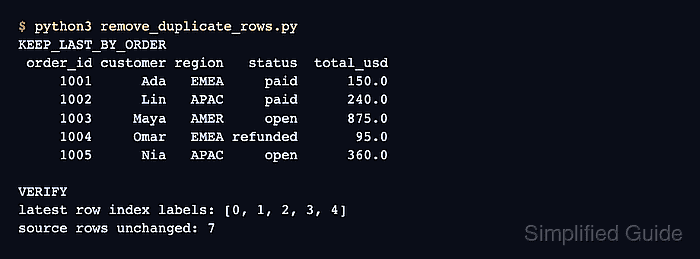
KEEP_LAST_BY_ORDER
order_id customer region status total_usd
1001 Ada EMEA paid 150.0
1002 Lin APAC paid 240.0
1003 Maya AMER open 875.0
1004 Omar EMEA refunded 95.0
1005 Nia APAC open 360.0
DROP_ALL_DUPLICATE_ORDER_IDS
order_id customer region status total_usd
1001 Ada EMEA paid 150.0
1003 Maya AMER open 875.0
1005 Nia APAC open 360.0
VERIFY
original rows: 7
exact rows: 6
latest order_ids: [1001, 1002, 1003, 1004, 1005]
latest row index labels: [0, 1, 2, 3, 4]
unique order_ids only: [1001, 1003, 1005]
source rows unchanged: 7
exact = orders.drop_duplicates()
pandas ignores row index labels when it decides whether rows are duplicates.
latest_per_order = orders.drop_duplicates( subset=["order_id"], keep="last", ignore_index=True, )
subset limits duplicate matching to selected columns. ignore_index=True resets output labels to 0, 1, 2, ....
unique_order_only = orders.drop_duplicates( subset=["order_id"], keep=False, ignore_index=True, )
keep=False removes all rows for duplicated keys, not just the second copy. Use it only when any repeated key makes the whole group invalid.
print(f"original rows: {len(orders)}") print(f"exact rows: {len(exact)}") print(f"latest order_ids: {latest_per_order['order_id'].tolist()}") print(f"latest row index labels: {latest_per_order.index.tolist()}") print(f"unique order_ids only: {unique_order_only['order_id'].tolist()}") print(f"source rows unchanged: {len(orders)}")
$ rm remove_duplicate_rows.py