How to write video files with OpenCV
A frame-processing pipeline is incomplete when its results cannot be replayed outside the running process. OpenCV VideoWriter turns a sequence of equal-sized image arrays into a video file while preserving the selected frame cadence.
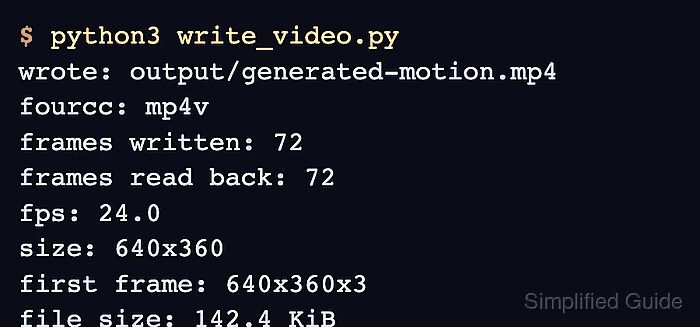
The writer configuration uses an output path, a FourCC codec code, a frame rate, and a frame size before the first frame is sent. The mp4v code produces an .mp4 file from 640 by 360 color frames, and every frame passed to write() keeps those dimensions.
Codec availability depends on the video backend in the local OpenCV build, so isOpened() must gate the writing loop. Closing the writer finalizes the container, while decoding every saved frame with VideoCapture proves that the result is readable rather than merely present.
Steps to write a video file with OpenCV:
- Create write_video.py with the output path and VideoWriter settings.
- write_video.py
#!/usr/bin/env python3
from pathlib import Path

import cv2 as cv
import numpy as np


output_path = Path("output/generated-motion.mp4")
width, height = 640, 360
fps = 24.0
frame_count = 72
fourcc = cv.VideoWriter_fourcc(*"mp4v")
The width and height values must equal the incoming frame shape. FFmpeg-backed writers can truncate the last column or row when either dimension is odd.
- Insert make_frame() after the writer settings to generate fixed-size BGR frames.
def make_frame(index):
    frame = np.full((height, width, 3), (34, 42, 58), dtype=np.uint8)
    progress = index / max(frame_count - 1, 1)
    center = (int(70 + progress * (width - 140)), height // 2)

    cv.circle(frame, center, 42, (40, 210, 245), -1)
    cv.putText(
        frame,
        f"Frame {index + 1:02d}/{frame_count}",
        (36, 62),
        cv.FONT_HERSHEY_SIMPLEX,
        1.1,
        (245, 245, 245),
        2,
        cv.LINE_AA,
    )
    return frame
- Append the writer initialization and frame loop after make_frame().
output_path.parent.mkdir(parents=True, exist_ok=True)
writer = cv.VideoWriter(str(output_path), fourcc, fps, (width, height))

if not writer.isOpened():
    raise SystemExit(f"Could not open VideoWriter for: {output_path}")

for index in range(frame_count):
    writer.write(make_frame(index))

writer.release()
release() closes the writer and finalizes the video container before the file is reopened.
- Append the read-back validation after writer.release().
capture = cv.VideoCapture(str(output_path))
if not capture.isOpened():
    raise SystemExit(f"Could not reopen video: {output_path}")

decoded_width = int(capture.get(cv.CAP_PROP_FRAME_WIDTH))
decoded_height = int(capture.get(cv.CAP_PROP_FRAME_HEIGHT))
decoded_fps = capture.get(cv.CAP_PROP_FPS)
decoded_frames = 0

while True:
    ok, frame = capture.read()
    if not ok:
        break
    decoded_frames += 1

capture.release()

if decoded_frames != frame_count:
    raise SystemExit(f"Decoded {decoded_frames} of {frame_count} frames")
if (decoded_width, decoded_height) != (width, height):
    raise SystemExit(
        f"Decoded size {decoded_width}x{decoded_height}, expected {width}x{height}"
    )
if abs(decoded_fps - fps) > 0.01:
    raise SystemExit(f"Decoded FPS {decoded_fps:.2f}, expected {fps:.2f}")

print(f"wrote: {output_path}")
print(f"frames decoded: {decoded_frames}/{frame_count}")
print(f"fps decoded: {decoded_fps:.1f}")
print(f"size decoded: {decoded_width}x{decoded_height}")
- Compare the completed write_video.py with the assembled source.
- write_video.py
#!/usr/bin/env python3
from pathlib import Path

import cv2 as cv
import numpy as np


output_path = Path("output/generated-motion.mp4")
width, height = 640, 360
fps = 24.0
frame_count = 72
fourcc = cv.VideoWriter_fourcc(*"mp4v")


def make_frame(index):
    frame = np.full((height, width, 3), (34, 42, 58), dtype=np.uint8)
    progress = index / max(frame_count - 1, 1)
    center = (int(70 + progress * (width - 140)), height // 2)

    cv.circle(frame, center, 42, (40, 210, 245), -1)
    cv.putText(
        frame,
        f"Frame {index + 1:02d}/{frame_count}",
        (36, 62),
        cv.FONT_HERSHEY_SIMPLEX,
        1.1,
        (245, 245, 245),
        2,
        cv.LINE_AA,
    )
    return frame


output_path.parent.mkdir(parents=True, exist_ok=True)
writer = cv.VideoWriter(str(output_path), fourcc, fps, (width, height))

if not writer.isOpened():
    raise SystemExit(f"Could not open VideoWriter for: {output_path}")

for index in range(frame_count):
    writer.write(make_frame(index))

writer.release()

capture = cv.VideoCapture(str(output_path))
if not capture.isOpened():
    raise SystemExit(f"Could not reopen video: {output_path}")

decoded_width = int(capture.get(cv.CAP_PROP_FRAME_WIDTH))
decoded_height = int(capture.get(cv.CAP_PROP_FRAME_HEIGHT))
decoded_fps = capture.get(cv.CAP_PROP_FPS)
decoded_frames = 0

while True:
    ok, frame = capture.read()
    if not ok:
        break
    decoded_frames += 1

capture.release()

if decoded_frames != frame_count:
    raise SystemExit(f"Decoded {decoded_frames} of {frame_count} frames")
if (decoded_width, decoded_height) != (width, height):
    raise SystemExit(
        f"Decoded size {decoded_width}x{decoded_height}, expected {width}x{height}"
    )
if abs(decoded_fps - fps) > 0.01:
    raise SystemExit(f"Decoded FPS {decoded_fps:.2f}, expected {fps:.2f}")

print(f"wrote: {output_path}")
print(f"frames decoded: {decoded_frames}/{frame_count}")
print(f"fps decoded: {decoded_fps:.1f}")
print(f"size decoded: {decoded_width}x{decoded_height}")
- Verify the written MP4 with the completed write_video.py script.
$ python3 write_video.py
wrote: output/generated-motion.mp4
frames decoded: 72/72
fps decoded: 24.0
size decoded: 640x360
A codec or frame mismatch stops the script with an error; all four lines appear only after the MP4 reopens and all 72 frames decode at the configured size and rate.