A still image can become a short video clip when an application needs a preview, placeholder stream, or repeatable test input. OpenCV writes that kind of clip by sending a sequence of image frames to its video I/O layer.
The Python path uses one source image, a fixed frame size, and a chosen frame rate. Every frame passed to cv.VideoWriter must match the frame size used when the writer was opened, so the script normalizes the image dimensions before writing frames.
The MP4 output uses the mp4v FourCC because it works with many OpenCV builds that have a video backend available. Codec support still comes from the local backend, so a read-back check confirms the saved file can be reopened and reports the frame count, frame rate, dimensions, and duration.
Steps to create a video from a still image with OpenCV:
- Create folders for the source image and generated video.
$ mkdir -p input output
- Copy the still image into the input folder.
$ cp ~/Pictures/scene.png input/scene.png
Replace ~/Pictures/scene.png with the image to animate. If you keep a different filename, update source_path in the script.
- Save the video creation script.
- image_to_video.py
from pathlib import Path

import cv2 as cv


source_path = Path("input/scene.png")
output_path = Path("output/still-demo.mp4")
fps = 24
duration_seconds = 3
frame_count = fps * duration_seconds

image = cv.imread(str(source_path))
if image is None:
    raise SystemExit(f"Could not read source image: {source_path}")

height, width = image.shape[:2]
width -= width % 2
height -= height % 2
frame_size = (width, height)
base = cv.resize(image, frame_size, interpolation=cv.INTER_AREA)

output_path.parent.mkdir(parents=True, exist_ok=True)
fourcc = cv.VideoWriter_fourcc(*"mp4v")
writer = cv.VideoWriter(str(output_path), fourcc, fps, frame_size)
if not writer.isOpened():
    raise SystemExit(f"Could not open VideoWriter for: {output_path}")

for index in range(frame_count):
    frame = base.copy()
    progress = index / max(frame_count - 1, 1)
    bar_width = int(progress * (width - 40))
    overlay = frame.copy()

    cv.rectangle(overlay, (20, height - 45), (20 + bar_width, height - 25), (0, 180, 255), -1)
    frame = cv.addWeighted(overlay, 0.35, frame, 0.65, 0)
    cv.putText(
        frame,
        f"Frame {index + 1:02d}/{frame_count}",
        (20, 40),
        cv.FONT_HERSHEY_SIMPLEX,
        1,
        (255, 255, 255),
        2,
        cv.LINE_AA,
    )

    writer.write(frame)

writer.release()

capture = cv.VideoCapture(str(output_path))
if not capture.isOpened():
    raise SystemExit(f"Could not reopen video: {output_path}")

saved_frames = int(capture.get(cv.CAP_PROP_FRAME_COUNT))
saved_fps = capture.get(cv.CAP_PROP_FPS)
saved_width = int(capture.get(cv.CAP_PROP_FRAME_WIDTH))
saved_height = int(capture.get(cv.CAP_PROP_FRAME_HEIGHT))
capture.release()

duration = saved_frames / saved_fps if saved_fps else 0
size_kib = output_path.stat().st_size / 1024

print(f"wrote: {output_path}")
print(f"frames: {saved_frames}")
print(f"fps: {saved_fps:.1f}")
print(f"size: {saved_width}x{saved_height}")
print(f"duration: {duration:.2f}s")
print(f"file size: {size_kib:.1f} KiB")
- Run the script to write the video.
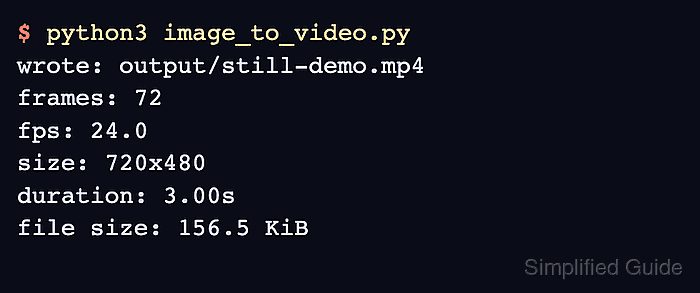
$ python3 image_to_video.py
- Confirm the script reports the saved video metadata.
wrote: output/still-demo.mp4
frames: 72
fps: 24.0
size: 720x480
duration: 3.00s
file size: 156.5 KiB
The exact file size changes with the source image and the video backend. The frame count, frame rate, and duration should match the script settings, and the dimensions should match the normalized source image.

Mohd Shakir Zakaria is a cloud architect with deep roots in software development and open-source advocacy. Certified in AWS, Red Hat, VMware, ITIL, and Linux, he specializes in designing and managing robust cloud and on-premises infrastructures.


