How to rotate an image with OpenCV
Image rotation is a common preprocessing step when camera frames arrive sideways, test images need controlled orientation changes, or annotations must line up with a rotated frame. In OpenCV Python code, the choice between an exact quarter-turn and a free-angle warp changes both the function call and the output canvas.
cv.rotate() handles the 90, 180, and 270-degree cases without interpolation. For any other angle, cv.getRotationMatrix2D() builds a 2×3 affine matrix and cv.warpAffine() samples the source image into the requested width, height output size.
A file-based smoke run accepts either a named right-angle mode or a degree value, writes a PNG, reopens it, and prints the saved dimensions. That output catches a swapped orientation, a clipped arbitrary-angle canvas, or a path that failed to write before the rotated image feeds a larger pipeline.
Steps to rotate an image with OpenCV:
- Create folders for the source and rotated images.
$ mkdir -p input output
- Copy the source image into the input folder.
$ cp scene.png input/scene.png
Replace scene.png with the image to rotate. Keep input/scene.png when using the default script arguments.
- Create the rotation script.
- rotate_image.py
from argparse import ArgumentParser
from pathlib import Path

import cv2 as cv
import numpy as np


RIGHT_ANGLE_MODES = {
    "cw90": cv.ROTATE_90_CLOCKWISE,
    "ccw90": cv.ROTATE_90_COUNTERCLOCKWISE,
    "180": cv.ROTATE_180,
}


parser = ArgumentParser()
parser.add_argument("--input", default="input/scene.png", help="Source image")
parser.add_argument("--output", default="output/scene-rotated.png", help="Rotated output image")
parser.add_argument(
    "--mode",
    choices=sorted(RIGHT_ANGLE_MODES),
    default="cw90",
    help="Right-angle rotation mode when --angle is not used",
)
parser.add_argument(
    "--angle",
    type=float,
    help="Arbitrary rotation angle in degrees; positive values rotate counter-clockwise",
)
parser.add_argument("--scale", type=float, default=1.0, help="Scale for --angle rotations")
parser.add_argument(
    "--expand",
    action="store_true",
    help="Expand the output canvas for --angle rotations instead of keeping the source size",
)
args = parser.parse_args()

input_path = Path(args.input)
output_path = Path(args.output)

image = cv.imread(str(input_path), cv.IMREAD_COLOR)
if image is None:
    raise SystemExit(f"could not read input image: {input_path}")

source_height, source_width = image.shape[:2]

if args.angle is None:
    rotated = cv.rotate(image, RIGHT_ANGLE_MODES[args.mode])
    method = f"cv.rotate mode={args.mode}"
    matrix_text = None
else:
    center = (source_width / 2, source_height / 2)
    matrix = cv.getRotationMatrix2D(center, args.angle, args.scale)
    output_size = (source_width, source_height)

    if args.expand:
        cos = abs(matrix[0, 0])
        sin = abs(matrix[0, 1])
        new_width = int((source_height * sin) + (source_width * cos))
        new_height = int((source_height * cos) + (source_width * sin))
        matrix[0, 2] += (new_width / 2) - center[0]
        matrix[1, 2] += (new_height / 2) - center[1]
        output_size = (new_width, new_height)

    rotated = cv.warpAffine(
        image,
        matrix,
        output_size,
        flags=cv.INTER_LINEAR,
        borderMode=cv.BORDER_REPLICATE,
    )
    method = f"cv.warpAffine angle={args.angle:g} scale={args.scale:g} expand={args.expand}"
    matrix_text = np.array2string(matrix, precision=3, suppress_small=True)

output_path.parent.mkdir(parents=True, exist_ok=True)
if not cv.imwrite(str(output_path), rotated):
    raise SystemExit(f"could not write output image: {output_path}")

written = cv.imread(str(output_path), cv.IMREAD_COLOR)
if written is None:
    raise SystemExit(f"could not read written image: {output_path}")

output_height, output_width = written.shape[:2]

print(f"method: {method}")
print(f"source: {source_width}x{source_height} channels={image.shape[2]}")
if matrix_text is not None:
    print("matrix:")
    print(matrix_text)
print(f"output: {output_width}x{output_height} channels={written.shape[2]}")
print(f"wrote: {output_path}")
print(f"verified: {output_path}")
Use --mode for cw90, ccw90, or 180. Use --angle when the image needs a non-right-angle rotation.
- Run a 90-degree clockwise rotation and confirm the output dimensions.
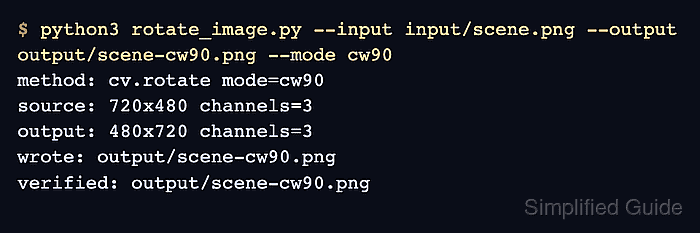
$ python3 rotate_image.py --input input/scene.png --output output/scene-cw90.png --mode cw90
method: cv.rotate mode=cw90
source: 720x480 channels=3
output: 480x720 channels=3
wrote: output/scene-cw90.png
verified: output/scene-cw90.png
cv.rotate() swaps rows and columns for quarter-turn modes. The 720×480 source becomes a 480×720 output after cw90.
- Review the right-angle output image.
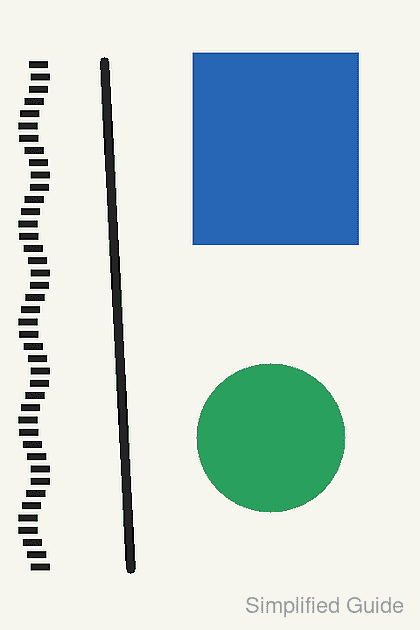
The blue square, green circle, diagonal line, and tick marks should appear rotated as a whole image, not individually redrawn or cropped.
- Run an expanded arbitrary-angle rotation.
$ python3 rotate_image.py --input input/scene.png --output output/scene-angle15.png --angle 15 --expand
method: cv.warpAffine angle=15 scale=1 expand=True
source: 720x480 channels=3
matrix:
[[  0.966   0.259  -0.35 ]
 [ -0.259   0.966 185.853]]
output: 819x649 channels=3
wrote: output/scene-angle15.png
verified: output/scene-angle15.png
Positive --angle values rotate counter-clockwise around the image center. --expand grows the cv.warpAffine() canvas before saving, so the corners are not clipped back to the original 720×480 size.
- Review the arbitrary-angle output image.
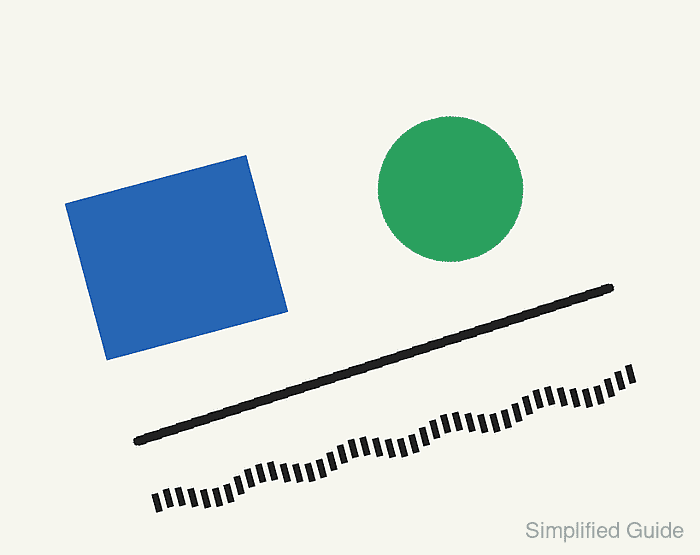
The expanded canvas should contain the whole rotated scene. If the output keeps the original dimensions, check whether --expand was omitted.
- Remove the sample script after adapting the rotation code.
$ rm rotate_image.py