Image resizing changes the pixel dimensions of a frame before it becomes a model input, thumbnail, preview, or downstream processing source. In OpenCV Python code, cv.resize() creates the resized image, and the destination size is supplied as width first, then height.
The interpolation choice should match the resize direction. Use INTER_AREA when reducing an image because it resamples source areas, and use INTER_LINEAR or INTER_CUBIC when enlarging. OpenCV defaults to INTER_LINEAR, so an explicit interpolation argument keeps the script clear when the target dimensions change.
Fixed width and height values can distort an image if they do not match the source aspect ratio. The script verifies the saved file by reopening it and checking the dimensions, which catches swapped width and height values before the resized image feeds another stage.
Related: How to read and write an image with OpenCV
Related: How to crop an image with OpenCV
Related: How to install OpenCV on Ubuntu
Steps to resize an image with OpenCV:
- Create folders for the input and resized image.
$ mkdir -p input output
- Copy the source image into the input folder.
$ cp scene.png input/scene.png
Replace scene.png with the image to resize. Keep input/scene.png when using the default script command.
- Create the resize script.
- resize_image.py
from argparse import ArgumentParser
from pathlib import Path

import cv2 as cv


INTERPOLATION_METHODS = {
    "area": cv.INTER_AREA,
    "linear": cv.INTER_LINEAR,
    "cubic": cv.INTER_CUBIC,
    "nearest": cv.INTER_NEAREST,
}

INTERPOLATION_NAMES = {
    "area": "INTER_AREA",
    "linear": "INTER_LINEAR",
    "cubic": "INTER_CUBIC",
    "nearest": "INTER_NEAREST",
}


parser = ArgumentParser()
parser.add_argument("--input", default="input/scene.png", help="Source image")
parser.add_argument("--output", default="output/scene-resized.png", help="Resized output image")
parser.add_argument("--width", type=int, default=360, help="Output width in pixels")
parser.add_argument("--height", type=int, default=240, help="Output height in pixels")
parser.add_argument(
    "--interpolation",
    choices=INTERPOLATION_METHODS,
    default="area",
    help="Interpolation method: area for shrinking, linear or cubic for enlarging",
)
args = parser.parse_args()

if args.width <= 0 or args.height <= 0:
    raise SystemExit("width and height must be positive integers")

input_path = Path(args.input)
output_path = Path(args.output)

image = cv.imread(str(input_path), cv.IMREAD_COLOR)
if image is None:
    raise SystemExit(f"could not read input image: {input_path}")

source_height, source_width = image.shape[:2]
resized = cv.resize(
    image,
    (args.width, args.height),
    interpolation=INTERPOLATION_METHODS[args.interpolation],
)

output_path.parent.mkdir(parents=True, exist_ok=True)
if not cv.imwrite(str(output_path), resized):
    raise SystemExit(f"could not write output image: {output_path}")

written = cv.imread(str(output_path), cv.IMREAD_COLOR)
if written is None:
    raise SystemExit(f"could not read resized image: {output_path}")

written_height, written_width = written.shape[:2]
if (written_width, written_height) != (args.width, args.height):
    raise SystemExit(
        "resized image has unexpected dimensions: "
        f"expected={args.width}x{args.height}, "
        f"actual={written_width}x{written_height}"
    )

x_scale = args.width / source_width
y_scale = args.height / source_height

print(f"read: {input_path}")
print(f"source: {source_width}x{source_height}")
print(f"target: {args.width}x{args.height}")
print(f"scale: {x_scale:.3f}x{y_scale:.3f}")
print(f"interpolation: {args.interpolation} ({INTERPOLATION_NAMES[args.interpolation]})")
print(f"wrote: {output_path}")
print(f"verified: {written_width}x{written_height}")
Use area when the target image is smaller than the source. Use linear or cubic when --width and --height enlarge the image.
- Run the script and confirm the saved dimensions.
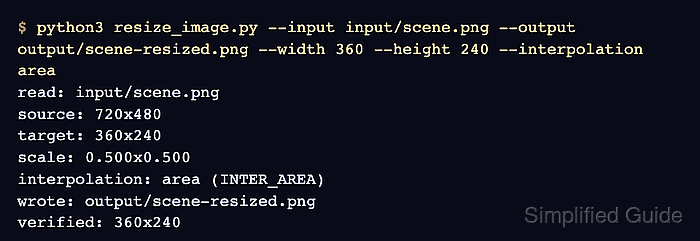
$ python3 resize_image.py --input input/scene.png --output output/scene-resized.png --width 360 --height 240 --interpolation area
read: input/scene.png
source: 720x480
target: 360x240
scale: 0.500x0.500
interpolation: area (INTER_AREA)
wrote: output/scene-resized.png
verified: 360x240
- Keep the destination size in width, height order.
resized = cv.resize(
    image,
    (args.width, args.height),
    interpolation=INTERPOLATION_METHODS[args.interpolation],
)
image.shape[:2] returns height, width, but cv.resize() expects the destination size as width, height.
- Review the resized output image.
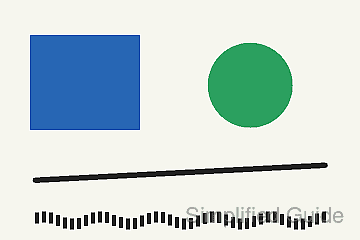
The output file should be 360×240 pixels. If the image looks stretched, choose target dimensions that match the source aspect ratio or add crop or padding logic before resizing.
- Remove the sample script after moving the resize logic into the project code.
$ rm resize_image.py

Mohd Shakir Zakaria is a cloud architect with deep roots in software development and open-source advocacy. Certified in AWS, Red Hat, VMware, ITIL, and Linux, he specializes in designing and managing robust cloud and on-premises infrastructures.


