How to set a task model in Open WebUI
Open WebUI uses task models for short background jobs such as chat titles, tags, follow-up suggestions, query generation, and autocomplete. Setting a dedicated task model keeps those chores on a small fast model instead of sending them to the same model selected for the conversation.
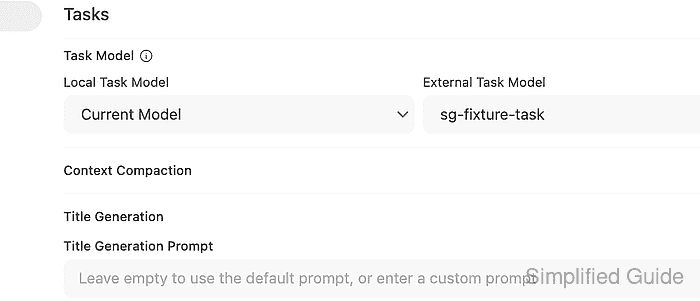
The controls live under Admin Panel → Settings → Interface → Tasks. External Task Model applies when the active chat model comes from an OpenAI-compatible or other external provider connection, while Local Task Model applies when the active chat model is local.
Choose a model that already appears in Open WebUI and can answer short instruction prompts without reasoning mode. The chat model picker does not change, so the setting is complete when title generation uses the task model while normal chat still uses the selected conversation model.
Steps to set an Open WebUI task model:
- Confirm that the conversation model and task model both appear in the Open WebUI model list.
$ curl --fail-with-body --silent --show-error "https://openwebui.example.com/api/models?refresh=true" \
  -H "Authorization: Bearer <open-webui-token>"
{
  "data": [
    {
      "id": "sg-fixture-chat",
      "name": "sg-fixture-chat",
      "object": "model"
    },
    {
      "id": "sg-fixture-task",
      "name": "sg-fixture-task",
      "object": "model"
    }
  ]
}
Refresh the model list after adding or changing provider connections. A task model that is not visible to Open WebUI cannot be selected for background work.
Related: How to refresh the Open WebUI model list - Open Admin Panel → Settings → Interface.
- Find Tasks and choose the dedicated model in External Task Model or Local Task Model.
Use External Task Model for cloud, proxy, and OpenAI-compatible provider models. Use Local Task Model for local or Ollama models.
- Click Save.
- Check the saved task-model setting when an Open WebUI API token is available.
$ curl --fail-with-body --silent --show-error "https://openwebui.example.com/api/v1/tasks/config" \
  -H "Authorization: Bearer <open-webui-token>"
{
  "TASK_MODEL": "",
  "TASK_MODEL_EXTERNAL": "sg-fixture-task",
  "ENABLE_TITLE_GENERATION": true,
  "ENABLE_TAGS_GENERATION": true,
  "ENABLE_FOLLOW_UP_GENERATION": true,
  "ENABLE_AUTOCOMPLETE_GENERATION": false
}
TASK_MODEL is the local task model, and TASK_MODEL_EXTERNAL is the external provider task model. If API access is disabled, reopen Admin Panel → Settings → Interface and compare the same fields visually.
Related: How to enable API keys in Open WebUI - Trigger a title-generation task with the conversation model selected.
$ curl --fail-with-body --silent --show-error "https://openwebui.example.com/api/v1/tasks/title/completions" \
  -H "Authorization: Bearer <open-webui-token>" \
  -H "Content-Type: application/json" \
  --data '{"model":"sg-fixture-chat","messages":[{"role":"user","content":"Plan a support handoff for a failed login report."}]}'
{
  "model": "sg-fixture-task",
  "content": "{\"title\":\"Task model proof\"}",
  "finish_reason": "stop"
}
The request names sg-fixture-chat as the conversation model, but the response model is sg-fixture-task because the background title task uses the saved external task model.
- Run a normal chat completion with the conversation model.
$ curl --fail-with-body --silent --show-error "https://openwebui.example.com/api/chat/completions" \
  -H "Authorization: Bearer <open-webui-token>" \
  -H "Content-Type: application/json" \
  --data '{"model":"sg-fixture-chat","messages":[{"role":"user","content":"Reply with one short sentence that says normal chat still uses the conversation model."}],"stream":false}'
{
  "model": "sg-fixture-chat",
  "content": "Normal chat still uses the conversation model.",
  "finish_reason": "stop"
}
Provider usage logs should show task traffic on the task model and user chat traffic on the conversation model. If both calls still hit the same model, save the task setting again and confirm the selected task model is available to the current provider type.